
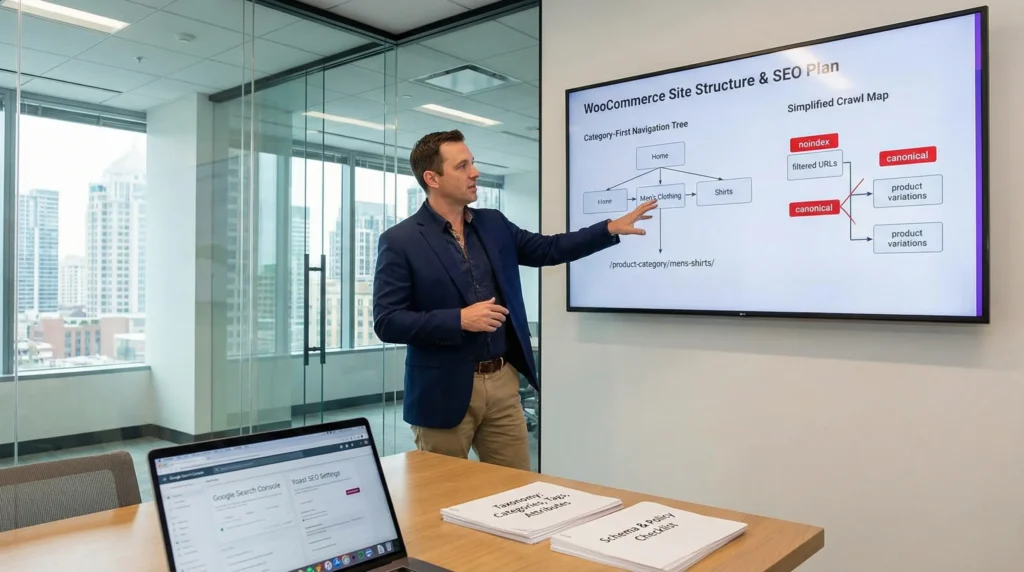
WooCommerce site structure and product SEO can feel fine right up until the day Google starts crawling the “wrong” pages and your best products quietly slip. We have watched stores with great products lose traction because filters created thousands of junk URLs, or because category paths made zero sense to shoppers. Quick answer: treat your store like a library, not a flea market. Put categories first, keep paths short, control index bloat, and make every product page answer a real query.
Key Takeaways
- Build a category-first WooCommerce site structure and keep key products within three clicks so Google crawls efficiently and shoppers don’t bounce.
- Prevent index bloat by blocking most faceted, filtered, and sorted URLs from indexing while keeping filters available for users.
- Align categories, tags, and attributes to real search intent (and avoid overlap) so product taxonomies create clear landing pages instead of keyword cannibalization.
- Use short, descriptive permalinks, breadcrumbs, and “related/cross-sell” links to strengthen internal linking and stop product pages from becoming orphaned.
- Improve product SEO with unique, layered product-page copy (title, intro, bullets, FAQs), fast compressed images, and descriptive alt text that reads naturally.
- Control duplicates with self-canonicals, variation-to-parent canonicals, UTM canonical cleanup, and noindex rules for cart, checkout, account, search, and most filtered pages.
Start With A Crawlable Store Architecture
Your architecture controls what Google finds and what shoppers reach.
Here is the cause-and-effect that matters: Store navigation -> guides -> Google crawlers and human buyers. If the nav is messy, crawlers waste time and buyers bounce.
Category-First Navigation And The 3-Click Rule
Put categories in your primary menu. Put “featured products” in collections and internal links, not in the main nav.
We aim for a simple rule: a shopper reaches any product in three clicks. This reduces pogo-sticking and keeps crawl paths short.
A practical pattern that works:
- Home
- Shop
- Category (broad intent)
- Subcategory (narrow intent)
- Product
If you need a gut check, open your store in an incognito window and try to reach a random product. If you need five clicks and two guesses, Google will struggle too.
Next steps: if you want a wider WooCommerce SEO view beyond structure, we cover it in our guide to getting more organic sales.
Facets, Filters, And Sorting Without Index Bloat
Filters help shoppers. Filters can also create an SEO dumpster fire.
This chain shows why: Faceted URLs -> create -> duplicate and thin pages. When those pages get indexed, Google spreads crawl budget across low-value URLs.
What we do on most WooCommerce builds:
- Keep filters for users, but block most filtered URLs from indexing.
- Use clean pagination.
- Avoid letting sort orders generate crawlable “new” pages.
If you run color, size, price, brand, and “in stock” filters, you can create thousands of combinations. Most do not deserve a place in search results.
If you need plugin-level settings (sitemaps, noindex toggles, canonical behavior), our Yoast SEO for WooCommerce walkthrough breaks down common store-safe defaults.
Product Taxonomies That Match Search Intent
Taxonomies only help when they match how people search.
A clean model looks like this: Search intent -> determines -> taxonomy choice. When intent and taxonomy match, you get better landing pages and clearer internal links.
When To Use Categories Vs Tags Vs Attributes
We keep the roles strict:
- Categories: hierarchy and main URLs. Think “women’s running shoes.”
- Tags: lightweight groupings. Think “wide toe box” or “trail-ready.”
- Attributes: structured filters and variations. Think size, color, material.
The trap: overlap. If “Leather” is a category, a tag, and an attribute, WooCommerce can generate multiple pages competing for the same query.
A good test is simple. Ask: “Would I put this in my menu?” If yes, it is probably a category. Ask: “Does this change the SKU or variation?” If yes, it is probably an attribute.
If you want to push this further, semantic structure helps a lot. We map entities and relationships in our semantic SEO playbook.
Building Attribute Pages Only When They Deserve To Rank
Some attribute pages can rank. Most should not.
Use this logic: High-volume modifier -> justifies -> an indexable attribute landing page.
Examples that often deserve a real page:
- “Waterproof hiking boots” (material or feature modifier)
- “Gluten-free protein bars” (diet modifier)
- “Stainless steel cookware set” (material modifier)
If you decide an attribute page should rank, treat it like a real category page:
- Write unique intro copy.
- Add featured products.
- Add FAQs.
- Add internal links to related categories.
If it does not meet that bar, keep it available as a filter but keep it out of the index.
Product URL, Breadcrumbs, And Internal Linking Patterns
Your link patterns act like store signage.
Here is the practical chain: Internal links -> pass -> context and authority. When you get this right, product pages stop feeling “orphaned.”
Permalink Structure And Slug Naming Conventions
We prefer a stable, descriptive structure:
/product-category/product-name/
Keep slugs:
- lowercase
- hyphenated
- short
- readable
A slug should answer: “What is this product?” without the fluff. If the slug reads like best-premium-top-quality-ultimate, you already know the problem.
Breadcrumbs matter because they reinforce hierarchy.
- Breadcrumbs -> confirm -> category relationships.
- Breadcrumbs -> create -> internal links back up the tree.
If you are tuning titles, meta descriptions, and breadcrumbs with a plugin, our on-page Yoast guide for professionals covers the exact fields that move the needle.
Related Products, Collections, And Cross-Sells As SEO Links
Related products are not just upsells. They are crawl paths.
This pattern works well:
- “Pairs well with” (cross-sells)
- “People also bought” (related)
- “Complete the set” (bundled intent)
Make the links feel human. If a shopper buys a camera body, link to batteries, SD cards, and a compatible lens. Google reads those connections as topical relationships.
We also like curated collections as landing pages:
- “Gifts under $50”
- “Clinic-ready scrubs”
- “Chef’s knife essentials”
Collections -> reduce -> choice overload. They also create natural internal link hubs.
Product Page SEO That Does Not Feel Like Keyword Stuffing
A product page should sound like a helpful salesperson, not a robot with a thesaurus.
Core cause-and-effect: Clear copy -> builds -> buyer trust. Trust lifts conversion rate, and conversion signals help long-term search performance.
Titles, Descriptions, And On-Page Sections That Convert
We write pages in layers:
- Title: category phrase + product identifier.
- First paragraph: who it is for, in plain English.
- Bullets: specs, sizing, materials, compatibility.
- FAQs: shipping, returns, fit, care.
Aim for at least 200 words of unique description where it makes sense. A one-line manufacturer blurb rarely ranks and rarely sells.
One quick rule we use: if two products share 90% of the same copy, Google will treat them as near-duplicates.
If you want a plugin comparison for product fields, schema toggles, and store settings, see our All in One SEO setup guide for online stores.
Product Images, Alt Text, And Media Performance Basics
Images sell. Images also slow sites down when nobody compresses them.
- Large images -> increase -> load time.
- Slow pages -> reduce -> conversions.
What we do:
- Use consistent image dimensions.
- Compress images before upload.
- Write alt text that describes the product in a real way.
Alt text should help a screen reader first. If it also includes a useful keyword naturally, great. If it reads like “shoe shoe shoe buy shoe,” do not ship it.
Indexing, Canonicals, And Duplicate Content Traps In WooCommerce
WooCommerce creates lots of URLs by default. Google will try to index them unless you stop it.
Simple chain: Duplicate URLs -> confuse -> canonical signals. Confusion leads to unstable rankings.
Canonical Strategy For Variations, Near-Duplicates, And UTM URLs
We usually want:
- Self-canonical on the main product page.
- Variations that point canonically to the parent product.
- UTM URLs that canonically resolve to the clean product URL.
If you run campaigns, UTMs matter. You want analytics, but you do not want 50 “versions” of the same product indexed.
Check this in your SEO plugin and test it with Google Search Console’s URL Inspection tool.
noindex Rules For Search, Cart, Checkout, And Filtered URLs
These pages almost never belong in Google:
- cart
- checkout
- account
- internal site search
- most filtered combinations
So we set them to noindex.
noindex rules -> reduce -> index bloat. Index bloat -> wastes -> crawl budget.
Keep the index for pages that can rank and sell.
Schema, Reviews, And Trust Signals For Rich Results
Rich results can lift click-through rate, but only when the underlying data stays clean.
Cause-and-effect stays simple: Structured data -> improves -> search snippet clarity. Better snippets attract better clicks.
Product, Offer, And Review Markup Checks
At a minimum, product pages should output:
- Product
- Offer (price, currency, availability)
- Review or AggregateRating (when you collect reviews)
We like to validate markup in Google’s Rich Results Test.
If you want a practical setup path, our Rank Math guide for WooCommerce stores covers schema settings and common errors.
Policy Pages And Merchant Trust Elements That Support SEO
Trust content helps buyers say yes.
Include clear pages for:
- shipping
- returns
- refunds
- contact
- privacy
Policy clarity -> reduces -> chargebacks and support tickets. It also supports merchant trust signals that shoppers look for before they buy.
If you operate in regulated fields, keep humans in the loop. Legal, medical, and financial claims need review. Do not let an automated workflow publish those statements unapproved.
A Lightweight Workflow To Implement And Govern Changes
Most SEO damage does not come from “bad SEO.” It comes from rushed changes.
We use a small workflow because it keeps risk low.
Map Trigger / Input / Job / Output / Guardrails Before You Edit
Before you touch any tools, map the work:
- Trigger: What starts the change? (new category, new product line, rebrand)
- Input: What data do we need? (keywords, margins, stock rules, policy text)
- Job: What gets edited? (permalinks, templates, schema, noindex rules)
- Output: What ships? (new URLs, updated copy, new internal links)
- Guardrails: What must not break? (checkout, tracking, index rules, canonicals)
This mapping step -> prevents -> “we fixed SEO and broke revenue.” We have seen that movie. It is not fun.
Staging, Logging, And Rollback For SEO-Safe Releases
We push most store changes through staging first.
- Staging -> catches -> template and plugin conflicts.
- Logs -> show -> what changed and when.
- Rollback -> limits -> blast radius.
If you run a busy store, ship changes in batches. Test indexation and revenue after each batch. Small releases beat big surprises.
Conclusion
WooCommerce site structure and product SEO work best when you treat them as one system: taxonomy, URLs, internal links, index rules, and trust signals all support each other. If you want a safe starting point, pick one category, clean up its filters, tighten its internal links, and rewrite the top five products with clearer intent. Then measure. We can always expand after the first win lands.
Frequently Asked Questions (WooCommerce Site Structure and Product SEO)
What is the best WooCommerce site structure for product SEO?
The best WooCommerce site structure for product SEO is category-first and easy to crawl: Home → Shop → Category → Subcategory → Product. Keep paths short, put categories in the main menu, and aim for a “3-click rule” so shoppers and Google can reach any product quickly.
How do I prevent faceted filters from creating index bloat in WooCommerce?
To prevent index bloat, keep filters for users but block most filtered URLs from indexing (and avoid crawlable sort-order URLs). Use clean pagination and strong canonical rules so Google focuses on pages that can rank. Too many filter combinations create thin, duplicate pages that waste crawl budget.
When should I use categories vs tags vs attributes in WooCommerce SEO?
Use categories for hierarchy and primary URLs (things you’d put in the menu), tags for lightweight groupings, and attributes for structured filters and variations like size or color. Avoid overlap—making “Leather” a category, tag, and attribute can create competing pages and unclear internal linking.
What permalink and internal linking pattern helps WooCommerce product pages rank?
A stable structure like /product-category/product-name/ plus clear breadcrumbs helps reinforce hierarchy and spreads authority back up the category tree. Add human-feeling cross-sells and related products (“pairs well with,” “complete the set”) so products don’t become orphaned and crawlers find more context.
How much unique content should a WooCommerce product page have for SEO?
Aim for around 200+ words of unique, helpful description when it makes sense, not a one-line manufacturer blurb. Write in layers: a clear title, an opening that states who it’s for, spec bullets, and FAQs. If two products share ~90% copy, Google may treat them as near-duplicates.
Do WooCommerce product variations need separate SEO pages, and how should canonicals work?
Most variations shouldn’t be separate indexable SEO pages. A common best practice is to keep the parent product page self-canonical and point variation URLs canonically back to the parent, while UTM versions canonicalize to the clean URL. This reduces duplicate content and stabilizes rankings.
Some of the links shared in this post are affiliate links. If you click on the link & make any purchase, we will receive an affiliate commission at no extra cost of you.
We improve our products and advertising by using Microsoft Clarity to see how you use our website. By using our site, you agree that we and Microsoft can collect and use this data. Our privacy policy has more details.
