
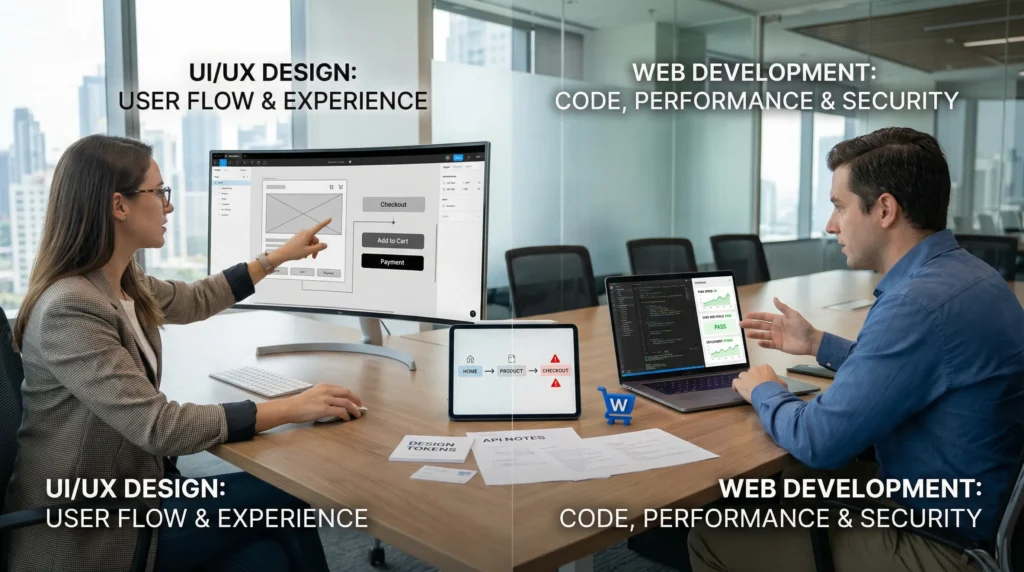
UI/UX vs web development sounds like a debate until you sit in front of a checkout funnel that leaks sales and think, “Well… now what?” We have watched gorgeous sites stall because the code creaked, and we have watched fast sites fail because the page confused real humans. Quick answer: neither is “better” in a vacuum: UI/UX changes how people decide, and web development changes what your site can safely do at scale.
Key Takeaways
- UI/UX vs web development isn’t about which is better—it’s about your current bottleneck, because UI/UX improves how users decide while web development ensures the site works reliably at scale.
- Use UI/UX to reduce friction and increase conversions by clarifying the “money path” (home → offer → checkout/booking) and testing small changes like clearer buttons and fewer form fields.
- Prioritize web development when you need speed, integrations, or custom functionality, because clean code, caching, and stable checkout/API logic directly impact performance and revenue.
- In regulated or high-risk industries, web development often becomes the safer priority by enforcing data minimization, access control, and audit-ready practices to reduce privacy and compliance risk.
- Strong outcomes come from a clean design-to-dev handoff—design tokens, component specs, and acceptance checks prevent rework and keep UI consistent across devices.
- To choose a career track, notice what energizes you—debugging and systems point to web development, user behavior and clarity point to UI/UX, and WordPress often rewards hybrids who can do both.
What UI/UX And Web Development Actually Mean (In Plain English)
UI/UX and web development solve different problems, so they produce different wins.
UI/UX design -> affects -> user confidence.
Web development -> affects -> site reliability.
If you run a business site, you usually need both. The only real question is: which one is your bottleneck right now?
UI And UX: Design That Reduces Friction
UI (user interface) is what people see and touch. UX (user experience) is how it feels to move through the site.
Here is what that means in practice:
- UI choices -> affect -> readability and click behavior. Fonts, contrast, spacing, button labels.
- UX choices -> affect -> task completion. Can someone find pricing, book a call, or buy in under a minute?
A quick example we see on WordPress service sites: a “pretty” homepage hero with no clear next step. The UI looks fine. The UX fails because the path is vague. People bounce, and nobody tells you why.
Web Development: Building The Site That Runs Reliably
Web development turns plans into a working system. It covers front-end code (what loads in the browser) and back-end code (what powers logins, forms, ecommerce, databases, and integrations).
A developer’s work -> affects -> speed and stability.
- Clean code -> affects -> page load times.
- Secure authentication -> affects -> account safety.
- Payment and API logic -> affects -> whether orders sync to your CRM.
If you want a plain-English breakdown of the role, our guide on what a developer handles day to day helps: what web development work includes.
Where WordPress Fits: Themes, Builders, And Custom Code
WordPress sits in the middle. It lets you ship fast with themes and builders, then extend with custom code when the business grows.
- A theme -> affects -> baseline UI consistency.
- A page builder -> affects -> publishing speed for marketing teams.
- Custom plugins and hooks -> affect -> unique features and safer control.
We often describe WordPress like this: it gives you the “house frame” quickly, but you still decide whether you want IKEA furniture or built-ins.
If you want a broader overview of the discipline behind this, start with our primer on web development basics.
What “Better” Depends On: Your Goal, Timeline, And Risk Tolerance
“Better” depends on what you cannot afford to break.
Design quality -> affects -> conversions.
Engineering quality -> affects -> uptime and compliance.
Pick the priority by looking at your goal, your timeline, and the cost of a mistake.
If You Want A Higher-Converting Website
If you already have traffic, UI/UX can pay back fast.
- Clear page hierarchy -> affects -> scroll depth.
- Strong product photography layout -> affects -> add-to-cart rate.
- Fewer form fields -> affect -> lead volume.
For ecommerce and service businesses, we usually start by mapping one “money path” (home -> product/service -> checkout/booking). Then we test friction points. A small UX fix, like rewriting a button from “Submit” to “Get my quote,” can change behavior because language -> affects -> perceived effort.
If You Need Speed, Integrations, Or Custom Functionality
When you need systems to talk to each other, development becomes the lever.
- A WooCommerce checkout tweak -> affects -> payment success rates.
- A CRM sync -> affects -> follow-up speed.
- Better caching -> affects -> mobile load time.
If you are planning a larger build, it helps to understand the typical lifecycle. Our breakdown of the seven stages of a web project makes planning less stressful, because you can see where design ends and engineering begins.
If You Are In A Regulated Or High-Risk Industry
If you work in law, healthcare, finance, or insurance, “better” often means “safer.”
- Data collection choices -> affect -> privacy exposure.
- Access control -> affects -> who can see client information.
- Audit logs -> affect -> incident response.
We keep a simple rule: your site should collect the minimum data needed to complete the task. Data minimization -> reduces -> breach impact.
If you use AI tools in content or support workflows, keep humans in the loop and avoid pasting sensitive information into third-party prompts. The FTC also reminds businesses to avoid deceptive claims in marketing and endorsements. See: Guides Concerning the Use of Endorsements and Testimonials in Advertising (FTC, updated guidance page).
Day-To-Day Work: Skills, Tools, And Deliverables Compared
This section matters if you are choosing a career track, hiring, or trying to manage a mixed team.
UI/UX work -> affects -> clarity before build.
Development work -> affects -> reality after launch.
UI/UX Work Outputs: Research, Flows, Wireframes, And Prototypes
UI/UX output is not “a pretty screen.” It is a set of decisions you can test.
Common deliverables:
- User interviews -> affect -> what you build first.
- User flows -> affect -> how many steps a task takes.
- Wireframes -> affect -> layout and information order.
- Clickable prototypes (often in Figma) -> affect -> stakeholder alignment.
If you like people and behavior, UX can feel like detective work. You look for patterns like: confusion -> causes -> hesitation -> causes -> abandonment.
Development Outputs: Architecture, Code, Performance, And Security
Development deliverables look less glamorous, but they keep revenue paths stable.
Common deliverables:
- Site architecture -> affects -> maintainability.
- Clean theme or block development -> affects -> editing safety.
- Plugin choices -> affect -> long-term risk.
- Performance work -> affects -> Core Web Vitals.
Google’s Core Web Vitals documentation explains why load, interactivity, and layout shifts matter. Search experience -> affects -> rankings, and rankings -> affect -> traffic.
Collaboration Handshake: The Handoff That Prevents Rework
Bad handoffs create expensive rework.
A good handoff includes:
- Design tokens (fonts, colors, spacing) -> reduce -> front-end guesswork.
- Component specs -> reduce -> inconsistent UI.
- Content rules -> reduce -> broken layouts.
- Acceptance checks -> reduce -> “it looked different on my phone.”
We like a simple checklist: Trigger / Input / Job / Output / Guardrails.
- Trigger: “New page request from marketing.”
- Input: copy, images, goal, SEO target.
- Job: design draft, build in staging, QA.
- Output: published page with tracking.
- Guardrails: accessibility checks, speed checks, rollback plan.
That structure keeps the work calm and repeatable.
Pay, Hiring Demand, And Career Paths (Without The Hype)
Pay and demand vary by location, portfolio strength, and specialization. We will keep this grounded.
Specialization -> affects -> earning power.
Proof of work -> affects -> hiring speed.
For U.S. salary ranges, we often point people to the U.S. Bureau of Labor Statistics for baseline data on related roles, like web developers and digital designers: Occupational Outlook Handbook.
Entry Paths And Portfolio Proof For UI/UX
Hiring managers want evidence that you can understand users and ship clear decisions.
Portfolio proof that counts:
- A before/after redesign -> affects -> measurable outcomes (more sign-ups, fewer support tickets).
- A usability test write-up -> affects -> credibility.
- A design system sample -> affects -> team readiness.
Good early projects: redesign a local service business site, or map an ecommerce product page flow. Show what you changed and why. Opinions do not convince. Test results convince.
Entry Paths And Portfolio Proof For Web Development
Development portfolios win when they show working code and safe practices.
Proof that counts:
- A GitHub repo -> affects -> trust for technical reviewers.
- A live site with performance scores -> affects -> hiring confidence.
- A security-minded build -> affects -> client risk.
And yes, people ask about age all the time. We covered that fear directly in starting web development at 40. Short version: consistency beats youth.
Specialization Tracks: Ecommerce, SaaS, And Marketing Sites
Generalists get started. Specialists get picked.
- WooCommerce focus -> affects -> checkout and catalog expertise.
- SaaS marketing sites -> affect -> conversion tracking and experimentation.
- Local services -> affect -> booking flows and reputation signals.
If you want a practical path: pick one niche, build three real projects, and measure something on each. Measurement -> affects -> your ability to charge more.
How To Choose For Yourself: A Simple Self-Assessment
You do not need a personality test. You need an honest look at what gives you energy.
Enjoyment -> affects -> consistency.
Consistency -> affects -> skill growth.
The “I Like The Puzzle” Vs “I Like The People” Signal
Ask yourself two questions:
- Do you feel calm when debugging a broken thing for an hour?
- Do you feel curious when you watch someone struggle on a page?
If #1 lights you up, development will feel satisfying.
- Debugging -> affects -> system reliability.
If #2 lights you up, UX will feel satisfying.
- User research -> affects -> design decisions.
If both sound good, you might be a hybrid. WordPress work often rewards hybrids because content teams -> affect -> site needs, and site needs -> affect -> technical choices.
Your First 30-Day Pilot Project To Test Fit
Here is the safest way to start: run one small project in “shadow mode.” Build it without risking the main business site.
Week 1:
- Pick one page type (service page or product page).
- Write the goal in one sentence.
Week 2:
- UI/UX path: make a wireframe and a prototype.
- Dev path: build the same page in a local WordPress install.
Week 3:
- Ask five people to complete one task.
- Record what slows them down.
Week 4:
- Fix the top three issues.
- Re-test.
Testing -> affects -> confidence because you see results, not vibes.
Common Mistakes When Picking A Track (And How To Avoid Them)
We see the same mistakes in hiring and career switches. They are avoidable.
Wrong assumptions -> affect -> wasted months.
Clear scope -> affects -> faster progress.
Choosing UI/UX When You Actually Need Development Coverage
A common business scenario: you hire a designer to “fix the site,” but the real issue is broken tech.
- Slow checkout -> affects -> revenue.
- Plugin conflicts -> affect -> uptime.
If the site crashes, design cannot save it. You need development to stabilize the foundation first, then UI/UX to polish the flow.
Choosing Development Without User Testing Or Content Strategy
The opposite mistake also hurts: a technically strong site that no one understands.
- Unclear messaging -> affects -> trust.
- Missing FAQs -> affect -> sales objections.
We push clients to test early copy and page structure. Content clarity -> affects -> conversions, even when the code is perfect.
Over-Relying On Templates Or AI Without Guardrails
Templates and AI can help, but they can also produce cookie-cutter pages and risky mistakes.
- Copy-paste prompts -> affect -> brand sameness.
- Unreviewed AI claims -> affect -> legal exposure.
- Too many plugins -> affect -> attack surface.
People also worry about whether tools will replace developers. Our take is practical: tools change the workflow, but business risk keeps humans involved. If you want the longer version, see our view on AI replacing web developers.
If you use AI, set guardrails:
- Keep humans in the loop.
- Do not paste client PII.
- Log what the tool generated.
- Review claims, especially in regulated industries.
Guardrails -> reduce -> regret.
Conclusion
UI/UX vs web development is not a winner-takes-all choice. UI/UX shapes how people feel and decide. Web development shapes what the site can do, how fast it runs, and how safely it holds up under pressure.
If you are choosing a career, pick the work you can do on a tired Tuesday and still feel curious. If you are building a business website, pick the discipline that removes today’s biggest bottleneck, then add the other before growth punishes the gaps. If you want help mapping that bottleneck to a WordPress plan, we do that kind of calm, practical scoping work every week at Zuleika LLC.
Frequently Asked Questions (UI/UX vs Web Development)
Which is better, UI/UX or web development for a business website?
Neither is universally “better.” UI/UX improves user confidence and conversion by reducing friction, while web development improves reliability, speed, and security at scale. The right choice depends on your current bottleneck—confusing pages need UI/UX, while slow, unstable, or broken features need development.
What’s the difference between UI/UX and web development in plain English?
UI is what users see and interact with (layout, buttons, readability). UX is how smoothly they complete tasks (finding pricing, booking, checking out). Web development is the code and architecture that makes everything run—front end and back end—affecting performance, stability, integrations, and safety.
When should I prioritize UI/UX over web development?
Prioritize UI/UX when you already have traffic but users hesitate or drop off—like a vague homepage hero, unclear calls to action, or too many form fields. Improving hierarchy, language, and flows can lift sign-ups and sales quickly because it makes the “money path” easier to complete.
When should I choose web development over UI/UX improvements?
Choose web development when you need speed, integrations, or custom functionality—like WooCommerce checkout fixes, CRM syncing, better caching, secure authentication, or fewer plugin conflicts. If the site crashes or payments fail, UI/UX can’t compensate; the foundation must be stable first.
How does WordPress fit into UI/UX vs web development decisions?
WordPress often sits between both worlds: themes create baseline UI consistency, page builders help marketing teams publish quickly, and custom code (plugins/hooks) adds unique features and tighter control. Many WordPress projects benefit from hybrid skills—good UX decisions plus solid engineering for performance and security.
Is UI/UX or web development a better career path in 2026?
It depends on what you’ll do consistently. If you like debugging and system puzzles, web development may fit better; if you’re curious about human behavior and testing decisions, UI/UX may fit. Hiring demand varies by specialization and portfolio proof—measurable outcomes matter more than job titles.
Some of the links shared in this post are affiliate links. If you click on the link & make any purchase, we will receive an affiliate commission at no extra cost of you.
We improve our products and advertising by using Microsoft Clarity to see how you use our website. By using our site, you agree that we and Microsoft can collect and use this data. Our privacy policy has more details.
