
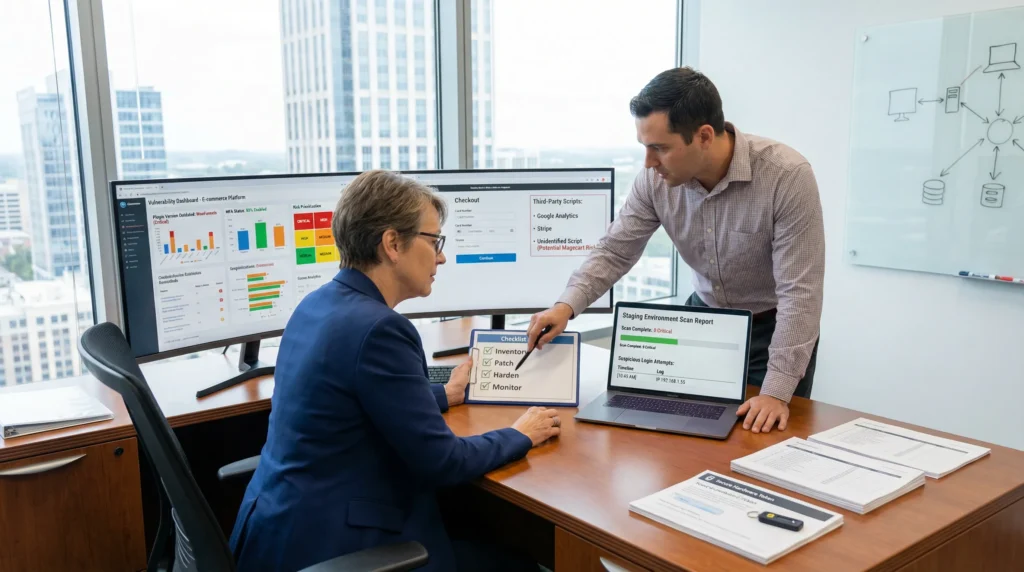
Security vulnerabilities on existing websites do not wait for a redesign. We have seen perfectly “quiet” sites get popped on a random Tuesday because one plugin update never happened.
Quick answer: most breaches come from three buckets you can control fast, outdated components, weak access, and bad defaults. The calm way forward is simple: inventory what you run, test in staging, fix the highest-risk paths first, then set a maintenance rhythm so the same holes do not reopen.
Key Takeaways
- Security vulnerabilities on existing websites most often come from outdated components, weak access (reused passwords/no MFA), and insecure defaults you can fix quickly.
- Start by inventorying users/roles, plugins/themes, integrations, and data flows so you can spot abandoned software, risky third-party scripts, and unnecessary data exposure.
- Run vulnerability scans in staging when possible, review logs for admin creation and unexpected file changes, and ignore common background noise like routine wp-login bot hits on the first pass.
- Prioritize remediation by risk: lock down admin access and any remote code execution paths first, then fix known exploited plugins/exposed endpoints, and finally harden headers, cookies, and permissions to prevent repeat incidents.
- Use a safe remediation playbook—patch/replace/remove components, enforce MFA and least privilege, tighten file permissions, add WAF/rate limiting, and disable unused features like XML-RPC and wp-admin file editing.
- Prevent regressions with a maintenance rhythm (weekly security updates, staging + rollback plan), monitoring/alerts for login anomalies and file changes, and an incident-ready contact sheet with evidence-preserving steps.
Why “Existing” Sites Get Hacked (Even If Nothing Changed)
Websites age like refrigerators. You can stop touching them, and they still keep running. Then a part fails.
Here is why: attackers do not need you to change anything. Attackers change their tooling every day. A stale site becomes easier to hit over time because the gap between your patch level and the attacker’s exploit kit grows.
Outdated Software, Abandoned Plugins, And Supply-Chain Risk
Old code invites break-ins. Unpatched flaws let attackers jump from the public internet to code execution.
A clean example sits outside WordPress: Ivanti reported and tracked issues like CVE-2024-21887 that attackers used for remote code execution against edge devices. The lesson transfers: a single unpatched component can give an attacker a foothold, even if your site content never changes.
Supply-chain risk is the scarier cousin. You can patch WordPress core and still lose if a plugin dependency, third-party script, or vendor update goes bad. Vendor A -> ships -> compromised update. That update -> runs -> on your server.
Weak Logins, Reused Passwords, And Missing MFA
Weak access control still does most of the damage because it scales.
Credential stuffing works like this: a breach from Site X -> dumps -> passwords. Attack bots -> try -> those passwords on your wp-admin, hosting panel, and email. If you reuse credentials, the bot wins.
The 2024 Levi Strauss incident became a public reminder that credential stuffing and reused passwords can lead to account compromise and data exposure. WordPress sites feel this fast because wp-admin gives direct leverage over plugins, themes, and file edits.
Misconfigurations: Hosting, Permissions, And Public Admin Paths
Misconfigurations create “open doors.” You do not see them in your page builder. You see them in your server settings.
Common ones we run into:
- Public admin paths with no rate limiting
- Excessive permissions on files and folders
- Overpowered API keys stored in plain text
- Cloud storage buckets that end up public
Broken access control -> exposes -> customer records. Excessive permissions -> lets -> a small compromise become a full takeover. This is why we treat hosting and IAM settings as part of website security, not “ops stuff.”
The Most Common Vulnerabilities We See On WordPress And Ecommerce Sites
WordPress and WooCommerce sites get hit because they sit at the intersection of plugins, payments, and lots of logins. That combo prints money for attackers.
Plugin And Theme Vulnerabilities (Including “Nulled” Software)
Plugins expand features. Plugins also expand the attack surface.
The riskiest pattern we see: abandoned plugins that still “work.” They work until a researcher publishes a proof-of-concept, then attackers mass-scan for sites that never updated.
“Nulled” themes and plugins are worse. You trade a license fee for unknown code provenance. Nulled packages often include backdoors. Backdoor code -> creates -> hidden admin users. Hidden admin users -> change -> checkout pages.
If you want a fast baseline before you start ripping things out, we keep a simple 30-minute triage here: our quick WordPress hardening checklist.
Cross-Site Scripting (XSS) And Injection Issues
Injection bugs still show up everywhere because input handling is hard and plugin ecosystems vary.
In 2025, MITRE’s CWE trends showed CWE-79 (XSS) and CWE-89 (SQL injection) near the top of common weakness lists, with XSS representing a large share of reported weaknesses. On WordPress, XSS often becomes:
- Session hijack -> steals -> an editor cookie
- Admin action spoof -> installs -> a new plugin
- Stored XSS -> runs -> on every admin page view
SQL injection, when it lands, can go from “weird error logs” to database exfiltration quickly.
File Upload And Media Library Abuse
File upload features look harmless because they feel like content work. Attackers love them.
Weak validation -> allows -> a PHP file upload. That file -> executes -> on the server. Even when WordPress blocks obvious PHP, attackers try polyglot files, double extensions, and misconfigured MIME types.
We also see “media library abuse” through compromised accounts. A low-privilege user -> uploads -> a malicious SVG. An admin -> views -> the library. Script runs.
Checkout, Payments, And Third-Party Script Risk (Magecart-Style Attacks)
Checkout pages attract skimmers.
Magecart-style attacks often work through third-party JavaScript. A tag manager container, chat widget, or analytics snippet -> loads -> attacker code. Attacker code -> reads -> form fields. Your payment flow looks normal, yet card data leaks.
This is why we audit not just WordPress plugins, but also every external script on cart and checkout pages. Your marketing stack can become your risk stack.
A Practical Audit: How To Find Vulnerabilities Without Breaking Production
We like audits that do not create new incidents. Start outside production, then move inward.
Start With Inventory: Users, Plugins, Integrations, And Data Flows
Inventory sounds boring. Inventory prevents surprises.
We map four things:
- Users and roles: who can publish, install plugins, manage WooCommerce, or access hosting.
- Plugins and themes: active, inactive, must-use, and “we forgot this existed.”
- Integrations: CRMs, email tools, Zapier/Make flows, shipping apps, payment gateways.
- Data flows: where PII goes, where order data goes, where form entries land.
System A -> sends -> customer email to System B. That flow -> creates -> a privacy obligation. When you know the flows, you can reduce what you collect and where it lives.
Run Scans And Review Logs: What To Check And What To Ignore
Run scans in staging first when you can. If you must scan production, keep the scan gentle and scheduled.
What we check:
- Known vulnerable plugin versions
- Exposed endpoints (xmlrpc, REST routes, debug pages)
- Suspicious admin creation events
- New files in wp-content that do not match deploy history
What we often ignore on first pass:
- Random bot hits on wp-login (common background noise)
- One-off 404 spikes on odd paths
- DNS “weirdness” that does not correlate with site behavior
Logs -> shorten -> detection time. Missing logs -> delays -> containment.
Verify Backups And Restore: Your Real Safety Net
Backups only count if restore works.
We test:
- Database restore into staging
- File restore (uploads, themes, plugins)
- A full-site restore runbook with timestamps
A backup file -> exists -> on storage. A restore test -> proves -> you can recover. This is the difference between a stressful afternoon and a week-long outage.
Risk-Based Prioritization: What To Fix First
When everything looks scary, teams freeze. We avoid that by ranking risk based on business impact and exploit likelihood.
Critical: Admin Access, Remote Code Execution, Payment Pages, And PII
Fix critical issues first because they end companies.
Critical usually means one of these:
- Admin takeover paths (wp-admin, hosting panel, DNS, email)
- Remote code execution routes through plugins or server services
- Checkout or payment form tampering
- Any exposure of PII, health data, legal case data, or financial info
Exploit -> grants -> admin. Admin -> installs -> persistence. Persistence -> survives -> password resets.
If you operate in healthcare, legal, finance, or anything regulated, keep humans in the loop. Do not paste private data into AI tools. Keep incident decisions human-led.
High: Known Exploits, Unpatched Plugins, And Exposed Endpoints
High risk items often have working exploits in the wild.
We treat these as “do this week”:
- Plugins with public CVEs and no patch applied
- Exposed admin endpoints with weak rate limits
- Old PHP versions and outdated server stacks
React2Shell (tracked as CVE-2025-55182) is a good reminder that web app stacks can expose surprising RCE paths. Your WordPress site may not run React directly, yet your broader stack might.
Medium/Low: Hardening And Hygiene That Prevents Repeat Incidents
Medium and low items still matter. They stop repeat hacks.
These include:
- Security headers that reduce XSS impact
- Content Security Policy tuning
- Safer defaults for cookies and sessions
- Locking down file editing, directory listing, and REST exposure
If you want one quick, visible win, check your headers grade and fix the obvious gaps. We show a safe, step-by-step approach here: audit your site’s security headers.
Fix And Harden: The Safest Remediation Playbook
We use the same remediation pattern on almost every site because it keeps risk low and progress steady.
Patch, Replace, Or Remove: Making Upgrade Decisions Fast
Every component gets one of three outcomes:
- Patch when a safe update exists and the plugin still has active support.
- Replace when the plugin is abandoned or conflicts with modern PHP and WordPress.
- Remove when nobody can explain why it exists.
Old plugin -> blocks -> PHP upgrades. That block -> locks -> you into older, riskier versions. So we decide fast.
Lock Down Access: MFA, Least Privilege, And Secure File Permissions
Access control reduces blast radius.
We apply:
- MFA on WordPress, hosting, email, and payment dashboards
- Unique passwords with a password manager
- Least privilege roles in WordPress and WooCommerce
- Tight file permissions and no write access where it is not required
Admin account -> controls -> plugin installs. Plugin installs -> change -> server behavior. This is why admin accounts should be rare.
Add Guardrails: WAF, Rate Limiting, And Bot Protection
Guardrails catch the stuff you do not have time to catch.
A WAF can block common injection payloads. Rate limiting can slow brute force attempts. Bot protection can reduce credential stuffing pressure.
Protection layer -> reduces -> noisy attacks. Reduced noise -> improves -> signal in your logs.
Reduce Attack Surface: Disable What You Do Not Use
Fewer doors means fewer locks.
We often disable:
- XML-RPC when it is not needed
- Unused plugins and themes
- File editing in wp-admin
- Unused endpoints and legacy integrations
Unused feature -> expands -> attack surface. Remove it and the risk drops without any fancy tools.
Operational Security For Busy Teams: Maintenance That Prevents Regression
Security work fails when it lives in a one-time project. Sites need routine care, like accounting.
Update Cadence, Staging, And Rollback Planning
We set a cadence that matches the business.
- Weekly checks for security updates
- Monthly feature updates
- A staging site for tests
- A rollback plan that anyone on the team can run
Update -> breaks -> a plugin sometimes. Rollback plan -> restores -> revenue faster. That is the trade you want.
Monitoring And Alerts: Uptime, File Changes, And Login Anomalies
Most owners find out about hacks from customers. That is the bad version of monitoring.
We watch:
- Uptime and response time
- File change alerts in wp-content
- New admin users and role changes
- Login anomalies by IP, time, and volume
Alerts -> speed up -> containment. Fast containment -> reduces -> data exposure.
Incident-Ready Basics: Contacts, Checklists, And Evidence Preservation
When something goes wrong, stress wipes memory.
We keep a short incident sheet:
- Who to call (hosting, domain registrar, payment provider)
- Where logs live and how long they store
- Steps to isolate the site without destroying evidence
- A decision rule for customer notifications
If you operate in regulated fields, add your attorney and compliance contact to that sheet. A rushed response -> creates -> legal risk. A calm, documented response -> limits -> fallout.
Conclusion
Security vulnerabilities on existing websites feel sneaky because they show up while you are busy running the business. We treat that as normal, not a moral failing.
If you take one step this week, take inventory and remove what you do not use. Then lock down admin access with MFA and verified backups. Small moves, done on schedule, beat panic-driven rebuilds every time.
Frequently Asked Questions about Security Vulnerabilities on Existing Websites
Why do security vulnerabilities on existing websites show up even if nothing changed?
Security vulnerabilities on existing websites increase over time because attackers evolve daily while your patch level stays frozen. As plugins, themes, and server components age, the gap between known exploits and your installed versions widens—turning a “quiet” site into an easier target without any redesign or content changes.
What are the most common causes of security vulnerabilities on existing websites?
Most security vulnerabilities on existing websites come from three fixable buckets: outdated components (old plugins, themes, PHP), weak access (reused passwords, missing MFA), and bad defaults or misconfigurations (excessive file permissions, public admin paths, exposed endpoints). Addressing these first reduces breach likelihood quickly.
How do I find vulnerabilities on an existing website without breaking production?
Start with an inventory of users/roles, plugins/themes, integrations, and data flows. Run vulnerability scans in staging first; if you must scan production, keep it gentle and scheduled. Review logs for suspicious admin creation and unexpected wp-content files, and verify backups by testing real restores.
What should I fix first after discovering security vulnerabilities on an existing website?
Prioritize by impact and exploit likelihood. Fix critical paths first: admin takeover routes, remote code execution, checkout/payment pages, and any PII exposure. Next, address high-risk items like plugins with public CVEs, exposed endpoints without rate limiting, and outdated server stacks. Then harden headers and defaults.
Do WordPress sites really need a WAF and rate limiting, or are updates enough?
Updates are essential, but they don’t stop every attack. A WAF and rate limiting add guardrails that block common injection payloads and slow brute force or credential-stuffing attempts, reducing noise and improving log signal. They’re especially valuable for WordPress and ecommerce sites with many logins and plugins.
How can I reduce supply-chain risk from plugins and third-party scripts?
Minimize dependencies and audit what you load—especially on checkout pages. Prefer actively maintained plugins, remove “nulled” software, and track versions. For third-party scripts, review tag managers, chat widgets, and analytics regularly, restrict what runs via Content Security Policy where possible, and monitor for unexpected script changes.
Some of the links shared in this post are affiliate links. If you click on the link & make any purchase, we will receive an affiliate commission at no extra cost of you.
We improve our products and advertising by using Microsoft Clarity to see how you use our website. By using our site, you agree that we and Microsoft can collect and use this data. Our privacy policy has more details.
