
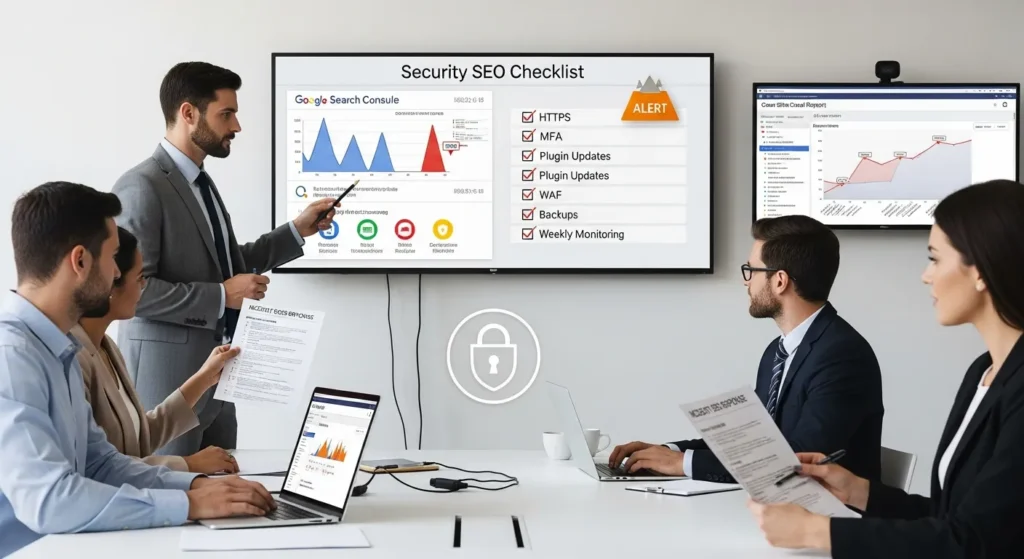
Security SEO checklist. We learned the hard way that rankings do not just “slide” sometimes: they get shoved off a cliff when a site gets hacked. One morning, our team opened Search Console, saw a spike in indexed pages we never created, and yes, coffee almost hit the keyboard.
Quick answer: Google rewards safe, trustworthy sites, and it also protects searchers from hacked ones. If you treat security like an SEO task with owners, checklists, and weekly checks, you protect traffic, customers, and revenue at the same time.
Key Takeaways
- Use a Security SEO checklist to prevent hacks from injecting spam pages, rogue redirects, and malware warnings that can tank rankings and revenue fast.
- Lock down admin access with strong passwords, MFA, limited login attempts, and removal of unused accounts to reduce account takeovers that lead to SEO damage.
- Patch WordPress core, themes, and plugins quickly (and delete abandoned plugins, not just disable them) to close common attack paths that affect index quality.
- Keep off-site, tested backups of both files and databases—and track RPO/RTO—so you can restore quickly and minimize downtime that hurts traffic and conversions.
- Harden technical foundations with HTTPS + mixed-content cleanup, add HSTS only after a clean audit, and use a WAF plus rate limiting to curb bot abuse that slows crawling and rankings.
- Run weekly monitoring in Google Search Console (Security Issues, Manual Actions, indexing spikes, and suspicious sitemaps) and spot-check for SEO spam and mobile-only redirects to catch problems early.
What “Security SEO” Means (And Why Google Cares)
Security SEO means you protect your site from attacks that change what Google crawls, indexes, and ranks. Security controls reduce the chance that spam, redirects, or malware land on your pages. That causes a simple chain reaction: site trust affects crawling, and crawling affects rankings.
Google has said HTTPS is a lightweight ranking signal, because encryption protects users on the web. That is not hype: it is a baseline expectation now. If your site throws browser warnings, users bounce. If users bounce, engagement drops. If engagement drops, your leads drop.
Here is why this matters to business owners: a hack does not only steal data. A hack often changes pages, adds links, and injects redirects. Those changes hit revenue fast.
How Hacks Turn Into SEO Problems
Most “SEO damage” from a hack shows up in a few predictable patterns:
- Spam page injection: Attackers add thousands of thin pages (often pharma, crypto, or adult terms). Google finds them. Google indexes them. Your index fills with junk.
- Rogue redirects: Users click your result, then a script redirects them to a scam site. Google detects the behavior, and your listings can disappear.
- Defacement and malware warnings: Browsers and search results show warnings. Users do not click. Google also flags the site in Search Console.
- Performance collapse: Attack scripts consume CPU and database resources. Speed drops. Crawling slows. Rankings follow.
Entity logic that shows up in real life looks like this: Injected spam pages affect index quality. Index quality affects rankings.
If you want a broader launch-style checklist that ties these pieces together, our all-in-one WordPress launch checklist lays out the same “trigger, input, job, output, guardrails” approach we use on client sites.
The 80/20 Pre-Flight: Access, Updates, Backups
If you do only three things for security SEO, do these: control access, patch fast, and keep recoverable backups. These steps stop most ugly scenarios before they start.
We treat this like pre-flight on a plane. You do it every time because the one time you skip it is the time you regret it.
Harden Logins And Admin Access
Start with admin access, because admin access controls everything else.
- Require strong passwords and block known weak ones.
- Turn on MFA for admins and shop managers.
- Limit login attempts or add a challenge after repeated failures.
- Change the default admin URL only if you can support it long-term.
- Remove unused admin accounts and shared logins.
Cause and effect stays simple: weak credentials affect account takeover. Account takeover affects content and redirects. Redirects affect rankings and revenue.
If you need a fast baseline you can finish in one sitting, our 30-minute WordPress security baseline covers the exact “do this first” order we use.
Patch The Stack: WordPress Core, Themes, Plugins
Updates feel boring until you skip one and spend a weekend cleaning spam links.
- Update WordPress core quickly, after testing on staging.
- Remove abandoned plugins. “Disabled” is not “gone.”
- Keep themes updated, even if you use a child theme.
- Review plugin permissions. Some plugins add admin pages that expose data.
If you run WooCommerce, treat payment and shipping plugins as high risk. Attackers love the surface area.
Backups And Rollback You Can Trust
Backups only matter if you can restore them fast.
- Store backups off-site. Same server backups die in the same fire.
- Keep both files and database backups.
- Test restores on a staging site at least quarterly.
- Track RPO and RTO in plain language.
- RPO: how much data you can lose.
- RTO: how long you can stay down.
Backup quality affects recovery time. Recovery time affects revenue. That math stays painful and simple.
Technical Controls That Also Support SEO
Some technical security controls pull double duty. They protect users, and they keep your crawl and index clean.
HTTPS, HSTS, And Mixed Content Cleanup
HTTPS protects logins, checkout, and form submissions. It also prevents “scary” browser warnings that kill conversions.
Checklist:
- Force HTTPS site-wide with 301 redirects.
- Fix mixed content (HTTP images, scripts, fonts) so pages load cleanly.
- Set HSTS after you confirm HTTPS works everywhere.
HSTS tells browsers to always use HTTPS for your domain. Misconfigure it and you can lock yourself out, so set it only after a clean audit.
For a broader tune-up that includes crawl and speed items, pair this with our WordPress SEO tune-up checklist.
WAF, Rate Limiting, And Bot Abuse Basics
A WAF blocks common exploit patterns before they hit WordPress. Rate limiting slows brute-force attempts and abusive bots.
Start simple:
- Turn on a managed WAF at your host or CDN.
- Block obvious bad bots and known malicious IP ranges.
- Rate limit login, XML-RPC, and sensitive endpoints.
Bot abuse affects server load. Server load affects speed. Speed affects crawling and rankings.
Crawlable, Fast, And Safe: CDN And Caching Guardrails
CDNs and caching can protect and speed up your site, but misconfigurations can create SEO mess.
Guardrails we use:
- Cache public pages. Do not cache cart, checkout, or account pages.
- Purge cache on content changes.
- Keep staging blocked from indexing.
- Verify that your CDN does not serve outdated redirects.
Fast delivery affects crawl budget. Crawl budget affects how quickly Google sees your fixes after a problem.
Indexing And Spam Monitoring (Weekly Checks)
You do not need daily panic checks. You do need a weekly routine that catches spam early.
Set a 15-minute calendar block. Protect it like a meeting.
Search Console Security Signals And Manual Actions
In Google Search Console, review:
- Security Issues reports.
- Manual actions.
- Pages indexing trends (look for sudden spikes).
- Sitemaps (watch for new sitemap files you did not create).
Google Search Console acts like a smoke alarm. Alerts affect response time. Response time affects damage.
If you use Yoast, run periodic on-page checks after updates or content pushes. Our Yoast audit walkthrough shows a practical routine for busy teams.
Spotting SEO Spam: Pages, Sitemaps, And Rogue Redirects
Spam often hides in plain sight.
Look for:
- Pages with weird slugs (random characters, brand names you never wrote about).
- Titles and meta descriptions you did not publish.
- Strange language blocks in your HTML source.
- Redirects that trigger only on mobile or only from Google traffic.
Quick checks that work:
- Search Google for
site:yourdomain.com viagra(and other obvious spam terms). - Crawl your site with a crawler and sort by recently created URLs.
- Check server logs for spikes in POST requests to admin endpoints.
Rogue redirects affect user trust. User trust affects conversions. Conversions keep your ad spend from feeling like a donation.
Safe WordPress Configuration For SEO Stability
WordPress makes publishing easy. It also makes permission mistakes easy.
This section keeps your site stable so SEO work sticks.
Least-Privilege Users, Keys, And Integrations
Give people the lowest role that still lets them do their job.
- Writers do not need admin.
- Contractors do not need permanent access.
- API keys should have scopes and expiration where possible.
Also review third-party connections:
- Email marketing plugins
- CRM sync tools
- Payment gateways
- Zapier or Make webhooks
Over-permissioned accounts affect content integrity. Content integrity affects index quality.
Secure Forms And Uploads Without Blocking Leads
Forms and file uploads bring leads. They also bring spam and malware.
Controls that keep the pipeline open:
- Add server-side validation. Client-side checks alone fail.
- Limit upload file types and file sizes.
- Store uploads outside public web root when possible.
- Add CAPTCHA only where spam hits. Do not slap it everywhere.
If your team publishes a lot of content, pair these controls with a content workflow checklist so spam does not sneak into drafts. Our content SEO checklist helps teams ship content that ranks without creating a mess.
Comments, UGC, And Outbound Link Hygiene
User-generated content helps communities. It also attracts link spam.
Do this:
- Moderate first-time commenters.
- Use
rel="nofollow"orrel="ugc"on user links. - Block common spam patterns.
- Remove old spam comments, because Google can still crawl them.
Spam outbound links affect site reputation. Site reputation affects rankings. This is one of the fastest ways a legit brand ends up next to sketchy keywords in search results.
Incident Response: What To Do If Rankings Drop Or You Get Hacked
When rankings drop and you suspect a hack, speed matters. So does calm.
Treat this like an ops incident, not a marketing problem.
Containment, Cleanup, And Evidence Preservation
First steps:
- Put the site in maintenance mode if users face risk.
- Rotate passwords and revoke suspicious sessions.
- Freeze changes long enough to capture evidence.
- Take a full backup of the current compromised state.
That last one sounds weird, but it helps with analysis and insurance. Evidence affects root cause. Root cause affects whether the hack returns.
Then clean:
- Remove injected files and malicious plugins.
- Replace core files with clean copies.
- Audit admin users and reset keys.
- Scan database tables for injected content and redirects.
If the site runs ecommerce, notify your payment provider and review PCI-related obligations. Keep legal, medical, and financial advice human-led. Bring in counsel where needed.
Recovery: Re-Submit, Re-Index, And Communicate Transparently
After cleanup:
- Request a review in Search Console if Google flagged the site.
- Resubmit sitemaps.
- Use URL Inspection on key pages to speed recrawl.
- Fix 404s and redirect chains created during the incident.
Communication helps, too:
- Tell customers what happened and what you changed.
- If you collect sensitive data, disclose based on your legal requirements.
Clear recovery steps affect crawl recovery. Crawl recovery affects ranking recovery. And ranking recovery affects whether your next payroll feels normal again.
Conclusion
Security SEO work pays off when you treat it like a routine, not a fire drill. Run the pre-flight, keep weekly checks, and write down who owns each task. Start small, prove stability, then widen the scope.
If you want us to map your “trigger, input, job, output, guardrails” for WordPress, WooCommerce, and Search Console, we do that every week at Zuleika LLC. Keep humans in the loop, keep sensitive data out of prompts and tickets, and keep your site boring in the best way.
Security SEO Checklist FAQs
What is a security SEO checklist, and why does it matter for rankings?
A security SEO checklist is a repeatable set of security tasks that protect what Google crawls, indexes, and ranks. When a site gets hacked, attackers can inject spam pages, add rogue redirects, or trigger malware warnings. That damages trust, reduces crawling, and can tank rankings quickly.
How can a hack create thousands of indexed pages I never published?
Hackers often perform spam page injection, generating thin URLs (pharma, crypto, adult terms) that Google discovers and indexes. Your index quality drops as junk pages dilute legitimate content. In Search Console, this may appear as a sudden spike in indexed pages, new sitemaps, or unfamiliar titles and slugs.
What are the top 3 “80/20” steps in a security SEO checklist for WordPress?
The highest-impact steps are: (1) control admin access with strong passwords, MFA, and removing unused accounts; (2) patch fast by updating WordPress core, themes, and plugins and deleting abandoned plugins; and (3) keep off-site backups you’ve tested for restoration so rollback is reliable.
How do HTTPS, HSTS, and mixed content affect Security SEO?
HTTPS prevents browser warnings and protects logins and forms, and it’s also a lightweight Google ranking signal. Mixed content (HTTP scripts/images on HTTPS pages) can break security indicators and page load behavior. HSTS enforces HTTPS, but should only be enabled after an audit to avoid lockouts.
What should I check weekly in Google Search Console for security SEO issues?
Set a weekly 15-minute routine to review Security Issues, Manual Actions, indexing trend spikes, and Sitemaps for files you didn’t create. Then spot-check for SEO spam by searching “site:yourdomain.com” plus spam terms, and look for odd slugs, unknown meta titles, or redirects that only trigger on mobile.
Do security plugins and a WAF help SEO, or are they only for protection?
They can help SEO indirectly by preventing spam injections, rogue redirects, and bot abuse that slows sites down. A managed WAF and rate limiting reduce exploit attempts and brute force traffic, which improves stability and performance. Faster, more reliable pages support better crawling and quicker recovery after fixes.
Some of the links shared in this post are affiliate links. If you click on the link & make any purchase, we will receive an affiliate commission at no extra cost of you.
We improve our products and advertising by using Microsoft Clarity to see how you use our website. By using our site, you agree that we and Microsoft can collect and use this data. Our privacy policy has more details.
