
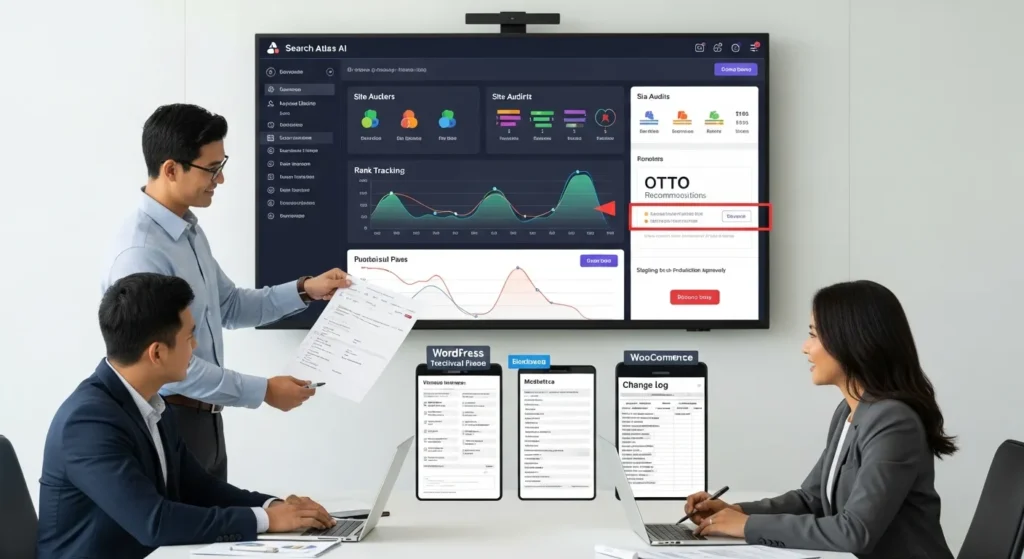
Search Atlas AI is the first SEO platform we have seen that tries to reduce the boring parts of WordPress SEO without turning your site into a risky science project. We still remember the moment: a client asked for “quick SEO wins,“ and our team stared at a spreadsheet of audits, meta updates, and internal links that would eat two weeks.
Quick answer: Search Atlas AI works best as a workflow layer between your WordPress site and your SEO to-do list, so you can plan, draft, and fix issues faster, while keeping humans in charge of what ships.
Key Takeaways
- Search Atlas AI works best as a centralized SEO workflow hub—use it to cut tool switching and speed up triage, not as a “set-and-forget” autopilot.
- Treat OTTO’s pixel-based recommendations as deployable drafts that still require human approval, especially on WordPress and WooCommerce where small changes can ripple into templates, schema, speed, and conversions.
- Use Search Atlas AI for keyword clustering and intent mapping to prevent cannibalization (e.g., blog posts competing with category or product pages) and to match content types to what the SERP rewards.
- Standardize execution with WordPress templates, custom fields, and editorial checklists so Search Atlas AI’s briefs, on-page guidance, and internal linking ideas turn into consistent, scalable improvements.
- Evaluate data quality with quick SERP spot-checks and real competitor validation, then connect reporting to business outcomes while documenting what changed, when, and who approved it.
- Start with a shadow-mode pilot on 20–50 pages, log and version every change, and add governance rules (data minimization, compliance review, and rollback plans) before scaling AI-assisted SEO.
What Search Atlas AI Is (And What It Is Not)
Search Atlas AI is an AI-powered SEO automation platform with a WordPress plugin. It bundles keyword research, content planning, audits, on-page guidance, rank tracking, and automated fixes through its OTTO SEO agent.
It is not a standalone “press one button, get traffic“ content machine. It is also not a simple rank tracker or a tiny WordPress add-on. Think of it as a unified SEO suite that reduces tool sprawl and turns repeatable SEO work into a system.
Where It Fits In A WordPress SEO Stack
On WordPress projects, we treat Search Atlas AI like the “brain” that sits between:
- Your site (WordPress, WooCommerce, your theme, your plugins)
- Your data (Google Search Console and performance signals)
- Your execution (drafts, meta updates, internal links, schema notes, fixes)
The WordPress plugin matters because it shortens the path from “SEO insight” to “WordPress change.“ That tends to be where teams stall.
In a typical stack, it can cover:
- Site audits and issue detection
- Keyword discovery and topical mapping
- Content briefs and drafting support
- Bulk meta titles and meta descriptions
- Publishing workflows through WordPress
And it can sit alongside tools you already trust, like a host-level caching setup, a security plugin, and your analytics.
AI Capabilities Vs. Traditional SEO Tooling
Traditional SEO tools often follow this pattern: the tool reports a problem, then a person fixes it. That is fine, but it turns SEO into a permanent backlog.
Search Atlas AI pushes more work into automation. OTTO can identify issues and propose fixes, and the platform can generate drafts and metadata at scale.
Here is the cause-and-effect we care about:
- Automated audits -> reduce manual review time
- Bulk meta updates -> speed up page-level improvements
- Topical mapping -> improves coverage gaps -> improves internal linking targets
Search Atlas also uses proprietary metrics like Domain Power™ and Topical Dominance™ to show progress in ways that teams can act on, not just admire in a dashboard.
Sources:
- Search Atlas, “Search Atlas” (Product site), LinkGraph, n.d., https://searchatlas.com/
- LinkGraph, “OTTO SEO” (Product page), LinkGraph, n.d., https://www.linkgraph.com/otto-seo/
How Search Atlas AI Typically Helps In Real SEO Work
Most teams do not fail at SEO because they lack ideas. They fail because they cannot turn ideas into shipped changes week after week.
Search Atlas AI helps when you need repeatable output: plans, drafts, fixes, and measurement, all tied to the pages you actually own.
Keyword Discovery And Clustering For Content Planning
Keyword research gets messy when every department wants a blog post.
Search Atlas AI helps you cluster keywords into topics, so you can build a content calendar that matches real intent. When we plan WordPress sites, we usually map:
- A pillar page (core service or category)
- Supporting articles (questions, comparisons, use cases)
- Conversion pages (pricing, booking, contact, quote)
That structure matters because topical coverage -> better internal linking -> better crawl paths -> stronger relevance signals.
If you run WooCommerce, clustering also helps you separate:
- “buy” queries (product and category pages)
- “learn” queries (guides and comparisons)
- “fix” queries (troubleshooting content that reduces support load)
On-Page Recommendations You Can Turn Into Checklists
On-page SEO advice often reads like a fortune cookie. What teams need is a list.
Search Atlas AI surfaces on-page recommendations while you write and edit. The trick is to convert those recommendations into checklists your team can run without debate:
- Title tag format for each page type
- Meta description rules (length, inclusion of benefit, no false claims)
- Header structure rules (one H1, scannable H2s)
- Internal linking targets and anchors
Checklists create consistency. Consistency reduces review time. And that is how you ship more pages without lowering standards.
Content Briefs, Drafting Support, And Editorial Guardrails
Search Atlas AI includes content tooling (often referenced as Content Genius) that can help with briefs and drafting.
We like it most for:
- First drafts that follow a brief
- Product description drafts for large catalogs
- Updating old pages with missing sections
But we still keep humans in the loop, because drafts -> affect trust -> affect conversion. If you operate in legal, healthcare, or finance, human review stays non-negotiable.
Sources:
- Google, “Search Console Help“ (Overview), Google, n.d., https://support.google.com/webmasters/
- Search Atlas, “Content Genius” (Product feature page), LinkGraph, n.d., https://searchatlas.com/
A Safe Implementation Plan For Small Teams
We have seen the same mistake across small teams: they connect a new SEO tool to WordPress and push changes on day one. Then they spend day two cleaning up.
Here is what that means in practice: treat Search Atlas AI like a controlled rollout, not a magic switch.
Map The Workflow: Trigger, Input, Job, Output, Guardrails
Before you touch any tools, map the workflow on one page.
- Trigger: weekly audit run, new product launch, traffic drop, new keyword set
- Input: target URLs, keyword cluster, internal link targets, brand rules
- Job: OTTO audits, content brief generation, meta suggestions, schema notes
- Output: WordPress drafts, recommended fixes, checklists, reports
- Guardrails: human review, no sensitive data in prompts, change logging
Workflow mapping -> reduces surprises -> reduces rollback work.
Run In Shadow Mode Before Publishing Changes
If the platform can suggest or automate changes, start with observation first.
Shadow mode means:
- Let OTTO and audits run
- Collect recommendations
- Compare suggested changes to your existing theme, plugin stack, and content rules
- Publish nothing until you like the pattern
This gives you a safe baseline. Then you can ship changes in batches.
Define Human Review Roles For Regulated Or High-Risk Pages
We define review roles by risk, not by ego.
- Low risk: blog posts about general topics, glossary pages
- Medium risk: product pages, category pages, pricing pages
- High risk: legal claims, medical guidance, financial advice, anything that could trigger compliance issues
For high-risk pages, we set rules like:
- AI drafts stay in WordPress as drafts
- A named reviewer approves before publish
- A second reviewer spot-checks claims and citations
If you want help building those workflows inside WordPress, that is the kind of system work we do at Zuleika LLC alongside WordPress SEO services and ongoing support.
Integration Patterns For WordPress And Ecommerce Sites
Teams ask us, “What does this look like inside WordPress?“ Good question. Tools only matter when they touch pages.
WordPress Publishing: Drafts, Meta, Internal Links, And Schema Notes
The clean pattern is: platform creates recommendations -> WordPress stores the change -> humans approve.
Common uses through the plugin:
- Draft creation for posts and pages
- Bulk meta title and meta description updates
- Internal link suggestions you can apply while editing
- Schema notes that you validate before adding
If your site runs custom fields (ACF) or custom post types, plan the mapping early. Field mapping -> reduces broken templates -> reduces indexation surprises.
If you need support with that WordPress-side structure, we usually pair a content workflow with technical basics like clean permalinks, redirect rules, and a maintenance plan. Our WordPress website development work often starts there.
WooCommerce: Category SEO, Product Copy, And Collections Pages
WooCommerce sites win or lose on category and collection pages. Those pages shape internal links and user paths.
Search Atlas AI can help you move faster on:
- Category page copy that matches search intent
- Product description drafts for large catalogs
- Collection pages that group products around a theme
The cause-and-effect matters:
- Better category content -> better relevance -> stronger rankings for non-brand queries
- Better product copy -> better clarity -> higher conversion rate
Keep one rule: never let AI write claims you cannot prove. That includes “best,“ “guaranteed,“ or health outcomes.
CRM And Help Desk Signals To Inform Content Priorities
Search Atlas AI focuses on SEO work, not CRM sync. Still, you can use your CRM and help desk data as inputs.
We often pull:
- Top pre-sale questions from chat logs
- Refund reasons from support tickets
- Sales objections from CRM notes
Those signals -> shape content topics -> reduce support load -> improve sales calls. If you run a service business, this is one of the fastest ways to pick topics that matter.
If your WordPress site connects to a CRM, we also recommend a lightweight logging flow for content changes, so sales and support can see what changed and when. Our website maintenance services plans often include that kind of practical governance.
Governance, Privacy, And Compliance Considerations
AI in SEO creates a new risk: speed makes it easy to publish mistakes.
Governance fixes that. It sets rules for data, approval, and change history.
Data Minimization And Sensitive-Info Handling Rules
Data minimization means you only send what the tool needs.
Our standard rules:
- Do not paste customer data into prompts
- Do not include protected health info, case details, or account numbers
- Use page URLs and public text when possible
- Store brand rules in a shared doc, not in ad hoc prompts
If you use Google Search Console data, treat it as performance data that can still reveal business strategy. Limit access to people who need it.
Source:
- European Data Protection Board, “Guidelines 4/2019 on Article 25 Data Protection by Design and by Default“ (final), EDPB, 2020, https://edpb.europa.eu/
Disclosure And Accuracy Standards For AI-Assisted Content
When AI helps draft content, accuracy becomes a process, not a hope.
We follow a simple standard:
- AI can draft and suggest
- Humans validate facts, claims, and citations
- Regulated advice stays human-led
If you run ads or endorsements, keep disclosure tight. The FTC expects clear and conspicuous disclosures that real people can understand.
Source:
- Federal Trade Commission, “.com Disclosures: How to Make Effective Disclosures in Digital Advertising,“ FTC, 2013 (updated guidance and related resources available on FTC site), https://www.ftc.gov/
Logging, Versioning, And Rollback For SEO Changes
SEO changes touch revenue pages, so you need a paper trail.
Minimum setup:
- Track what changed (meta, content, internal links)
- Track who approved it
- Keep WordPress revisions on
- Keep a rollback plan for templates and bulk updates
Logging -> speeds debugging -> protects revenue. It also calms teams down when rankings wobble for a week.
How To Evaluate Results Without Chasing Noise
SEO tools can tempt you to stare at charts like they are a horoscope. We prefer boring measurement.
Baseline Metrics: Rankings, Clicks, Leads, And Revenue Pages
Start with a baseline before you change anything.
Track:
- Rankings for priority queries
- Clicks and impressions from Google Search Console
- Conversions tied to revenue pages (lead form submits, purchases, bookings)
- A short list of “money pages” you protect during tests
Then watch direction, not daily swings. Google reindexing and algorithm shifts can create short-term noise.
Tests That Matter: Template Changes, Content Updates, And Internal Linking
The best tests connect a single change to a measurable outcome.
Three tests we run often:
- Template changes: improve heading structure, add FAQ blocks, fix duplicate title patterns
- Content updates: expand sections that match new intent, refresh outdated facts, add missing comparisons
- Internal linking: add links from high-traffic posts to money pages with clear anchor text
Each test -> changes crawl behavior -> changes relevance signals -> changes rankings over time.
Run one test per page group, measure for a few weeks, then decide. That pace feels slow until you realize it saves months of cleanup.
Conclusion
Search Atlas AI can make SEO feel less like a never-ending backlog, but only if you treat it like a workflow system, not a content slot machine.
If you want the safest path, do this: map triggers and guardrails, run in shadow mode, then ship changes in small batches with logging and human review. That approach keeps your WordPress site stable and still lets you move fast.
If you are building or rebuilding a WordPress site and you want an SEO workflow that your team can actually run, we can help you design it at Zuleika LLC. Start small, measure the boring metrics, and let the tool handle the repetitive work while your team keeps the judgment calls.
Frequently Asked Questions (FAQs) About Search Atlas AI
What is Search Atlas AI, and what does it actually do for SEO?
Search Atlas AI is an all-in-one SEO platform that combines keyword research, site audits, rank tracking, backlink analysis, and content guidance. It’s strongest as a workflow hub: it clusters keywords, helps build content briefs, surfaces technical priorities, and centralizes reporting so teams spend less time switching tools.
Is Search Atlas AI (OTTO) a fully autonomous SEO tool that can run my site for me?
No. Search Atlas AI isn’t a “set it and forget it” SEO employee. OTTO can recommend fixes and deploy certain changes via a JavaScript pixel, but your team should stay responsible for approvals. Human review protects rankings, brand voice, conversions, and compliance—especially on WordPress and WooCommerce.
How should WordPress and WooCommerce teams safely test Search Atlas AI before making changes?
Start with a shadow-mode pilot where OTTO suggestions stay in review. Test on 20–50 pages (posts, service pages, and a few ecommerce categories), then measure rankings, clicks, and conversions. Log every change, confirm intent by spot-checking SERPs, and keep the “blast radius” small until results look stable.
Why can pixel-based SEO fixes in Search Atlas AI be risky or not fully permanent?
Pixel-based changes can alter what users and crawlers see without rewriting your WordPress theme, database, or templates. That may limit permanence for certain fixes, and it can introduce performance considerations on slower sites. Treat pixel deployments like code: document, version, and be ready to roll back quickly.
What are the best use cases for Search Atlas AI in WooCommerce SEO?
Search Atlas AI can support WooCommerce by aligning category pages to category intent, improving internal links and topical hubs, and encouraging product-page consistency using attribute-driven details for unique descriptions and FAQs. It’s also helpful for programmatic guardrails—like preventing duplicate titles across large product catalogs.
Can using Search Atlas AI cause privacy or compliance problems, and what should I avoid uploading?
It can if you paste sensitive data into any SEO tool. Practice data minimization: avoid patient/client details, payment data, contracts, credentials, private emails, or internal legal drafts. For regulated industries, require human approval for medical/legal/financial claims, keep compliance checklists, and maintain change logs and rollback plans.
Some of the links shared in this post are affiliate links. If you click on the link & make any purchase, we will receive an affiliate commission at no extra cost of you.
We improve our products and advertising by using Microsoft Clarity to see how you use our website. By using our site, you agree that we and Microsoft can collect and use this data. Our privacy policy has more details.
