
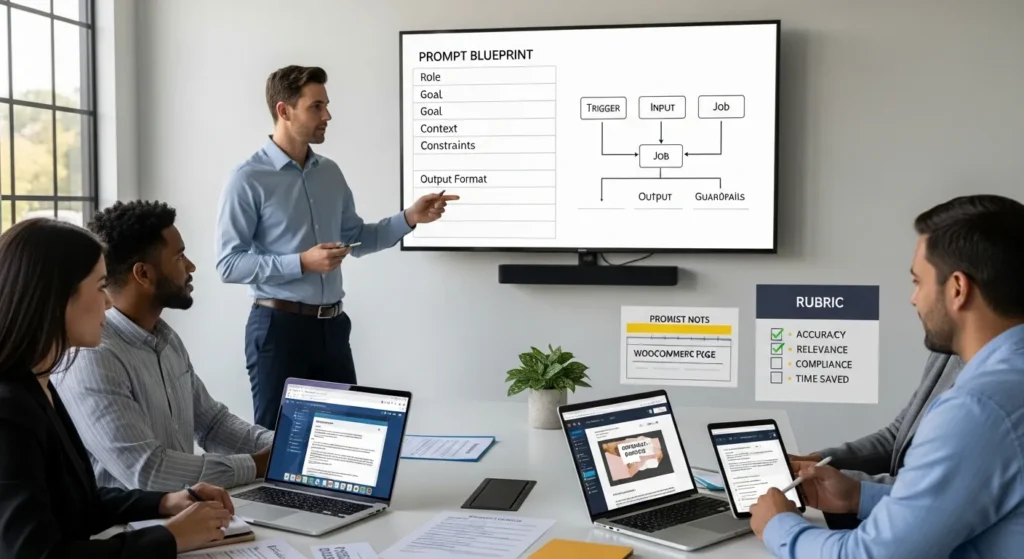
Prompt engineering is the fastest way we know to turn “AI tried its best” into “AI did the boring parts, and we stayed in control.” We learned this the hard way after watching a model confidently invent product specs for a WooCommerce store, right as a client wanted to push a sale page live. The fix was not a new tool. It was a better prompt, written like a workflow, with guardrails.
Quick answer: prompt engineering means you write clear, structured instructions so an AI model produces reliable outputs you can actually use in real business work, especially inside WordPress content, marketing ops, and support workflows.
Key Takeaways
- Prompt engineering turns unreliable “AI tried its best” outputs into repeatable business results by writing clear, structured instructions with guardrails.
- Treat prompt engineering like workflow design by defining the Trigger, Input, Job, Output, and Guardrails before you run any tool.
- Use the five-part prompt blueprint—Role, Goal, Context, Constraints, Output Format—to reduce guesswork and improve consistency across teams.
- Apply prompts where repetitive work still needs judgment, especially drafting, summarizing, extracting key details, and classifying leads or support tickets.
- Prevent hallucinations and compliance issues by requiring “use only provided facts,” “ask one question if missing,” and “flag uncertainty instead of guessing,” plus citations for factual claims.
- Improve prompts with a simple test loop: run in shadow mode, score outputs with an accuracy/tone/compliance rubric, and log/version prompts as SOPs for easy training and rollback.
What Prompt Engineering Is (And Why It Matters In Real Work)
Prompt engineering is the practice of writing inputs that steer an AI model toward a useful result. In business terms, it is how you reduce rework.
A prompt does two things:
- Your prompt -> shapes -> model behavior
- Your constraints -> reduce -> risky output
- Your examples -> improve -> format consistency
If you run a WordPress site, an online store, or a service business, that matters because AI output rarely fails loudly. It fails quietly. It sounds confident. And then it costs you time.
Prompt Engineering As Workflow Design: Trigger, Input, Job, Output, Guardrails
We treat prompts like mini SOPs.
Here is the workflow frame we use before we touch any tools:
- Trigger: Why you are running the prompt right now.
- Input: The facts the model must use.
- Job: The task you want completed.
- Output: The format you need for WordPress or your system.
- Guardrails: The rules that prevent bad output.
When you write prompts this way, your prompt -> reduces -> random “creative” decisions. Your guardrails -> prevent -> policy and brand mistakes. Your output format -> speeds up -> publishing.
When It Helps Most: Drafting, Summarizing, Extracting, Classifying
Prompt engineering helps most when the work feels repetitive but still needs judgment.
We see the best results in four buckets:
- Drafting: blog sections, landing page blocks, product descriptions.
- Summarizing: long calls, meeting notes, support threads into a clean brief.
- Extracting: pulling names, dates, SKUs, key promises, and requirements from messy text.
- Classifying: tagging leads, routing tickets, sorting FAQs by topic.
A good prompt -> turns -> “blank page” work into “editor” work. That is the win.
The Prompt Blueprint We Use: Role, Goal, Context, Constraints, Output Format
Most prompts fail because they leave the model guessing. Our blueprint removes guesswork.
We write five parts, in this order:
- Role
- Goal
- Context
- Constraints
- Output format
This structure -> increases -> repeatability across teams.
Role And Audience: Who The Model Is Acting As
Role matters because role -> affects -> vocabulary choices.
If we want a WordPress page draft, we do not ask for “a great landing page.” We specify:
- the role (“Act as a conversion copywriter for a WooCommerce brand”)
- the audience (“busy small business owners shopping on mobile”)
- the intent (“they want pricing and trust fast”)
If you skip the audience, the model -> defaults to -> generic writing.
Constraints And Definition Of Done: What “Good” Looks Like
Constraints are where prompt engineering stops being a fun writing trick and starts being a safety tool.
We define “done” in plain terms:
- Use only the provided facts
- If a fact is missing -> ask -> one question
- If unsure -> flag -> uncertainty
- Keep tone -> match -> brand voice
- Avoid claims -> unless -> cited
Constraints -> prevent -> hallucinated features, risky health claims, and accidental legal advice. For regulated work, that last part matters.
Output Format: Make The Response Easy To Paste Into WordPress
We like outputs that drop straight into the WordPress editor.
We often request:
- H2 and H3 headings
- short paragraphs
- bullet lists
- a meta title under 60 characters
- a meta description under 155 characters
Output format -> reduces -> copy-paste cleanup time. It also helps when you publish in Gutenberg, Elementor, or a custom theme.
On our own client builds at Zuleika LLC, we treat formatting rules as part of the workflow, not a “nice to have.”
A Repeatable Prompt Template (Copy, Paste, Customize)
Here is a template we use. Keep it in a doc. Version it like you version a checklist.
Repeatable prompt template
- Role: [who the model is]
- Goal: [what you want]
- Context: [facts, source text, product details]
- Constraints: [tone, length, must-use facts, what to avoid]
- Output: [format, headings, tables, metadata]
Small note from experience: shorter prompts often work worse than medium prompts. The model -> needs -> enough context to stay honest.
Input Checklist: Source Material, Links, Tone, And Must-Include Points
Before you run the prompt, you want your inputs ready.
We use this checklist:
- Source notes or raw text (call transcript, doc, product spec)
- Brand voice notes (friendly, direct, formal)
- Must-include items (pricing, warranty, shipping windows)
- Must-avoid items (unapproved claims, private info)
- Links you want referenced
If you build WordPress pages often, this checklist -> speeds up -> content production more than any prompt trick.
For WordPress teams, we also keep a short “site facts” snippet (about page basics, service list, unique proof). That snippet -> improves -> consistency across posts.
Quality Controls: Citations, Uncertainty, And “Ask Me If Missing”
Quality controls keep you from publishing nonsense.
We include three rules in many prompts:
- Cite sources for factual claims.
- Flag uncertainty instead of guessing.
- Ask if missing when the prompt lacks required info.
Those rules -> reduce -> confident errors. They also make review faster because your editor sees what needs human input.
Prompt Patterns That Work Well For WordPress And Marketing Teams
Patterns beat one-off prompts. When you run the same type of job every week, a pattern -> becomes -> a process.
Below are patterns we use with marketing teams, ecommerce teams, and service businesses.
SEO Brief To Draft: Keywords, Outline, Internal Links, Metadata
This one works when you already know what the page must cover.
Prompt pattern:
- Provide target keyword and related terms
- Provide an outline (your real one, not a vague topic)
- Require internal links to your service pages
- Require metadata
If your site sells services, internal linking -> improves -> crawl paths and user flow. On a WordPress build, we often link to pages like WordPress website development or a support offering such as website care plans.
We also ask for:
- title tag options
- FAQ blocks for schema planning
Content Repurposing: Blog To Email, Social Captions, And Ad Variations
Repurposing works because one source post -> feeds -> many channels.
We use prompts like:
- “Turn this post into a 6-sentence email with one CTA.”
- “Write 5 social captions under 280 characters with a clear hook.”
- “Create 10 ad headline variations, each under 30 characters.”
The guardrail: keep claims tied to the source. If the blog did not say it, the ad copy should not invent it.
WooCommerce And Support Ops: Product Copy, FAQs, And Ticket Summaries
WooCommerce stores live on product pages and support speed.
Prompt ideas we use a lot:
- Draft product descriptions from bullet specs and brand voice notes
- Convert 20 support tickets -> into -> 10 FAQ entries
- Summarize a ticket thread -> into -> “issue, steps tried, outcome, next step”
A good prompt -> turns -> messy ticket history into a clean knowledge base article. That reduces repeat tickets, which your team will feel immediately.
Testing And Iteration: How To Improve Prompts Without Guesswork
You do not need prompt “magic.” You need a test loop.
We improve prompts the same way we improve websites: run a baseline, change one thing, measure the output.
Run In Shadow Mode: Compare AI Drafts To Human Baselines
Shadow mode means you let AI draft, but you do not publish it yet.
Process:
- Human writes the usual draft (baseline).
- AI writes a draft from the same inputs.
- You compare time spent and edit count.
Shadow mode -> protects -> quality while you learn. It also calms teams down because nobody has to “trust AI” on day one.
Evaluation Rubric: Accuracy, Relevance, Tone, Compliance, Time Saved
A rubric keeps feedback honest.
We score drafts on:
- Accuracy: facts match the inputs
- Relevance: it answers the real question
- Tone: it sounds like your brand
- Compliance: it avoids restricted claims and sensitive advice
- Time saved: minutes saved vs baseline
Your rubric -> guides -> prompt edits. It also gives you a clean reason to reject an output without arguing about “style.”
Safety, Privacy, And Compliance Guardrails You Should Not Skip
Prompt engineering without guardrails -> creates -> hidden risk.
If you work in law, healthcare, finance, insurance, or even just handle customer data, you need rules that people can follow on a busy Tuesday.
Data Minimization: What Never To Paste Into A Prompt
Data minimization means you share the least sensitive info needed to do the job.
We tell teams to avoid pasting:
- passwords, API keys, or login links
- full credit card data
- private health details
- full legal case files
- unredacted customer PII (full name plus address plus order details)
If you need the model to rewrite a support message, you can redact.
EDPB guidance on data minimization supports this general approach for personal data handling: Data minimisation.
Human In The Loop: Approval Steps For Legal, Medical, And Financial Content
We keep humans in the loop for anything that can harm a person or create liability.
Rules we use:
- AI drafts -> humans approve -> final publish
- Professionals review -> regulated advice -> before it goes live
- Teams add disclosures -> when content could be mistaken for professional advice
The FTC also warns brands to avoid deceptive claims in marketing, which applies when AI writes copy you publish: FTC guidance on advertising and marketing.
Logging And Versioning: Prompts As SOPs
Logging sounds boring until you need it.
We keep:
- prompt versions (v1, v2, v3)
- what changed and why
- example inputs and outputs
- who approved the workflow
Logging -> speeds up -> training new staff. It also helps during audits or client reviews. If a prompt breaks, versioning -> allows -> rollback.
If you run WordPress content at scale, pair this with your site process docs. For teams that want a stable foundation, we often tie prompt SOPs to the same system used for website maintenance services so content and site changes follow one approval path.
Conclusion
Prompt engineering works when you treat it like workflow design, not a clever chat trick. Your prompt -> sets -> expectations. Your guardrails -> prevent -> risky guesses. Your rubric -> turns -> “AI feels weird” into measurable output you can improve.
If you want to start today, start small: pick one low-risk job (like summarizing meeting notes or drafting an FAQ), run it in shadow mode, and log what changed. When that feels steady, move up to SEO drafts and WooCommerce product copy.
If you want a second set of eyes, we do this work inside WordPress projects all the time at Zuleika LLC. We map the trigger, input, job, output, and guardrails first, then we pick tools. That order saves time, and it keeps you out of trouble.
Frequently Asked Questions About Prompt Engineering
What is prompt engineering, and why does prompt engineering matter in real business work?
Prompt engineering is writing clear, structured instructions that steer an AI model toward reliable outputs. It matters because AI often fails quietly—sounding confident while being wrong. Good prompts reduce rework, keep humans in control, and add constraints that prevent risky guesses in everyday workflows.
How do you write a prompt engineering workflow (trigger, input, job, output, guardrails)?
Treat prompt engineering like a mini SOP: define the trigger (why now), input (facts to use), job (task), output (required format), and guardrails (rules to prevent mistakes). This structure reduces random “creative” decisions, speeds publishing, and prevents brand, policy, or compliance errors.
What is the best prompt engineering blueprint for repeatable results across a team?
A repeatable prompt engineering blueprint is: Role, Goal, Context, Constraints, Output format. Role and audience guide vocabulary; context supplies facts; constraints define “done” (use provided facts, ask if missing, flag uncertainty); and output format locks in consistency for WordPress blocks, metadata, or internal docs.
How can prompt engineering help WordPress, WooCommerce, and support teams day to day?
Prompt engineering works best for repetitive tasks that still need judgment: drafting page sections and product descriptions, summarizing calls or ticket threads, extracting SKUs/dates/requirements from messy text, and classifying leads or tickets. With clear formatting rules, outputs paste cleanly into WordPress and reduce cleanup time.
How do you test and improve prompts without guessing if prompt engineering is “working”?
Use a simple test loop: run a baseline, change one variable, and compare outputs. Shadow mode helps—AI drafts aren’t published yet—so you can measure time saved and edits required safely. Score results with a rubric: accuracy, relevance, tone, compliance, and minutes saved.
What should you never paste into an AI prompt, and what are safe alternatives?
Don’t paste passwords, API keys, full credit card data, private health details, full legal files, or unredacted customer PII. A safer approach is data minimization: share only what’s needed, redact identifying details, and keep a human approval step for regulated or high-liability content before publishing.
Some of the links shared in this post are affiliate links. If you click on the link & make any purchase, we will receive an affiliate commission at no extra cost of you.
We improve our products and advertising by using Microsoft Clarity to see how you use our website. By using our site, you agree that we and Microsoft can collect and use this data. Our privacy policy has more details.
