
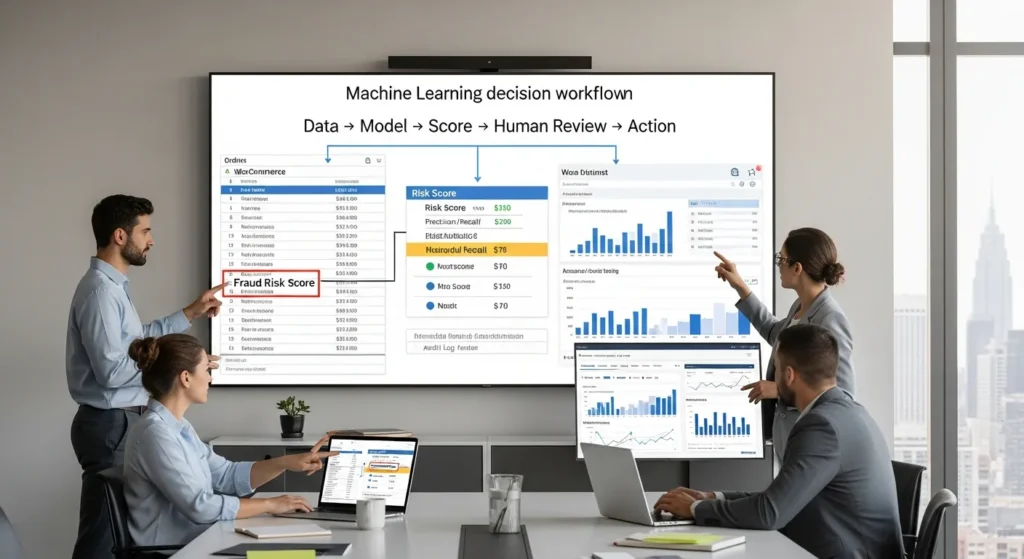
Machine learning shows up in business websites in sneaky ways. One day your store’s fraud score starts flagging weird orders, and you realize a model made that call, not a person. Quick answer: machine learning (ML) learns patterns from data to predict or rank outcomes, and it works best when you wrap it in clear workflows, human review, and tight data rules.
We build WordPress and WooCommerce sites for teams that want growth without chaos. So we are going to treat ML like any other production system: define inputs and outputs, set guardrails, log decisions, and roll out in small, reversible steps.
Key Takeaways
- Machine learning learns patterns from data to score, rank, or classify outcomes, and it works best when you pair it with clear workflows, human review, and tight data rules.
- Use machine learning when the world changes (fraud patterns, search intent, customer behavior), and use rules or automation when decisions must be fully explainable and consistent.
- Judge model performance with the right metrics (precision, recall, F1) using training/validation/test splits, because accuracy alone can hide failures in rare but costly cases like fraud.
- Start safely by mapping the workflow (trigger, inputs, model job, outputs, guardrails), then run the model in shadow mode before gradually rolling out automation with conservative thresholds.
- Treat data, privacy, and compliance as first-class requirements by minimizing inputs, controlling retention and access, disclosing ML use where it affects people, and logging model versions and decisions for audits.
- In WordPress and WooCommerce, keep heavy ML compute in external services via plugins/APIs/webhooks, and protect revenue with monitoring, safe fallbacks, and a fast rollback switch when behavior drifts.
What Machine Learning Is (And What It Is Not)
Machine learning is a slice of AI where software learns patterns from data and then makes a prediction or decision without you writing every rule by hand. IBM explains ML as algorithms that “learn from data” to improve performance over time, which is the key point most business teams need to grasp first. That learning step is the whole thing. No learning, no ML.
ML is not:
- Rule-based programming (if X, then Y)
- Simple automation (a fixed workflow that repeats)
- Generative AI (systems that create new text, images, or audio)
If you have ever built a Zapier flow that moves a form lead into a CRM, that is automation. It can be great, but it does not learn.
ML Vs. Rules, Automation, And Generative AI
Rules work when the world stays steady. You define logic. The system follows logic. A rules engine -> enforces -> consistency.
ML works when the world shifts. Data changes. Behavior changes. Fraud patterns change. A model -> adapts to -> new patterns when you retrain it.
Here is the practical split:
- Rules: You want speed and clarity. You can explain every decision.
- Automation: You want repetitive work done the same way every time.
- Machine learning: You want prediction, ranking, classification, or anomaly detection in messy data.
- Generative AI: You want drafts, summaries, images, or other created content.
Google’s developer documentation describes ML as using statistical techniques to “give computer systems the ability to learn” from data. That matches how ML shows up in business: it scores things.
Common ML Terms You Will Hear (In Plain English)
Teams get stuck because ML terms sound academic. They are not that scary.
- Algorithm: The math recipe the system uses to learn.
- Model: The trained result you can run on new data.
- Training: The process where the algorithm learns from past examples.
- Prediction: The model’s output, like “fraud risk = 0.82” or “lead score = 71.”
One mental model we like: a model -> outputs -> a score, and your business rules -> decide -> what to do with that score.
Sources
- What is machine learning? IBM, 2024, https://www.ibm.com/topics/machine-learning
- Machine Learning Glossary Google Developers, 2025, https://developers.google.com/machine-learning/glossary
How Machine Learning Actually Works: Data → Model → Decision
Machine learning works in a simple loop:
- Data goes in (past orders, support tickets, clicks, refunds, outcomes).
- A training process builds a model that captures patterns.
- New data goes through the model, and the model outputs a decision signal (score, category, ranking).
This cause-and-effect matters for websites. Your product catalog -> affects -> search relevance. Your checkout behavior -> affects -> fraud signals. Your form submissions -> affect -> lead quality.
If you want a business-friendly example, think of chargeback prevention. Past orders plus known fraud outcomes -> train -> a model. New orders -> get -> a risk score. Your checkout flow -> applies -> a step-up action, like manual review or 3D Secure.
Training, Validation, And Testing (Why Accuracy Is Not Enough)
Accuracy can lie to you.
If only 1% of orders are fraud, a model that labels everything “not fraud” hits 99% accuracy. It also fails at the one job you hired it for.
So we split data into:
- Training set: the model learns here.
- Validation set: you tune settings here.
- Test set: you check real performance here.
Then you use metrics that match the risk:
- Precision tells you how often “fraud” flags were right.
- Recall tells you how much fraud you actually caught.
- F1 balances both.
NIST frames AI risk work around measurement, monitoring, and accountability. That maps cleanly to ML on websites: you measure model outcomes, you monitor drift, and you keep ownership clear.
Sources
- AI Risk Management Framework (AI RMF 1.0) NIST, 2023, https://www.nist.gov/itl/ai-risk-management-framework
Common Business Use Cases For Websites And eCommerce
Machine learning earns its keep when your site handles lots of decisions that feel “soft,” like intent, risk, or relevance.
Here are use cases we see most often with WordPress, WooCommerce, and connected tools.
Personalization, Search, And Recommendations
Personalization sounds fancy. The business version is simple: the site -> shows -> the right thing sooner.
ML can:
- Rank products based on behavior, not just category rules
- Improve on-site search relevance using click and purchase patterns
- Recommend bundles that match real buying habits
McKinsey reports that personalization can lift revenue and reduce acquisition costs in many cases, but the wins come from clean data and steady testing, not magic. Your product data -> affects -> recommendation quality.
If you are doing content marketing, ML can also score which topics drive conversions. That can guide your editorial calendar without guessing.
Fraud, Risk Scoring, And Chargeback Prevention
Fraud changes. Rules struggle. ML handles patterns like:
- Unusual order velocity
- Mismatched shipping behavior
- New account behavior that looks like a bot
A risk model -> flags -> anomalies. Your team -> reviews -> edge cases. Your payment provider -> blocks -> high-risk attempts.
Stripe talks about ML-based fraud detection as a way to catch new fraud patterns. Even if you never see the model, you still need to plan how your checkout reacts to scores.
Support Triage, Lead Scoring, And Operational Forecasting
This is the unglamorous gold.
- Support triage: a model -> routes -> tickets to the right queue.
- Lead scoring: a model -> ranks -> inbound leads by close likelihood.
- Forecasting: a model -> predicts -> demand so you can plan staffing and inventory.
If you already run a help desk plus WordPress forms, you can start with classification. You do not need a moonshot.
Want a low-risk first step? Start by logging and tagging. Then your training data stops being a dumpster fire.
Sources
- The value of getting personalization right McKinsey & Company, 2021, https://www.mckinsey.com/capabilities/growth-marketing-and-sales/our-insights/the-value-of-getting-personalization-right-or-wrong-is-multiplying
- How Radar works Stripe, 2024, https://stripe.com/radar
A Safe, Repeatable Way To Start: Map The Workflow Before Tools
We see teams buy an ML tool first, then argue about what it should do. That leads to broken flows and nervous legal teams.
Here is what works: you map the workflow like an architect. Then you pick tools.
Trigger / Inputs / Model Job / Outputs / Guardrails
Use this template. It keeps everyone honest.
- Trigger: What event starts the flow? New order. New lead. New ticket.
- Inputs: What data does the model need? Keep it tight.
- Model job: What does the model do? Classify, rank, or score.
- Outputs: What leaves the step? A label, score, or routing decision.
- Guardrails: What stops bad actions? Human approval, thresholds, rate limits, and fallbacks.
Entity logic in plain English looks like this: your checkout event -> triggers -> scoring, and scoring -> affects -> fulfillment speed.
Run In Shadow Mode, Then Roll Out With Human Review
Shadow mode means the model runs, but it does not act.
You compare:
- model score
- human decision
- business outcome
Then you tighten the guardrails.
Rollout plan we like:
- Shadow mode for 2 to 4 weeks.
- Human review required for every “high risk” output.
- Partial automation with conservative thresholds.
- Full automation only for low-risk decisions.
This is also where WordPress teams win. You can add approvals in the admin UI. You can store logs in custom tables. You can keep a clean audit trail.
If you want related reading, our approach to workflow mapping mirrors how we plan WordPress automation workflows for sales and support teams.
Data, Privacy, And Compliance Guardrails (Especially For Regulated Teams)
ML needs data. Compliance teams need boundaries. Both can be true.
If you work in legal, healthcare, finance, or insurance, treat ML like a system that can create risk if you feed it the wrong inputs.
Data Minimization, Retention, And Access Controls
Data minimization reduces exposure.
- Collect only what the model needs.
- Strip direct identifiers when you can.
- Set retention windows for raw inputs and model logs.
- Limit access by role.
The European Data Protection Board ties data minimization and purpose limits to GDPR principles. Even if you are US-based, these ideas help you set clear internal rules.
Disclosures, Bias Checks, And Audit Logging
If ML affects people, disclose it. If ML scores leads, approves loans, or prioritizes services, do not hide the ball.
The FTC warns that companies must avoid misleading claims about AI and must watch for bias and unfair outcomes. So build checks into the workflow:
- Run bias tests on outcomes across relevant groups.
- Log model version, inputs used, and outputs.
- Keep a review process for user complaints.
A model -> affects -> decisions. Logs -> support -> accountability.
If you publish content that uses ML or other AI tools, you may also want a visible policy page. We often ship that with a build, right next to your privacy policy and cookie banner.
Sources
- Guidelines 4/2019 on Article 25 Data Protection by Design and by Default European Data Protection Board, 2020, https://edpb.europa.eu/our-work-tools/our-documents/guidelines/guidelines-42019-article-25-data-protection_en
- Aiming for truth, fairness, and equity in your company’s use of AI Federal Trade Commission, 2021, https://www.ftc.gov/business-guidance/blog/2021/04/aiming-truth-fairness-equity-your-companys-use-ai
How ML Fits Into WordPress And WooCommerce Without Breaking Your Stack
WordPress can host your storefront and still play nicely with ML. You just need clear boundaries. WordPress -> handles -> content and commerce. External services -> handle -> heavy model compute.
Where ML Lives: Plugins, APIs, Webhooks, And Light Custom Code
Most teams should not run training jobs inside WordPress.
Common patterns:
- Plugins that connect to fraud tools, search tools, or analytics
- APIs where WordPress sends data to an ML service and receives a score
- Webhooks that trigger scoring when an order or form arrives
- Light custom code using WordPress hooks like
save_postor WooCommerce order events to pass clean data
If you sell on WooCommerce, you can attach model outputs as order meta, then show staff a “risk score” badge in wp-admin. Staff -> sees -> context. Staff -> makes -> the final call when risk is high.
If you are also working on search, pair this with a solid technical base. We usually start with site structure and tracking, then add smarter ranking. Our WordPress SEO services focus on that foundation first.
Monitoring, Fallbacks, And Rollback Plans
ML systems drift. Data shifts. Promotions change behavior.
So we plan:
- Monitoring: watch key metrics, false positives, and conversion impact
- Fallbacks: when the ML call fails, default to a safe rule
- Rollback: keep a switch to disable the model step fast
This is the part people skip, then they panic at 2 a.m. when checkout flags half the orders. A rollback button -> reduces -> stress.
If you want to make this safer, run the ML step behind a feature flag and log every decision. We do that often in website maintenance and support plans, because production sites deserve seatbelts.
Conclusion
Machine learning pays off when you treat it like a scored decision step, not a mystery box. Data -> trains -> a model. The model -> outputs -> a score. Your workflow -> controls -> what happens next.
If you want to start this week, pick one low-risk decision on your site and run it in shadow mode. Log outcomes. Keep humans in the loop. Then expand only after you can explain what changed and why.
When you are ready, we can help you design the workflow, connect WordPress and WooCommerce to the right services, and put guardrails around privacy, logging, and rollbacks. That is the calm way to ship ML on a real business website.
Frequently Asked Questions (FAQ) About Machine Learning
What is machine learning, and how is it different from automation or rule-based programming?
Machine learning is a type of AI that learns patterns from data to make predictions or rankings without hand-coding every rule. Rule-based systems follow “if X then Y” logic, and automation repeats fixed workflows. ML adapts when behavior changes by retraining on new data.
How does machine learning work in practice (data → model → decision) on a website?
In production, machine learning is a loop: you collect data (orders, clicks, tickets), train a model on past outcomes, then score new events. The model outputs a signal (risk score, category, ranking), and your workflow applies business rules like manual review, routing, or step-up checkout.
Why is accuracy not enough to evaluate a machine learning model?
Accuracy can be misleading when outcomes are rare. If only 1% of orders are fraud, labeling everything “not fraud” yields 99% accuracy but catches nothing. Better evaluation splits data into training/validation/test sets and uses precision, recall, and F1 to match real risk goals.
What are common machine learning use cases for WordPress and WooCommerce sites?
Machine learning is often used for personalization and recommendations, on-site search relevance, fraud and risk scoring, support ticket triage, lead scoring, and demand forecasting. These tasks benefit from prediction and ranking in messy data, especially when patterns shift and rules get brittle.
How do you safely roll out machine learning without breaking checkout or operations?
A safe rollout starts with workflow mapping: triggers, inputs, model job, outputs, and guardrails. Run the model in shadow mode for 2–4 weeks, compare scores to human decisions, then automate only low-risk actions. Add monitoring, fallbacks, audit logs, and a fast rollback switch.
Do I need to run machine learning inside WordPress, or should it live elsewhere?
Most teams shouldn’t train or run heavy machine learning inside WordPress. A common approach is using plugins, APIs, and webhooks: WordPress sends clean event data to an ML service and receives a score back. Store outputs as order meta, show them in wp-admin, and keep a fallback plan.
Some of the links shared in this post are affiliate links. If you click on the link & make any purchase, we will receive an affiliate commission at no extra cost of you.
We improve our products and advertising by using Microsoft Clarity to see how you use our website. By using our site, you agree that we and Microsoft can collect and use this data. Our privacy policy has more details.
