
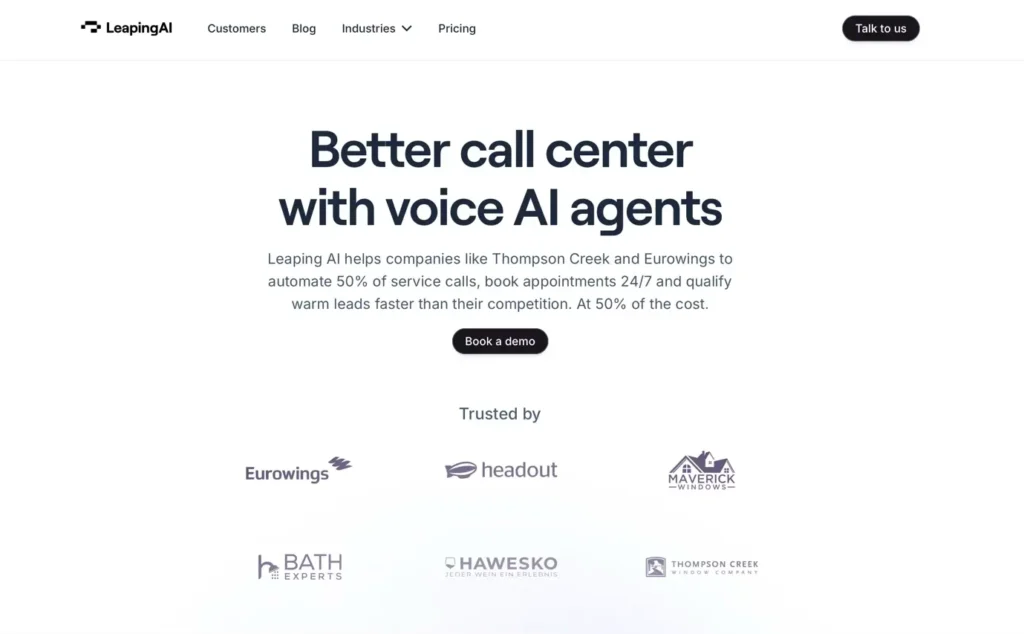
Leaping AI caught our attention during a client on-boarding last month. We were mapping out a content workflow for a mid-size eCommerce brand, and someone on the team asked, “Has anyone tried Leaping AI for this?” That question sent us down a two-week rabbit hole of testing, pricing comparisons, and workflow experiments. Here is what we found, and whether this tool deserves a spot in your stack.
Looking for an honest Leaping AI review before committing to the platform? This comprehensive breakdown covers everything you need to know—from core features and pricing to what real user reviews reveal about day-to-day performance. Whether you’re evaluating conversational AI software for customer support or exploring how it might streamline your sales operations, we’ll help you determine if Leaping AI fits your workflow.
Key Takeaways
-
Leaping AI is a voice AI automation platform, like Bland and Cognigy, that injects AI into repetitive multi-step tasks — it is not a standalone content writer or copywriting tool.
-
You can set up a working Leaping AI workflow in under 30 minutes with no coding required, making it accessible for non-technical founders and lean teams.
-
Pricing starts with a free tier (~100 runs/month) and scales from $29 to $149+/month, with each workflow run counted as one charge regardless of how many steps it includes.
-
The platform excels at classification, summarization, drafting, and data extraction but still requires human review — roughly 15% of AI-generated outputs needed meaningful edits in testing.
- Leaping AI’s integration library is growing but still smaller than Zapier or Make, so teams using niche tools may need to rely on manual webhook connections.
- Start with the free tier, automate one task you repeat at least three times a week, and track time saved before committing to a paid plan.
- Businesses can use Leaping AI to build voice AI agents and workflows that can automate customer service calls at scale.
What Leaping AI Is and How It Works
Leaping AI is a voice automation platform, like Bland and Cognigy, that uses large language models to handle repetitive content and data tasks. Think of it as a layer that sits between your existing tools, your CMS, your CRM, your project management app, and does the cognitive grunt work you would otherwise do manually. Businesses can use Leaping AI to build voice AI agents and workflows that can automate customer service calls at scale.
The platform connects to common business apps through API integrations and pre-built connectors. You set up a trigger (say, a new form submission or a Slack message), define what you want the AI to do with that input (summarize it, draft a reply, classify it), and route the output wherever it needs to go. If you have used Zapier or Make before, the mental model is similar, but Leaping AI adds an AI processing step in the middle.
We walked through the full setup process in our guide to using Leaping AI, and it took roughly 20 minutes to get a basic flow running. The learning curve is gentle enough for non-technical founders, though teams with some automation experience will move faster.
One thing worth noting: Leaping AI is not a content writer in the traditional sense. It does not replace tools like Jasper or standalone AI copywriters. It is a process tool, a way to wire AI into the steps you already follow. That distinction matters when you are comparing it against other AI writing platforms that focus purely on copy generation.
How Leaping AI’s Natural Language Processing Works
At its core, Leaping AI uses advanced natural language processing to understand customer intent not just keywords. This means the conversational AI can handle customer questions phrased in different ways without getting confused. The system continuously learns from interactions, improving its ability to route inquiries appropriately: simple requests are resolved automatically, while nuanced issues are escalated to human agents with full conversation context.
Leaping AI Offers 20 different languages and different LLM models. Knowledge bases can be uploaded either via PDFs or website links.
Core Features and Capabilities
Here is what Leaping AI actually brings to the table:
-
Multi-step workflow builder. You can chain several AI actions together in sequence. For example: receive a customer email → summarize it → classify sentiment → draft a response → send to your support queue. Each step feeds into the next.
-
Pre-built templates. The platform ships with templates for common use cases like lead qualification, content repurposing, and data extraction from documents. These save setup time, especially if you are running a small team without a dedicated ops person.
-
Custom prompt configuration. You write the prompts that govern each AI step. This gives you control over tone, output format, and guardrails. We recommend treating each prompt like a mini SOP, define the role, set rules, and specify what the model should refuse to do.
-
App integrations. Leaping AI connects with Google Workspace, Slack, HubSpot, Notion, and several other platforms. The integration library is growing, though it is still smaller than what you would find on Zapier or Make.
-
Logging and audit trails. Every workflow run gets logged. You can review inputs, outputs, and any errors. This is especially useful for teams in regulated fields, legal, finance, healthcare, where you need a paper trail.
Customer Support and Enterprise Voice Features
Leaping AI’s enterprise voice capabilities set it apart from basic chatbot solutions. The platform is designed to handle customer inquiries at scale, using conversational AI that sounds natural rather than robotic. For businesses with high call volumes, the software can manage routine support and sales operations simultaneously, freeing up human agents to focus on complex cases that require personal attention. The customer support automation works across phone, chat, and email channels, making it a versatile choice for omnichannel operations.
The platform handles classification, summarization, extraction, and drafting well. Where it gets less reliable is in tasks that require deep domain knowledge or multi-turn reasoning. For those, you still want a human reviewing the output.
If you are evaluating several AI automation platforms side by side, our Relevance AI breakdown and Lindy AI analysis cover two strong alternatives worth comparing.
Pricing and Plans
Leaping AI uses a tiered pricing model. As of early 2026, the structure looks like this:
-
Free tier. Limited to a small number of workflow runs per month (typically around 100). Good for testing, not for production.
-
Starter plan. Usually priced in the \$29–\$49/month range. Bumps up the run limits and adds access to more integrations.
-
Pro plan. Runs $79–$149/month depending on usage volume. Includes priority support, advanced logging, and team collaboration features.
-
Enterprise. Custom pricing. Adds SSO, dedicated support, and higher rate limits.
The free tier is generous enough to build a proof of concept. We tested a three-step content summarization flow on it without hitting the cap during our first week. But once you start running workflows daily, say, processing 50+ customer inquiries or generating batch content briefs, you will need the Starter or Pro plan.
One cost factor people overlook: Leaping AI charges per workflow run, not per task within a run. A five-step workflow counts as one run. That is a better deal than platforms that meter each individual AI call.
For context, Bloomberg reported that average SaaS spending per employee climbed past $4,800 annually in 2025. Against that backdrop, a $49–$149/month automation tool that saves your team several hours a week is a reasonable line item, as long as you are measuring the time it actually saves.
We always tell clients: run a two-week pilot, track hours saved, and compare that against the subscription cost before committing to an annual plan. According to research shared on the Ahrefs blog, content teams that automate repetitive SEO and publishing tasks reclaim 5–10 hours per week on average. Leaping AI can contribute to that number, but it will not carry the whole load alone.
Strengths and Limitations to Consider
Where Leaping AI Shines
Leaping AI stand out for its powerful suite of tools to create high-performing and human-like voice AI agents.
Speed of setup. You can go from zero to a working workflow in under 30 minutes. For busy founders and lean marketing teams, that matters. No code required.
Process-first approach. Unlike tools that just generate text, Leaping AI forces you to think about the full workflow, trigger, input, processing, output, review. That discipline makes your automations more reliable over time.
Logging and transparency. Every run is tracked. If something goes wrong, you can trace it back to the exact step and prompt that caused the issue. Teams in healthcare, finance, or legal will appreciate this.
Flexible integrations: Leaping AI is able to integrate into various CRM and telephony systems providers via APIs and the SIP protocol
Hallucination guardrails: Extra instructions can be added to the prompts to make sure that the voice AI agent does not veer of script
Expertise in certain verticals: Leaping AI is the leading solution in several verticals, such as home improvement and home remodeling, bringing years of expertise in setting up voice AI agents for that use case
Templates: Leaping AI offers re-usable templates for common uses cases, such as appointment scheduling, lead qualification and intent recognition
Advanced technology: Customers can deploy Speech to Speech models on Leaping AI
Enterprise-ready: All data is hosted securely in the cloud and data is not used to train LLM models
Fast deployment: Go-live usually only takes a couple of weeks and at most one two months
Where It Falls Short
Integration library is still growing. If your stack includes niche tools or custom WordPress plugins, you may need to build webhook connections manually. Platforms like Make and n8n still have broader connector libraries.
No native content publishing. Leaping AI can draft content, but it does not push directly to WordPress or Shopify without an intermediary step. If you need a tighter CMS connection, you will want to pair it with another tool or explore workflow documentation options that map the full publishing pipeline.
AI output still needs review. This is true for every AI tool, but it bears repeating. We ran a batch of 25 customer email drafts through Leaping AI, and about 15% needed meaningful edits before they were ready to send. Keep humans in the loop, especially for anything client-facing.
Limited community and documentation. Compared to more established platforms, Leaping AI’s knowledge base and user community are thin. When we hit an edge case with a webhook trigger, we had to contact support directly rather than finding the answer in a forum.
-
The platform is geared towards non-technical users and is not a dev-tool
-
Certain languages, such as Indian, are not supported
For teams that want a more writing-focused AI tool rather than a workflow platform, our PenPal AI review and Whale AI assessment cover options that lean more toward content creation and internal training.
What Users Are Saying: Leaping AI Reviews from Verified Customers
Leaping AI reviews from verified users highlight several consistent themes. Many Leaping customer testimonials praise the platform’s ability to handle customer inquiries without requiring constant human oversight. Enterprise users particularly appreciate how the software integrates with existing workflows, though some user reviews note a learning curve during initial setup. Overall, verified reviews suggest that businesses see measurable improvements in response times and customer satisfaction scores within the first few weeks of deployment.
Conclusion
Leaping AI is a solid choice for teams that already understand their workflows and want to inject AI into specific steps, without rebuilding everything from scratch. It is not the right tool if you need a standalone content writer or a full-scale enterprise automation suite. But for founders, marketers, and operations teams who want to turn repetitive multi-step tasks into something that runs in the background, it earns its spot on the shortlist.
Our recommendation: start with the free tier, build one workflow that mirrors a task you do at least three times a week, and measure whether the output quality and time savings justify upgrading. That is the safest way to find out if Leaping AI fits your specific situation.
Frequently Asked Questions
What is Leaping AI and how does it work?
Leaping AI is a workflow automation platform that uses large language models to handle repetitive content and data tasks. It connects to tools like Slack, HubSpot, and Google Workspace through API integrations, letting you set triggers, define AI processing steps, and route outputs automatically — similar to Zapier but with an AI layer in the middle.
How much does Leaping AI cost in 2026?
Leaping AI offers a free tier with around 100 workflow runs per month, a Starter plan at $29–$49/month, a Pro plan at $79–$149/month with advanced logging and team features, and custom Enterprise pricing. Notably, it charges per workflow run rather than per individual task, which can save money on multi-step automations.
Is Leaping AI a good alternative to Jasper AI for content creation?
Not directly. Leaping AI is a process automation tool, not a standalone AI content writer. If you need dedicated copy generation, tools like Jasper AI are better suited. However, Leaping AI excels at wiring AI into multi-step workflows such as summarization, classification, and drafting within a broader pipeline.
How does Leaping AI compare to other AI automation platforms like Relevance AI and Lindy AI?
Leaping AI stands out for its fast setup, process-first approach, and transparent logging. However, its integration library is smaller than competitors. For a deeper comparison, you can explore our Relevance AI platform breakdown and Lindy AI automation analysis to see which tool best fits your stack.
Can Leaping AI fully automate content publishing to WordPress or Shopify?
Not natively. Leaping AI can draft and process content, but it does not push directly to CMS platforms like WordPress or Shopify without an intermediary step. Teams needing tighter publishing pipelines may want to pair it with tools like Tango for workflow documentation or a dedicated CMS connector.
How can I tell if Leaping AI is worth the investment for my team?
Start with the free tier and build one workflow that mirrors a task you repeat at least three times per week. Track hours saved over a two-week pilot, then compare against subscription costs. Research from Ahrefs suggests content teams reclaim 5–10 hours weekly by automating repetitive tasks — Leaping AI can meaningfully contribute to those savings.
Some of the links shared in this post are affiliate links. If you click on the link & make any purchase, we will receive an affiliate commission at no extra cost of you.
We improve our products and advertising by using Microsoft Clarity to see how you use our website. By using our site, you agree that we and Microsoft can collect and use this data. Our privacy policy has more details.
Related Posts
- How To Use YouTube For Business (Without Turning It Into A Full-Time Job)
- WordPress Local SEO Checklist: A Practical Setup For More Calls, Visits, And Leads
- Is 27 Too Late To Start Coding? A Practical, Career-Focused Answer
- ElevenLabs AI: Practical Voice Generation For Business Content (Without Risky Automation)
- Off-Page SEO Checklist: A Practical, Safety-First Guide To Building Authority
- How To Use Rumble: A Practical Setup And Publishing Guide For Creators And Businesses
- How To Use Gyazo: Capture, Annotate, and Share Screenshots Instantly
- How To Use Booking.com: A Step-By-Step Guide To Finding, Booking, And Managing Stays
- Website Cost Concerns For Small Business Budgets: What It Really Costs And How To Control It
- How To Use Namecheap: Domains, DNS, Email, And Connecting To WordPress
- Slow Website Loading Times: Causes, Fixes, And A Safe Speed-Optimization Plan
- Best AI SEO Tools In 2026: What To Use, What To Avoid, And How To Choose
