
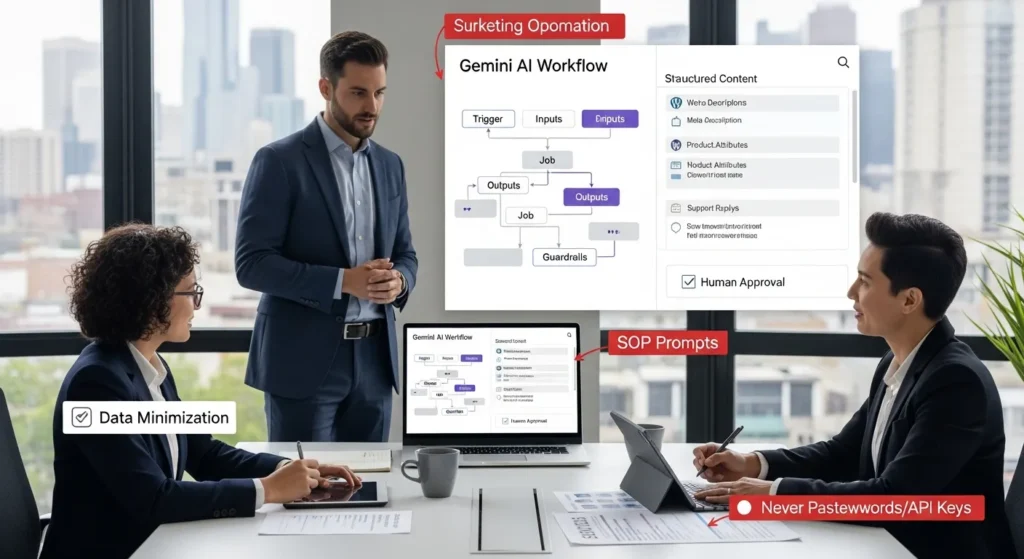
Gemini AI is showing up in more places than most teams expected, and we felt it the first time Chrome “helped” us finish a research rabbit hole before lunch. Quick answer: Gemini can save small teams real time when you treat it like a supervised assistant inside a mapped workflow, not a magic button. If you run WordPress, WooCommerce, or a service business site, the win comes from pairing clear inputs with guardrails, then letting automation handle the boring handoffs.
Key Takeaways
- Use Gemini AI as a supervised drafting assistant inside a mapped workflow, not a “magic button,” to save real time without increasing risk.
- Clarify what Gemini AI is (a model family plus Workspace/Chrome feature layers) so you set realistic expectations for speed, cost, and output quality.
- Get better results by feeding Gemini AI clean inputs and strict formats (voice rules, approved facts, character limits) so drafts stay consistent and usable.
- Map every automation as Trigger → Inputs → Job → Outputs → Guardrails, then run in shadow mode with human review, logging, and a rollback plan before anything can publish.
- In WordPress and WooCommerce, keep WordPress as the system of record and store Gemini AI outputs as drafts in custom fields or statuses until a human approves.
- Protect privacy and compliance with data minimization (“never paste this” rules), human-led decisions in regulated industries, and clear AI disclosure when required.
What Gemini AI Is (And What It Is Not)
Gemini sits in a confusing spot because Google uses the same name for a few related things. Clarity matters, because tool confusion -> wrong expectations -> bad risk decisions.
Gemini, Google Workspace, And The Model Family In Plain English
Gemini AI refers to Google’s AI models and the products that use them. In practice, you will see Gemini inside Google surfaces such as Chrome and Google Workspace, and you can also access Gemini through apps and APIs.
What we anchor on:
- Gemini is a model family, not one single “bot.” Model choice -> affects -> speed, cost, and output quality.
- Gemini in Workspace is a feature layer. Your prompt -> affects -> what a doc, email, or sheet draft looks like.
- Gemini in Chrome can assist with browsing work. A browsing assistant -> affects -> how fast you can collect and summarize info.
What it is not:
- It is not a source of truth. A model output -> reflects -> patterns in training and context you provide.
- It is not a compliance program. Your process -> controls -> privacy, retention, and review.
- It is not “set and forget” automation. An unsupervised flow -> increases -> risk.
Google positions Gemini as its most advanced model line, with newer releases and product integrations continuing to expand. Start with the assumption that features will change, then design your workflow so it can change too.
Where Gemini Fits In A Modern Marketing And Ops Stack
Most teams already run a stack like this:
- WordPress for pages, SEO landing pages, blogs
- WooCommerce for product catalog, checkout, order email
- A CRM (HubSpot, Salesforce, Zoho)
- A help desk (Zendesk, Help Scout, Freshdesk)
- A spreadsheet layer (Google Sheets) that holds “just one more list”
Gemini fits best as the brain between triggers and actions.
- A trigger (new form lead) -> starts -> an AI drafting job.
- A clean input (lead message + page URL) -> improves -> draft quality.
- A guarded output (draft email) -> reduces -> agent fatigue.
If you want a mental shortcut: WordPress holds the public truth, your CRM holds the relationship truth, and Gemini holds the draft work that humans approve.
What Gemini AI Can Do Well For Small Teams
Small teams win when they pick repeatable tasks with clear inputs. Clear inputs -> reduce -> weird outputs.
Draft, Rewrite, And Repurpose Content With Clear Inputs
Gemini AI does well when you give it a tight brief. We treat prompts like mini SOPs.
Good fits:
- Rewrite a service page paragraph for a different buyer (law firm vs HVAC)
- Turn a long FAQ answer into a short snippet for a product page
- Create three subject lines from a single offer
What keeps it sane:
- You provide voice rules (what you do and do not say)
- You provide facts only from your site (pricing, delivery windows, guarantees)
- You force format (bullets, table, 155-character meta description)
A prompt -> affects -> tone. A prompt also affects risk, so keep it boring and specific.
Summarize, Classify, And Extract From Docs, Emails, And Tickets
This is where Gemini often pays for itself.
- A long email thread -> becomes -> a 6-bullet summary
- A batch of tickets -> becomes -> a tag list (billing, shipping, returns)
- A messy note -> becomes -> structured fields (name, deadline, next action)
For WordPress teams, extraction work matters because structured fields -> improve -> site speed and consistency. When product attributes stay consistent in WooCommerce, filters work better and support tickets drop.
Reasonable “Analyst” Tasks: Lists, Comparisons, And Planning
We use Gemini for “analyst-lite” work where we still verify.
- Compare two plugin options using your stated constraints
- Build a content calendar from a list of services and seasons
- Draft a launch checklist for a new WooCommerce category
Planning output -> saves -> time, but it also creates false confidence. We treat planning drafts as draft scaffolding, not final truth.
How We Map A Safe Gemini Workflow Before Touching Any Tools
We have seen the same failure pattern: a team connects tools fast, then they panic when private data shows up in a prompt box. Fast wiring -> increases -> audit pain.
Trigger, Inputs, Job, Outputs, And Guardrails
Before we touch Zapier, Make, n8n, or a custom plugin, we map five boxes:
- Trigger: What event starts the flow?
- Inputs: What data enters Gemini?
- Job: What does Gemini do with that data?
- Outputs: Where does the result go?
- Guardrails: What rules block bad outcomes?
Here is a practical WordPress example:
- Trigger: A post enters “Needs Meta Description” status
- Inputs: Post title, H1, outline, target keyword
- Job: Draft 5 meta descriptions within 155 characters
- Outputs: Save drafts to a custom field in WordPress
- Guardrails: Block medical claims, block pricing promises, require human approve checkbox
A guardrail -> prevents -> silent failure.
Shadow Mode, Human Review, And Rollback Plans
We start in shadow mode. That means Gemini runs, but it cannot publish.
Shadow mode does three things:
- Logging -> reveals -> what data you really send
- Review -> catches -> tone drift and factual errors
- Time tracking -> proves -> if the flow matters
Then we add a rollback plan.
- If the output writes to WordPress fields, we keep previous values.
- If the output drafts emails, we keep them in “draft” state.
- If the output touches WooCommerce products, we stage it first.
A rollback plan -> lowers -> fear, and fear is what stops teams from trying useful automation.
Practical Use Cases For WordPress And WooCommerce
If you run your business site on WordPress, you already have a content engine. Gemini AI can help, but only if WordPress remains the system of record.
Content Ops: Briefs, Meta Descriptions, And Draft Posts
We like three safe wins:
- Content briefs: You give Gemini the service, audience, and goal. It returns a brief with H2 ideas and objections to cover.
- Meta descriptions: You feed page intent + target keyword, and Gemini outputs options. Human choice -> improves -> CTR.
- Draft posts: You feed an outline, internal links you want included, and banned claims. Gemini returns a draft that your editor fixes.
If you want a simple starting point, keep the workflow local:
- Store prompts in a doc
- Store outputs in WordPress draft posts
- Require a human to hit Publish
If you need help setting up clean custom fields and editorial statuses, that is the kind of thing we build at Zuleika LLC when teams want repeatable content ops, not random one-off prompts.
Store Ops: Product Copy, Attributes, And Customer Support Drafts
WooCommerce teams often drown in small text tasks.
Gemini can help with:
- Product short descriptions from a spec sheet
- Attribute suggestions (material, size, care)
- Draft replies for order questions
But here is the catch: product claims -> create -> legal risk. So we enforce rules:
- Gemini can draft copy from your approved specs only
- A human verifies sizing, ingredients, warranties, and shipping promises
- Support drafts stay in “suggested” state until an agent approves
When you clean product data, WooCommerce search -> improves -> product discovery. When discovery improves, returns often drop because buyers understand what they bought.
Automation Options: No-Code, Light Dev, And Webhooks
Automation turns Gemini from “a tab we forget” into “a worker that shows up on time.” Still, automation also turns small mistakes into fast mistakes.
Zapier/Make/n8n Patterns For Gemini In The Middle
We use a consistent pattern:
- Trigger app -> sends -> clean payload
- Gemini step -> returns -> structured text or JSON
- Action app -> stores -> result in the right place
Common flows:
- New lead form -> draft -> reply email + CRM note
- New support ticket -> classify -> tag + suggested first reply
- New blog outline -> draft -> meta description + excerpt
If you want related reading for your site stack, our clients often start with:
- WordPress website development as the base system
- WooCommerce solutions when the catalog and checkout need real care
WordPress Hooks And Fields To Connect (With Minimal Risk)
No-code tools work, but sometimes WordPress needs a small bit of code so the flow stays clean.
Safer WordPress connection points:
- Use custom post statuses so Gemini outputs never publish by accident
- Use custom fields (ACF or native meta) to store drafts, not overwrite real copy
- Use WordPress hooks like
save_postto trigger internal workflows only after validation
A good data model -> reduces -> prompt length. Short prompts -> reduce -> accidental leakage.
If your team wants a maintainable setup, ask for a build that includes logs and approvals. A workflow without logs -> creates -> mystery, and mystery becomes a support nightmare.
Privacy, Compliance, And Disclosure Guardrails
This is the section most hype posts skip, and it is the section that keeps regulated teams employed.
Data Minimization And “Never Paste This” Rules
We use a plain rule: less data in -> less risk out.
“Never paste this” list ideas:
- Patient details, diagnoses, treatment notes
- Full payment card data
- Full bank account numbers
- Private legal documents that have not been cleared
- Passwords, API keys, admin login links
Data minimization -> reduces -> breach blast radius.
Also set a retention stance. Decide who can access outputs and where outputs live. If the output lands in WordPress, WordPress permissions -> control -> who sees it.
Regulated Industries: What Must Stay Human-Led
If you work in legal, medical, finance, insurance, or mental health, keep these human-led:
- Final advice and client guidance
- Medical or legal conclusions
- Financial recommendations tied to a person
- Anything that creates a binding promise
Gemini can still help in regulated work, but only on the safe side:
- Summaries for internal review
- Drafts that a licensed pro edits
- Classification and routing
And yes, disclose when it matters. The U.S. Federal Trade Commission has clear guidance on avoiding deceptive AI claims and marketing. Your disclosure policy -> affects -> trust.
If you need a practical starting point, build a one-page policy and train your team. Policy + training -> reduces -> “oops” moments.
Sources (selected):
- Gemini product and plan details (Google AI Pro/Ultra tiers), Publisher: Google, Publication Date: 2025-2026 (varies by page), URL: https://ai.google
- FTC guidance on deceptive claims and endorsements, Publisher: Federal Trade Commission, Publication Date: 2023-2024 (guidance updated periodically), URL: https://www.ftc.gov
- EDPB guidance and principles around data minimization and lawful processing under GDPR, Publisher: European Data Protection Board, Publication Date: 2018-2023 (guidelines updated periodically), URL: https://edpb.europa.eu
Conclusion
Gemini AI works best when you treat it like a draft engine inside a supervised system. Your workflow map -> drives -> output quality. Your guardrails -> limit -> risk.
If you want a low-stress way to start, pick one workflow that meets all three conditions:
- It saves real time each week
- It uses low-sensitivity data
- It has a clear human approval step
Run it in shadow mode for two weeks. Track time saved. Keep the logs. Then decide if you want to expand.
If you would like us to help you connect Gemini-style drafting with WordPress and WooCommerce in a way your team can trust, we can scope a small pilot first at Zuleika LLC. Small pilot -> creates -> confidence, and confidence is what turns AI from a side tab into a real operating habit.
Frequently Asked Questions about Gemini AI
What is Gemini AI, and what is it not?
Gemini AI refers to Google’s family of AI models and the products that use them across surfaces like Chrome and Google Workspace, plus apps/APIs. It’s not a single “bot,” not a source of truth, and not a compliance program. Treat outputs as drafts that need verification and process controls.
How does Gemini AI fit into a WordPress and WooCommerce workflow?
Gemini AI works best as the “brain” between triggers and actions: a form submission can trigger drafting, clean inputs (message + URL) improve results, and guarded outputs reduce fatigue. Keep WordPress as the system of record, store drafts in custom fields or draft posts, and require human approval before publishing.
What can Gemini AI do well for small teams without creating chaos?
Small teams get the most value when tasks are repeatable and inputs are specific. Gemini AI is strong at drafting, rewriting, repurposing, summarizing long threads, classifying tickets, and extracting structured fields. Provide voice rules, use only approved facts, force output formats, and verify plans to avoid false confidence.
How do you build a safe Gemini AI automation with guardrails and human review?
Map five boxes before connecting tools: Trigger, Inputs, Job, Outputs, and Guardrails. Start in shadow mode so Gemini AI can’t publish, log what data is sent, and measure time saved. Add rollback plans (keep prior WordPress field values, keep emails as drafts, stage WooCommerce changes) to limit damage from mistakes.
What data should you never paste into Gemini AI prompts?
Use data minimization: less in means less risk out. Avoid patient details, full payment card data, bank account numbers, uncleared private legal documents, passwords, API keys, and admin login links. Decide where outputs live and who can access them (for example, WordPress permissions), and set a retention stance early.
Do you need to disclose using Gemini AI in marketing or customer support?
Often, yes—especially when omission could mislead. A practical rule is to disclose when AI use affects consumer understanding, creates implied endorsements, or could be seen as deceptive. Follow FTC guidance on avoiding deceptive AI claims, and create a simple internal policy so staff know when AI-assisted content must be labeled or reviewed.
Some of the links shared in this post are affiliate links. If you click on the link & make any purchase, we will receive an affiliate commission at no extra cost of you.
We improve our products and advertising by using Microsoft Clarity to see how you use our website. By using our site, you agree that we and Microsoft can collect and use this data. Our privacy policy has more details.
