
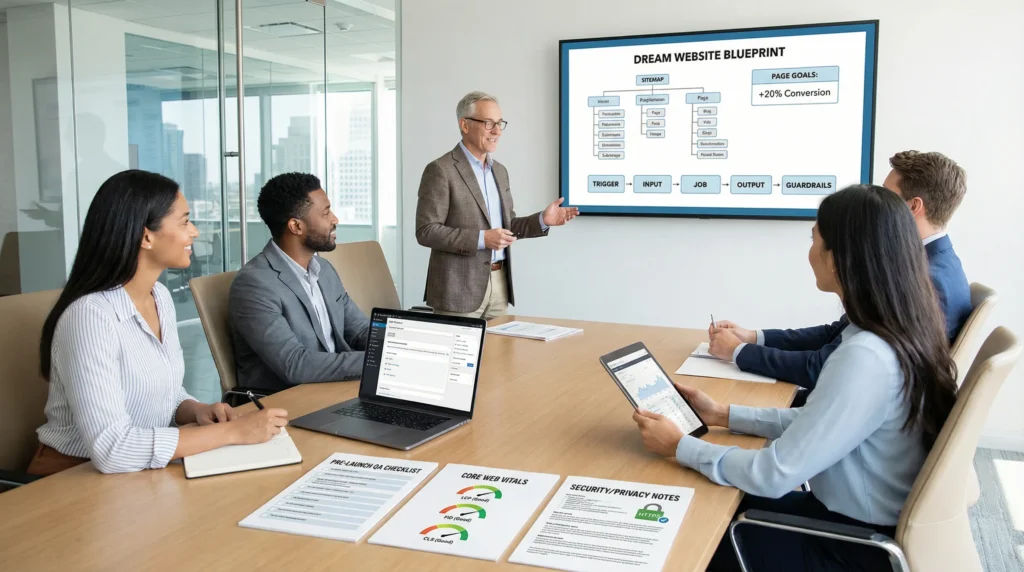
Dream website. Two words, big feelings. We have watched smart teams lose weeks to “one more tweak” because nobody agreed on what “dream” meant, or what the site had to do on Monday morning.
Quick answer: your dream website becomes real when you define success in business terms, map the workflow, design the structure, then build in WordPress with speed, trust, and a clean launch plan.
Key Takeaways
- A dream website becomes achievable when you define the goal, audience, and success metrics in business terms before you touch design tools.
- Set one primary goal per page (sell, book, subscribe, download) so the layout and copy stay focused and decisions get easier.
- Map the dream website workflow—trigger, input, job, output, and guardrails—to prevent rework and bake in privacy and compliance from day one.
- Run a content inventory (keep, fix, cut/merge) to reduce clutter, improve findability, and align pages with your goals and keywords.
- Design structure first with clear navigation and conversion paths, then build in WordPress with the right mix of themes, blocks, and minimal custom code for stability.
- Protect performance and trust with Core Web Vitals basics, security hardening, and a boring launch plan that includes staging, QA, backups, monitoring, and rollback readiness.
Define “Dream” In Business Terms (Goals, Audience, And Success Metrics)
Most people describe a dream website with adjectives: clean, modern, bold, luxurious, minimalist. We like those words too, but they do not keep a project on track.
A dream website, in business terms, has three anchors:
- Goal: what the site must produce (sales, booked calls, qualified leads, subscriptions, demo requests).
- Audience: who must take action (and what scares them, confuses them, or convinces them).
- Metrics: how you will measure progress in plain numbers (conversion rate, revenue per visitor, lead quality, time on page).
When you name those anchors, clarity -> reduces -> redesign loops. And a shared target -> speeds -> decisions.
If you are at the “please just build my website” stage, this is where we start. Not in a theme shop. Not in a logo file.
Choose One Primary Goal Per Page
A page that tries to do everything usually does nothing. We set one primary goal per page, then we support it with a few secondary actions.
Examples we use a lot:
- Homepage -> builds -> trust and direction. Primary action: choose a path (Shop, Book, Learn).
- Service page -> converts -> prospects to calls. Primary action: request a quote or book a consult.
- Product page -> moves -> buyers to checkout. Primary action: add to cart.
- Blog post -> earns -> attention and email signups. Primary action: download a lead magnet.
This approach keeps copy, layout, and design honest. You stop arguing about what goes “above the fold” because the goal decides it.
Translate Brand Vibes Into Measurable Outcomes
Brand “vibes” matter. They just need a scoreboard.
- “High-end” -> increases -> price acceptance when photography and whitespace do the heavy lifting.
- “Friendly and fast” -> lowers -> support tickets when navigation labels match real customer language.
- “Serious and compliant” -> builds -> form completion when policies, disclosures, and credentials sit near the CTA.
We often show clients an example of a clever website that looks fun but still guides visitors with ruthless clarity. The lesson: personality is not the enemy. Confusion is.
Map The Dream Website Workflow Before You Touch Tools
We treat websites like systems, not art projects. A website takes inputs, runs jobs, and produces outputs.
When teams skip workflow mapping, assumptions -> create -> rework. When teams map first, requirements -> prevent -> surprises.
If you want the cleanest path, start with a simple document that you can share with stakeholders and vendors. Then you can talk about the actual development of website work with less guesswork.
Trigger / Input / Job / Output / Guardrails (A Simple Planning Template)
Here is the planning template we use on real projects:
- Trigger: what starts the action (visitor clicks “Book,” customer buys, reader joins the list).
- Input: what data enters the system (email, order details, form fields, UTM source).
- Job: what the site must do (show a page, calculate shipping, send an email, create a CRM record).
- Output: what the user gets (confirmation, receipt, booked time, download link).
- Guardrails: what must not happen (collect sensitive data you do not need, store card details, show medical advice, violate policies).
A concrete example:
A customer clicks “Schedule.” The form collects name, email, and preferred time. The site creates a booking and sends a confirmation. Guardrails block open text fields that invite people to paste private health details.
Content Inventory: What You Have, What You Need, What Gets Cut
A dream website does not mean “keep everything.” It means “keep what helps.”
We do a content inventory in three buckets:
- Keep: pages that already match your goals and keywords.
- Fix: pages with good intent but weak structure, old offers, or messy headings.
- Cut or merge: pages that dilute the story or compete with better pages.
This step tends to sting a little. That is normal. But a smaller site -> improves -> findability because visitors see fewer forks in the road.
Design The Structure First: Pages, Navigation, And User Journeys
We have seen stunning designs fail because the structure fought the user.
Structure creates momentum. Good navigation -> reduces -> cognitive load. And clear journeys -> increase -> conversions.
Core Pages Most Dream Websites Share
Even “unique” sites share a common backbone. We usually start with:
- Homepage (direction, trust, top paths)
- About (proof, story, why you)
- Services or Products (offers, pricing logic, outcomes)
- Blog or Resources (search growth and education)
- Contact (lead capture, location, policies)
Then we add what your business needs: case studies, portfolio, FAQs, shipping and returns, appointments, memberships.
If you have ever fallen in love with a fancy interaction like a parallax scrolling website, this is where we sanity-check it. Parallax can support storytelling. It can also slow pages down and distract from the main action. We pick it only when it supports the journey.
Conversion Paths For Services, Ecommerce, And Content Creators
Different business models need different paths. Here is what we build most often:
- Services: services page -> proof (case study) -> booking or contact form -> confirmation page.
- eCommerce: category -> product -> cart -> checkout -> post-purchase email.
- Creators and influencers: content -> email signup -> welcome sequence -> offer.
The main idea stays the same: a clear next step -> increases -> follow-through. If your visitor must guess what to do, they will leave. They are not lazy. They are busy.
Make It Real In WordPress: Themes, Blocks, And Custom Builds
We like WordPress because it gives you real control. You can move fast with blocks, or go deeper with custom code when you need it.
If you are choosing your platform right now, start with what you need your wordpress website to publish, sell, and connect to.
When A Theme Is Enough Vs When You Need Custom Development
A theme is enough when:
- You have a standard marketing site or a straightforward WooCommerce store.
- You can live with 90 percent of a design system.
- You do not need heavy app-like features.
Custom development makes sense when:
- You need unusual layouts that must stay fast.
- You need deep connections to CRMs, ERPs, help desks, or gated content.
- You need strict control over roles, approvals, and audit trails.
We often start with a theme and block patterns, then add small custom pieces. Small custom code -> improves -> stability because you avoid plugin stacks that fight each other.
Plugins As Capabilities, Not Decorations
Plugins should act like tools, not souvenirs.
We choose plugins that add clear capability:
- SEO controls and schema support
- Forms that send data where it needs to go
- Security hardening and backups
- Caching and image handling
We avoid plugins that only add “cute” effects. They age badly.
If you feel tempted to use a drag-and-drop builder because it feels faster, pause and read our take on DIY website builders and why we rarely recommend them. The short version: the bill often arrives later, in speed issues, limits, and rebuild costs.
Build For Trust, Speed, And Search From Day One
A dream website that loads slowly or feels sketchy turns into a nightmare. People bounce. Ads get expensive. Rankings stall.
Trust and performance are not “later” work. Speed -> affects -> conversion rate. And security -> protects -> reputation.
Performance And Core Web Vitals Basics
Google’s Core Web Vitals focus on real-user experience signals like loading, interactivity, and layout stability. When we build for these, we do a few boring things that pay off:
- Use modern image formats and correct sizing.
- Limit heavy scripts and third-party widgets.
- Cache pages and assets.
- Keep fonts and animations under control.
You do not need perfection. You need progress you can measure. We set benchmarks before launch and re-check after.
Security, Privacy, And Compliance Guardrails (Especially For Regulated Fields)
If you work in health, legal, finance, insurance, education, or government, your website carries real risk.
Guardrails we like:
- HTTPS everywhere and strong admin passwords with MFA.
- Data minimization: collect the least data you can.
- Clear consent and privacy notices when you track or market.
- Human review for any AI-assisted content in regulated topics. No autopilot medical, legal, or financial advice.
In practice, privacy rules -> shape -> form design. And compliance needs -> limit -> what you store. This is not a vibe. It is a boundary.
Launch Like A Pro: Staging, QA, And A Rollback Plan
Launch day should feel boring. If it feels like a heist movie, something went wrong.
We use staging, QA, and rollback planning because a calm launch -> prevents -> lost revenue.
Pre-Launch Checklist: Links, Forms, Analytics, Backups, And Monitoring
Before we flip the switch, we run a checklist that covers the stuff people forget:
- Test all links and menus on mobile and desktop.
- Submit every form and confirm delivery.
- Check checkout flows (if eCommerce).
- Install analytics and conversion tracking.
- Take a full backup and confirm restore works.
- Set uptime monitoring and error logging.
If you want a deeper look at what professional teams include, our overview of WordPress website design services explains how we structure scope, testing, and handoff.
Run A Low-Risk Pilot Before You Automate Everything
Automation feels great until it emails the wrong thing to the wrong person.
We like a low-risk pilot:
- Launch one funnel first.
- Run it in “shadow mode” when possible, so humans review outputs.
- Log what happens.
- Expand only after you see clean results.
This approach keeps your dream website stable while you add growth features like CRM routing, post-purchase sequences, and content ops.
Conclusion
Your dream website is not a single design reveal. It is a system you can run without holding your breath.
If you want the safest path, set business goals first, map the workflow, design the structure, then build in WordPress with speed, trust, and a launch plan you can roll back. We do this work every week, and the pattern holds: clear inputs create clean outputs. And clean outputs make your site feel like it finally “clicks,” for you and your customers.
Dream Website FAQs
What is a dream website in business terms (not just design)?
A dream website is defined by business anchors, not adjectives. Clarify the goal (sales, booked calls, leads), the audience (who must act and what they need to trust you), and success metrics (conversion rate, revenue per visitor, lead quality). This shared definition prevents endless redesign loops.
How do you plan a dream website workflow before you start building?
Map the system first using Trigger → Input → Job → Output → Guardrails. Example: a visitor clicks “Book,” enters name/email, the site creates a booking and sends confirmation, while guardrails prevent collecting unnecessary sensitive data. Workflow mapping reduces assumptions, rework, and late-stage surprises.
Why should each page on a dream website have one primary goal?
A page trying to do everything usually does nothing. Assign one primary goal per page—homepage guides a next step, service pages drive consult requests, product pages drive add-to-cart, blog posts drive email signups. With a single goal, copy, layout, and “above the fold” decisions become objective and faster.
What core pages do most dream websites need for strong navigation and user journeys?
Most dream websites share a backbone: Homepage (direction and trust), About (proof and story), Services/Products (offers and outcomes), Blog/Resources (search growth), and Contact (lead capture). Add business-specific pages like case studies, portfolios, shipping/returns, appointments, or FAQs to support conversions.
Is WordPress a good choice for building a dream website, and when do you need custom development?
WordPress is a strong choice for a dream website because it balances speed and control. A theme works for standard marketing sites or straightforward WooCommerce stores. Custom development makes sense for unusual fast layouts, deep CRM/ERP integrations, gated content, or strict roles, approvals, and audit trails.
How do you keep a dream website fast and trustworthy for SEO and conversions?
Prioritize performance and security from day one. Improve Core Web Vitals by using properly sized modern images, limiting heavy scripts/widgets, caching assets, and keeping fonts/animations controlled. Build trust with HTTPS, MFA, backups, data minimization, and clear consent/privacy notices—especially in regulated fields.
Some of the links shared in this post are affiliate links. If you click on the link & make any purchase, we will receive an affiliate commission at no extra cost of you.
We improve our products and advertising by using Microsoft Clarity to see how you use our website. By using our site, you agree that we and Microsoft can collect and use this data. Our privacy policy has more details.
