
Deep learning shows up the moment you add “smart” features to a WordPress site, and we learned that the hard way during a late-night support sprint. A client wanted better product recommendations by Monday, and our inbox filled up with “Can AI do this?” messages before the coffee finished brewing. Quick answer: deep learning is great at messy data like text and images, but you only want it when the problem and the data justify the cost and risk. Let’s keep it practical, WordPress-friendly, and safety-first.
Key Takeaways
- Use deep learning when you’re working with high-volume, unstructured data (text, images, audio) and the upside clearly justifies the added cost and governance.
- Choose the simplest tool that fits: classic machine learning for structured predictions, deep learning for pattern recognition, and generative AI only when you truly need new content created.
- Deep learning delivers the most value in real workflows like intent-based search, product photo tagging, ticket routing, and personalization—especially when volume is in the thousands, not dozens.
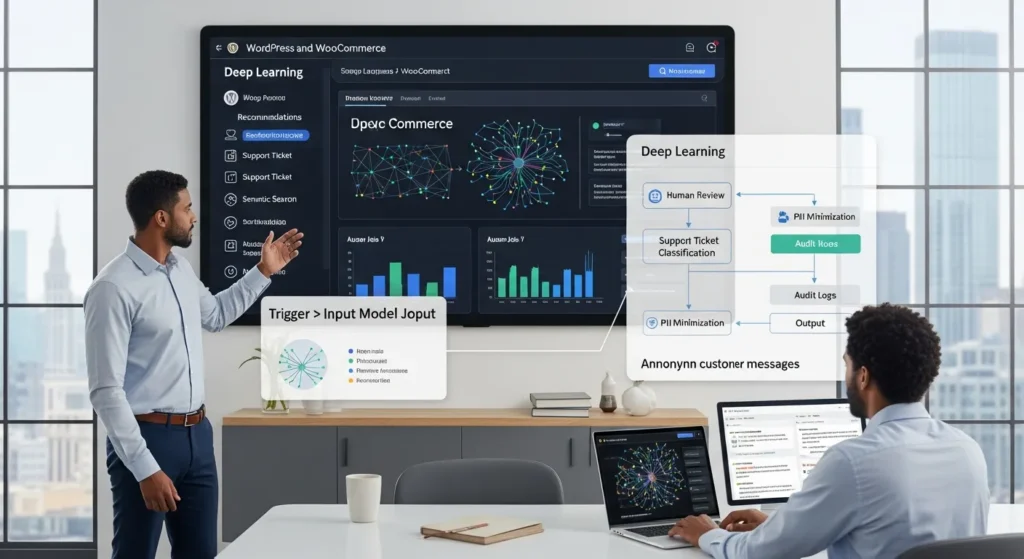
- Integrate deep learning into WordPress as a service (trigger → small input → model job → output) and add guardrails like human review, confidence thresholds, and audit logs to prevent bad outputs.
- Start safety-first with data minimization and privacy boundaries (mask PII, avoid sensitive fields), then validate in shadow mode for 2–4 weeks to measure real error rates before automation goes live.
- Run a low-risk pilot by picking one metric (time saved, conversion lift, or deflection rate), assigning an owner and rollback plan, and scaling only after results and risk controls hold up.
What Deep Learning Is (And When You Actually Need It)
Deep learning is a type of artificial intelligence that uses neural networks with many layers to learn patterns from data. It can learn directly from raw inputs like text, images, audio, and video.
Here is the decision rule we use with business teams: deep learning fits when your data looks like a pile of “stuff” instead of a neat spreadsheet. Product photos, support tickets, call transcripts, medical notes, and policy PDFs push you toward deep learning.
Deep learning often costs more to run and govern than classic machine learning. GPUs cost money. Vendor APIs cost money. Human review costs money. So we only recommend deep learning when the upside is clear.
Deep Learning Vs. Machine Learning Vs. Generative AI
Machine learning often works best when you have structured fields and clear targets. Think: customer lifetime value prediction from order history.
Deep learning often wins when you need pattern recognition across unstructured inputs. Think: “What product is in this photo?” or “What is the intent of this message?”
Generative AI sits on top of deep learning. It creates new content like text, images, or code. So the relationship looks like this in real life: deep learning affects generative AI because it supplies the model types and training methods that make generation possible.
If you only need a score or a label, you may not need generative AI at all. A classifier can do the job faster and with less mess.
Common Business Problems Deep Learning Solves
We see deep learning earn its keep when the work has volume and judgment.
- Search that understands meaning: Deep learning affects site search because it can match intent, not just keywords.
- Image understanding: Deep learning affects ecommerce catalogs because it can tag products from photos and flag low-quality images.
- Text triage: Deep learning affects support queues because it can classify and route tickets.
- Personalization: Deep learning affects conversion because it can rank products and content per visitor behavior.
If your team only has 50 support tickets a month, skip it. If you have 5,000 a week, deep learning can pay rent.
Sources: What is deep learning? (IBM, 2024): Deep learning (NVIDIA, 2023)
How Deep Learning Works In Plain English
Deep learning takes input data, turns it into numbers, and learns patterns that predict an output. Text becomes tokens. Images become pixel arrays. Audio becomes wave features.
Then the model learns weights. Weights are just adjustable knobs inside the network. Training tweaks those knobs until the model produces fewer wrong answers.
Here is why that matters for business: data quality affects model output. If your product titles are messy, your model learns messy.
Neural Networks, Layers, And Why “Deep” Matters
A neural network stacks layers that each learn a different level of pattern.
- Early layers learn simple signals.
- Middle layers learn combinations.
- Later layers learn higher meaning.
Depth affects capability because more layers let the network represent more complex relationships. That is why deep learning often beats simpler methods on images and language.
In WordPress terms, we think of it like this: a basic rules engine matches exact phrases. A deep model learns that “refund status” and “where is my money” live in the same neighborhood.
Training, Inference, And The Role Of Data
Training is the learning phase. Inference is the using phase.
- Training uses lots of examples and lots of compute.
- Inference runs the trained model to create a result for a new input.
Data affects both phases. Volume matters, but labeling also matters. A model learns what you teach it.
If you cannot label data, you can still use pretrained models from vendors. That shifts work from “train our own” to “choose a provider, set boundaries, and review outputs.”
Sources: What is deep learning? (IBM, 2024): What is a neural network? (IBM, 2024)
Where Deep Learning Shows Up In Real Workflows
Deep learning rarely lives as a big shiny button. It lives inside workflows. It makes one step faster, cheaper, or more consistent.
We also see this pattern: deep learning affects trust. If the output touches customers, you need review and logging. If the output stays internal, you can move faster.
Marketing And Content: Personalization, Recommendations, And Creative Assist
Marketing teams use deep learning for ranking, targeting, and generation.
- Product recommendations: Deep learning affects average order value because it can rank “next best product” based on behavior.
- Email and ad copy drafts: Generative AI affects production speed because it drafts variations in minutes.
- Image help: Models can suggest crops, backgrounds, or alt text.
One caution: do not let the model invent claims. That creates legal and brand risk fast. The U.S. Federal Trade Commission has warned that advertisers must back up claims and avoid deceptive marketing, even when AI helps write it.
Source: Using AI tools to help you advertise (Federal Trade Commission, 2023)
Operations And Support: Classification, Routing, And Search
Support and ops teams love deep learning because the work is repetitive and high-volume.
- Ticket tagging and routing: Deep learning affects response time because it sends issues to the right queue.
- Auto-summaries for agents: Generative AI affects handle time because agents read less and act faster.
- Internal search across docs: Deep learning affects onboarding because staff can find answers in policy docs without guessing keywords.
On WordPress, this often starts with a help desk form, WooCommerce order events, and a knowledge base. The model becomes the “brain” that labels and summarizes.
Security And Risk: Fraud Signals, Anomaly Detection, And Monitoring
Security teams use deep learning to spot weird patterns.
- Deep learning affects fraud detection because it can learn subtle behavior changes across many signals.
- Deep learning affects monitoring because it can flag anomalies in logs.
If you run WooCommerce, fraud often shows up as mismatched shipping details, odd purchase bursts, or high-risk payment patterns. A model can score risk, but a human should still make the final call.
Source: Artificial intelligence and cybersecurity (NIST, 2023)
Deep Learning On A WordPress Stack: Integration Patterns
Most teams do not “add deep learning to WordPress.” They connect WordPress to a model through a clean workflow.
We treat WordPress as the system of record. We treat the model as a service that performs one job. That mindset keeps the build sane.
Trigger → Input → Model Job → Output: The Repeatable Automation Blueprint
Before you touch any tools, map the flow:
- Trigger: What event starts this? A form submit. A new WooCommerce order. A new post draft.
- Input: What data do we send? Keep it small. Product title, description, and category often beat “send the whole database.”
- Model job: What is the task? Classify, extract, summarize, rank, generate.
- Output: Where does it go? ACF fields, order notes, a Slack channel, a CRM.
- Guardrails: What stops bad output? Human review, blocked terms, confidence thresholds, audit logs.
This blueprint reduces risk because each step has an owner. It also improves debugging because you can see where things broke.
No-Code, Low-Code, And Custom Plugin Options (Webhooks, REST API, Hooks)
You have three common paths:
- No-code (Zapier, Make): Fast pilots. Good for “send form content to a model, store a summary in Google Sheets, notify Slack.”
- Low-code (webhooks + WordPress REST API): More control. You can push and pull data between WordPress and a model endpoint.
- Custom plugin (WordPress hooks): Best control and governance. You can attach logic to hooks like
save_post,woocommerce_checkout_order_processed, orwp_insert_post.
We often start no-code, then move critical flows into a plugin. Code affects reliability because it removes brittle copy-paste steps.
If you want more WordPress workflow patterns, see our guides on WordPress website development, WordPress SEO services, and website maintenance services.
The Responsible Way To Start: Guardrails, Privacy, And Human Review
Deep learning affects risk because it can process sensitive text at scale. So we set boundaries first, not last.
If your team works in legal, healthcare, finance, or insurance, treat AI like a junior assistant. It can draft and sort. A human still decides.
Data Minimization, PII Boundaries, And Regulated Industry Notes
Start with data minimization. Send only what the model needs.
- Remove SSNs, full card data, and full medical record details.
- Mask emails and phone numbers when you can.
- Keep protected health information out of general-purpose tools unless your contracts and settings support it.
European regulators also stress data minimization and purpose limits. If you operate in the EU or serve EU users, that matters for GDPR posture.
Source: Guidelines 4/2019 on Article 25 Data Protection by Design and by Default (European Data Protection Board, 2020)
Logging, QA Checklists, And Shadow Mode Pilots
We use three safety tools that teams can actually keep up with:
- Logging: Store inputs, outputs, timestamps, model version, and reviewer decisions.
- QA checklist: Check for privacy leaks, made-up claims, and brand tone violations.
- Shadow mode: Run the model, but do not auto-publish. Compare model output to human output for two to four weeks.
Shadow mode affects confidence because it shows real error rates without real damage. It also keeps your stakeholders calm. Nobody likes surprise automation.
How To Plan A Low-Risk Pilot That Proves ROI
A pilot works when it answers one question: “Did this save time or increase revenue without adding new risk?”
We keep pilots small on purpose. Small pilots finish. Big pilots become folklore.
Pick One Metric: Time Saved, Conversion Lift, Or Deflection Rate
Pick one metric and track it weekly.
- Time saved: Measure minutes per ticket or minutes per content draft.
- Conversion lift: Measure add-to-cart rate or revenue per session on pages with recommendations.
- Deflection rate: Measure how many support requests your knowledge base answers without an agent.
A single metric affects decisions because it stops debates from turning into vibes.
Operational Readiness: Owners, Escalations, And Rollback Plans
Assign owners before launch.
- Name a workflow owner who approves changes.
- Set an escalation path for bad outputs.
- Write a rollback plan. “Disable this webhook” beats “panic in Slack.”
We also recommend a clear disclosure policy for customer-facing content. If a chatbot answers support questions, say so. Transparency affects trust, and trust affects retention.
If you want us to pressure-test a pilot plan on your WordPress stack, we can review triggers, data boundaries, and rollout steps in a consult on Zuleika LLC.
Conclusion
Deep learning can make a WordPress business feel calmer. It sorts the noisy stuff, drafts the first pass, and flags the strange edge cases that humans miss at 4:55 pm.
But deep learning also raises the bar for process. You need clear triggers, small inputs, logged outputs, and a human review loop.
If you want the safest next step, pick one workflow that already hurts, run it in shadow mode, and measure one metric. When the numbers look real and the risks stay contained, you can expand without turning your website into a science project.
Frequently Asked Questions About Deep Learning
What is deep learning, and when do you actually need deep learning?
Deep learning is an AI approach that uses multi-layer neural networks to learn patterns from raw, unstructured data like text, images, audio, and video. You usually need deep learning when the data is “messy,” volume is high, and the business upside justifies added compute, governance, and review costs.
Deep learning vs machine learning vs generative AI: what’s the difference?
Machine learning often fits structured data and clear targets (like predicting customer value). Deep learning tends to win on unstructured inputs (like intent in messages or what’s in a photo). Generative AI is built on deep learning and creates new content; if you only need labels or scores, a classifier may be simpler.
What business problems does deep learning solve well on a WordPress or WooCommerce site?
Deep learning can improve meaning-based site search, classify and route support tickets, tag products from images, personalize recommendations, and flag anomalies for fraud monitoring. It’s most worth it when work is high-volume and judgment-heavy—thousands of tickets or large catalogs—not when tasks are small and infrequent.
How does deep learning work in plain English (training vs inference)?
Deep learning turns inputs into numbers—text into tokens, images into pixel arrays—then learns adjustable “weights” to reduce errors during training. Inference is the day-to-day use of the trained model on new inputs. Data quality and labeling strongly affect results, though pretrained vendor models can reduce training effort.
How do you integrate deep learning into WordPress without turning it into a science project?
Treat WordPress as the system of record and the model as a service in a workflow: Trigger → Input → Model job → Output, with guardrails like human review, confidence thresholds, and audit logs. Start with no-code tools, then move critical flows to REST API/webhooks or a custom plugin for reliability and control.
What’s the best way to start a low-risk deep learning pilot and prove ROI?
Pick one painful workflow and one metric—time saved, conversion lift, or deflection rate—then run the model in shadow mode for 2–4 weeks so nothing auto-publishes. Log inputs/outputs and review outcomes to measure real error rates. Have owners, escalations, and a rollback plan before launch.
Some of the links shared in this post are affiliate links. If you click on the link & make any purchase, we will receive an affiliate commission at no extra cost of you.
We improve our products and advertising by using Microsoft Clarity to see how you use our website. By using our site, you agree that we and Microsoft can collect and use this data. Our privacy policy has more details.
