
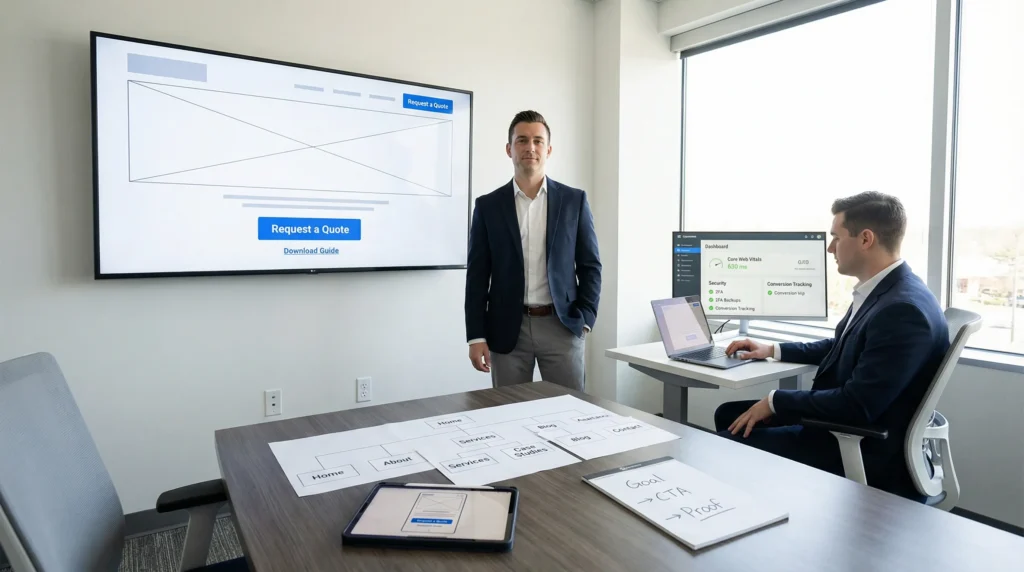
When someone tells us, “build my website,” we hear the unspoken part too: “and please do not let it become a six-month headache.” We have watched great businesses lose leads because the homepage looked pretty but gave people nothing to do. Quick answer: start with one clear outcome, build the smallest site that supports it, then tighten performance, security, and tracking before you scale.
Key Takeaways
- When you say “build my website,” start by choosing one primary outcome (leads, sales, bookings, or authority) so every page and CTA supports a single goal.
- Define your audience, offer, and proof in one clear sentence, then place testimonials, case studies, and trust signals right next to the actions you want visitors to take.
- Choose the right website type and stack (simple service site, booking system, or WooCommerce) because “cheap now” can become costly later through maintenance, uptime, and security issues.
- Create a minimum viable sitemap (Home, About, Services/Products, Reviews/Case Studies, Blog, Contact) and write conversion-focused copy that clarifies who it’s for, what you deliver, and the next step.
- Prioritize mobile-first UX, accessibility, and speed (Core Web Vitals, image compression, caching, minimal plugins) to improve rankings and conversions before you scale design extras.
- Treat launch as the start: QA forms/payments/SEO/tracking, then iterate in the first 30 days using analytics and Search Console to improve CTAs, content, and internal links.
Start With The Goal, Not The Theme
Your theme does not set your results. Your goal sets your results.
A theme controls styling. A goal controls decisions like page layout, copy, forms, product flow, and tracking. Goal clarity -> reduces page bloat. Reduced bloat -> improves speed. Speed -> improves conversions.
Pick One Primary Outcome (Leads, Sales, Bookings, Or Authority)
Pick one outcome and make it the boss of the site.
- Leads: You want calls, demos, quote requests, or email signups.
- Sales: You want transactions with as few steps as possible.
- Bookings: You want paid or free appointments on a calendar.
- Authority: You want trust and reputation that drives inbound demand.
If you try to push all four at once, your pages start to argue with each other. Mixed calls to action -> decision fatigue. Decision fatigue -> fewer clicks.
We often set a “primary CTA” (the main button) and a “secondary CTA” (the lower-pressure backup). Primary CTA -> drives revenue. Secondary CTA -> captures people who are not ready yet.
Define Your Audience, Offer, And Proof
Clarity beats clever.
Write one plain sentence that answers:
- Who you help (industry, role, or situation)
- What you deliver (result, not features)
- Why you are credible (proof)
Here is a simple pattern we use:
We help [audience] get [outcome] without [pain], backed by [proof].
Then add proof where it matters:
- Testimonials near the CTA
- Case studies near pricing or packages
- Logos, certifications, or reviews near trust-sensitive actions
Proof close to action -> reduces risk feelings. Reduced risk -> higher form completion.
If you want a deeper WordPress-specific walkthrough, we laid out the full process in our guide on building a WordPress site the right way.
Choose The Right Website Type And Stack
Your stack is your long-term tax rate.
Tool choice -> affects cost. Cost -> affects maintenance. Maintenance -> affects uptime and security. This is why “cheap now” can turn into “expensive later.”
WordPress Options: DIY, Managed WordPress, Or Agency Build
We see three common paths:
- DIY WordPress
- Best when you need a simple brochure site and you can handle updates.
- Risk: plugins sprawl fast if you keep patching holes.
- Managed WordPress (hosting + guardrails)
- Best when you want speed, backups, and support without babysitting.
- You still need someone to own content and conversions.
- Agency build (strategy + build + governance)
- Best when your site needs custom flows, custom fields, automation, or tighter compliance.
- You get process, documentation, and a clean handoff.
A lot of people start with a drag-and-drop builder because it feels fast. Then the site hits limits right when marketing finally starts working. We wrote about the tradeoffs in our take on DIY builders and why many teams outgrow them.
When To Use WooCommerce, A Booking System, Or A Simple Service Site
Match the site type to the goal:
- WooCommerce: Use it when selling products, memberships, or paid downloads matters. Product pages -> affect SEO. Checkout steps -> affect revenue.
- Booking system: Use it for clinics, salons, consultants, trainers, home services, and anyone who sells time. Calendar friction -> reduces booked appointments.
- Simple service site: Use it when you sell high-touch work and need leads, not a cart. Clear service pages -> increase qualified inquiries.
Rule of thumb: if you need inventory, variants, shipping, taxes, coupons, and receipts, use WooCommerce. If you need a calendar plus reminders, use a booking plugin. If you need trust and a phone call, keep it simple.
Plan The Pages And Content That Actually Convert
Most sites fail from missing basics, not missing “big ideas.”
Page plan -> affects crawl paths. Crawl paths -> affect rankings. Rankings -> affect lead volume. Then copy quality -> affects conversion rate. Traffic without conversion still wastes money.
Minimum Viable Sitemap For Most Businesses
For many businesses, a tight sitemap beats a giant menu.
Start here:
- Home
- About
- Services or Products
- Case Studies or Reviews
- Blog (even small, if you can maintain it)
- Contact
If you sell multiple services, add one page per service. One page per service -> clearer intent signals. Clearer intent -> better SEO matching.
If you want to see how we think about the step-by-step development process, our breakdown on the development of a website maps the sequence we use so projects do not drift.
Copy Checklist: What To Say On Each Core Page
Here is the checklist we use when a client says “build my website” and we want the words to pull their weight.
Home page
- Who it is for
- The result you deliver
- The primary CTA
- 3 to 5 proof points (reviews, metrics, logos)
Services or product pages
- What you do, in plain language
- Who it is best for (and who it is not for)
- Benefits and deliverables
- Pricing ranges or “starting at” (when you can)
- FAQs that reduce objections
About page
- The story, but tied to client outcomes
- Why your approach works
- Photos that show you are real people
Contact page
- One clear next step
- A short form
- Expectations (response time, what happens next)
Copy clarity -> improves time on page. Time on page plus clicks -> sends better engagement signals.
Design, UX, And Performance Basics (Before You Launch)
Design should feel good, but it should also behave.
Layout -> affects comprehension. Comprehension -> affects action. Action -> affects revenue. That chain is why we treat design as a conversion tool, not decoration.
Mobile-First Layout, Navigation, And Accessibility
Most of your visitors arrive on a phone. Mobile friction -> kills forms and checkouts.
We use a simple mobile-first rule set:
- Make the primary CTA visible without scrolling on mobile.
- Keep navigation short (5 to 7 items).
- Use headings that match how people skim.
- Increase tap targets. Small buttons -> missed taps -> rage clicks.
Accessibility matters too. The ADA does not name one technical standard, but many teams follow WCAG guidance to reduce risk and widen reach. Good accessibility -> helps SEO and usability because it forces clear structure.
Speed Essentials: Images, Caching, And Core Web Vitals
Speed is not a “nice to have.” Speed -> affects conversions.
Google’s Core Web Vitals focus on real user experience measures like loading, responsiveness, and visual stability. Google ties these metrics to its page experience systems, and you can see them inside Search Console.
What we do before launch:
- Compress images (and use modern formats when possible)
- Enable caching
- Avoid heavy sliders and giant video backgrounds
- Limit plugin bloat
If you want the source, Google documents Core Web Vitals and the signals in its Page Experience guidance.
Security, Privacy, And Governance You Cannot Skip
If your website collects data, you have responsibility. That includes contact forms, checkout data, appointment notes, and even newsletter signups.
Weak access control -> increases breach risk. Breach risk -> creates legal and brand damage. Brand damage -> kills conversion faster than any design flaw.
Backups, Updates, Roles, And Least-Privilege Access
Here is our baseline:
- Automated backups (and a tested restore plan)
- Scheduled updates for WordPress, themes, and plugins
- Two-factor authentication for admins
- Least-privilege roles (no one gets admin “just because”)
WordPress updates close known issues. Delayed updates -> leave doors open.
NIST frames access control and least privilege as core security concepts. You can read the definitions in the NIST glossary.
Privacy Disclosures, Cookies, And Regulated-Industry Boundaries
If you operate in healthcare, finance, legal, or work with children, keep a tighter line.
What we recommend:
- Clear privacy policy written in plain English
- Cookie notice where required
- Form copy that tells users what happens next
- Data minimization (collect only what you need)
If you handle health data, HIPAA rules may apply. Do not paste patient details into random tools. Keep sensitive work human-led and documented.
When clients ask for their “perfect” public presence, we push them to separate brand dreams from risk reality. Our post on building your dream website covers that balance in a practical way.
Launch, Measure, And Improve In Small Cycles
A website launch is a handoff, not a finish line.
Launch discipline -> prevents broken forms and lost sales. Measurement -> tells you what to fix. Fixes -> compound.
Pre-Launch QA: Forms, Payments, SEO, And Tracking
Before you publish, test like a skeptical customer.
QA checklist:
- Submit every form and confirm delivery
- Run a test purchase (if ecommerce)
- Check mobile layouts on iPhone and Android
- Validate titles and meta descriptions for key pages
- Confirm your analytics and conversion events fire
The FTC also expects truth in advertising, including endorsements and reviews. If you use testimonials, keep them real and disclose material connections. FTC guidance lives in the Endorsement Guides.
First 30 Days: Content, Reviews, And Iteration Based On Data
The first month tells the truth.
What we watch:
- Which pages get traffic
- Which CTAs get clicks
- Where people drop off
- What search terms show in Search Console
Then we ship small changes:
- Add 1 to 2 supporting blog posts that answer real questions
- Add reviews and case studies near high-intent pages
- Tighten copy where people bounce
- Improve internal links so important pages get more visibility
Small cycles keep the project calm. Big redesigns create stress and risk.
Conclusion
If you want someone to “build my website,” you do not just want pages on the internet. You want a system that turns attention into leads, sales, or bookings, with fewer surprises.
Start with one outcome. Ship the smallest site that supports it. Then earn the fancy stuff with data.
If you want a steady partner for WordPress strategy, build, SEO, and ongoing care, we do that work at Zuleika LLC. We keep humans in the loop, we document decisions, and we keep your risk profile in mind from day one.
Sources
- Page Experience (Google Search Central), Google, accessed 2026, https://developers.google.com/search/docs/appearance/page-experience
- NIST Glossary: Least Privilege, National Institute of Standards and Technology, accessed 2026, https://csrc.nist.gov/glossary/term/least_privilege
- Endorsements, Influencers, and Reviews (FTC Guidance), Federal Trade Commission, accessed 2026, https://www.ftc.gov/business-guidance/advertising-marketing/endorsements-influencers-reviews
Frequently Asked Questions (FAQ)
When I say “build my website,” what should I decide first?
Start with one primary outcome—leads, sales, bookings, or authority—before choosing a theme or features. Your goal should drive layout, copy, forms, and tracking. A clear goal reduces page bloat, improves site speed, and typically increases conversions because visitors always know what to do next.
How do I choose the right website type when someone needs to build my website?
Match the website type to your goal. Use WooCommerce if you need inventory, variants, shipping, taxes, coupons, and receipts. Use a booking system if you sell time and need reminders. Keep a simple service site if you mainly need trust-building pages that generate calls or inquiries.
What pages are essential in a minimum viable sitemap for a new business website?
Most businesses can start with a tight sitemap: Home, About, Services/Products, Case Studies or Reviews, Blog (only if you can maintain it), and Contact. If you offer multiple services, add one page per service. Clear page intent helps SEO matching and improves qualified leads.
What are the most important performance steps before launching a website?
Prioritize mobile-first usability and speed. Make the primary CTA visible on mobile, keep navigation to about 5–7 items, and use clear headings. For performance, compress images, enable caching, avoid heavy sliders/video backgrounds, and limit plugin bloat. These steps support Core Web Vitals and conversions.
What security and privacy basics should I set up on a WordPress website?
Use automated backups with a tested restore plan, schedule WordPress/theme/plugin updates, enable two-factor authentication for admins, and apply least-privilege roles so access is limited. Add a plain-English privacy policy, use a cookie notice where required, and minimize data collection—especially in regulated industries.
How much does it cost to build my website, and what affects the price most?
Website cost varies mainly by complexity and ownership: a simple brochure site is typically cheapest, while ecommerce, bookings, custom integrations, compliance, and ongoing governance increase cost. Your platform choice also impacts long-term maintenance. “Cheap now” can become “expensive later” if the site requires constant fixes or rebuilds.
Some of the links shared in this post are affiliate links. If you click on the link & make any purchase, we will receive an affiliate commission at no extra cost of you.
We improve our products and advertising by using Microsoft Clarity to see how you use our website. By using our site, you agree that we and Microsoft can collect and use this data. Our privacy policy has more details.
