
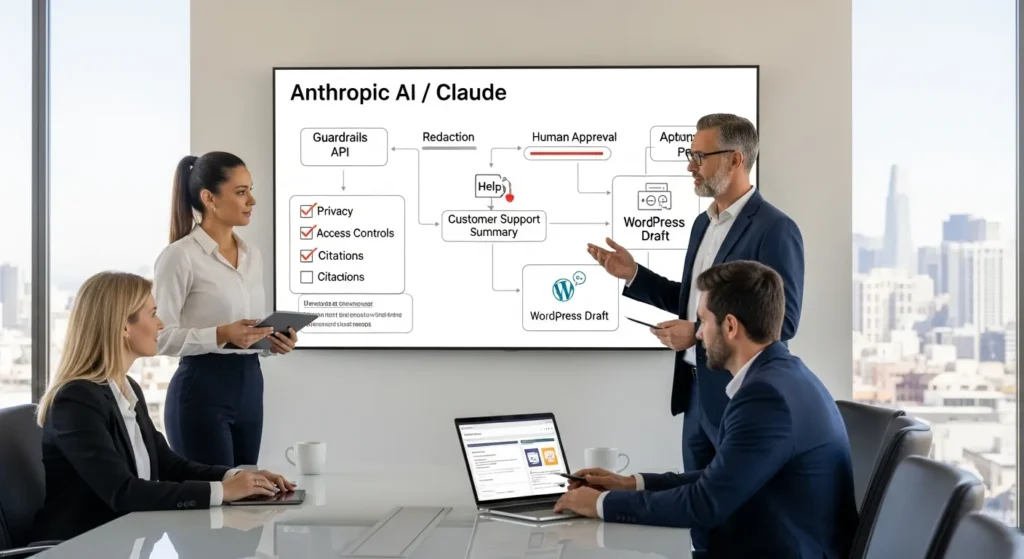
Anthropic AI shows up in meetings the same way a new hire does: exciting on day one, slightly unpredictable on day two. We have watched teams paste messy customer emails into a chatbot at 11:47 PM and hope for the best. That works right up until it does not.
Quick answer: Anthropic AI (best known for Claude) can save real time in content, support, and back-office workflows, but you only get the upside when you design guardrails first and treat prompts like operating procedures.
Key Takeaways
- Anthropic AI (Claude) saves time on content, support, and back-office work when you treat prompts like SOPs and build guardrails before automating anything.
- Anthropic AI is not an all-knowing employee—Claude predicts text, so you must supply approved business facts or connect it to trusted systems to avoid confident errors.
- Use Anthropic’s safety-first approach (Constitutional AI) in real workflows by designing for refusal, human review, and data minimization to reduce risk and improve trust.
- For WordPress and WooCommerce teams, Claude works best for draft-only content ops, ticket summaries and tagging, and document classification where structured inputs keep outputs consistent.
- Protect privacy in regulated use cases by never pasting secrets, redacting inputs, enforcing role-based access, and keeping humans responsible for legal, clinical, and financial decisions.
- Implement Anthropic AI with a workflow-first playbook—map Trigger → Input → Job → Output → Guardrails, run shadow mode, sample results, and add logging and rollback plans before scaling.
What Anthropic AI Is (And What It Is Not)
Anthropic is an AI safety and research company based in San Francisco. It launched in 2021 and former OpenAI leaders Dario Amodei (CEO) and Daniela Amodei (President) helped found it. Anthropic builds large language models (LLMs) under the Claude name and it positions “safety” as a first-order product requirement, not a side quest. Anthropic also operates as a public-benefit corporation, which signals a mission that includes public interest, not only profit.
Anthropic AI is not a magical employee. Claude predicts text. That means Claude can draft, summarize, classify, and transform language. Claude cannot “know” your business facts unless you provide them, connect it to your systems, or feed it approved knowledge.
Here is why this definition matters: model limits -> affect -> business risk. If your team treats Anthropic AI like an all-knowing oracle, you will get confident nonsense at the worst moment.
Anthropic vs. Other AI Labs: The Practical Differences That Matter
We see three differences that show up in daily work:
- Safety posture: Anthropic pushes techniques like Constitutional AI (more on that below). That approach -> affects -> how the model refuses unsafe requests and how consistent the model feels across prompts.
- Enterprise routing: Claude runs via Anthropic’s API and also appears through partners like Amazon Bedrock. That partner ecosystem -> affects -> procurement, billing, and where your data flows.
- Policy limits: Anthropic restricts access in certain countries for security reasons. Those restrictions -> affect -> global rollouts and vendor selection for multinational teams.
If you already use OpenAI or Google models, do not frame this as “which one wins.” Frame it as “which model fits this workflow with acceptable risk.”
The Anthropic Model Lineup In Plain English: Claude, Tools, And Context Windows
In plain terms, Claude is the model family. You interact through chat apps, a web UI, or an API.
Two capabilities change what you can automate:
- Large context windows: Claude supports very large inputs in some tiers, commonly cited around 200K tokens. Long context -> affects -> tasks like summarizing big policy docs, reviewing long meeting transcripts, or comparing contract versions.
- Tool use and agent-style workflows: Anthropic has pushed coding and agent experiences like Claude Code. Tool use -> affects -> whether Claude can take structured steps (call an API, check a file, draft a patch) instead of only chatting.
If you run WordPress or WooCommerce, the practical question becomes: “Can we feed Claude the right slice of content, at the right moment, with the right redactions?” If yes, you can automate the boring parts without losing control.
How Anthropic’s Safety Approach Works: Constitutional AI And Guardrails
Anthropic AI talks about safety in a way we like: it tries to bake rules into the model’s behavior, not only bolt them on after problems appear.
Constitutional AI uses a written set of principles (a “constitution”) to guide training and model responses. Principles -> affect -> refusals, tone, and how the model handles gray areas. Anthropic also researches interpretability, which aims to make model behavior easier to inspect and understand.
What “Safety-First” Means In Real Workflows
Safety-first only matters when it changes how you build workflows.
Here is what that means in practice:
- You design for refusal: the model should say “no” when inputs include sensitive data, medical decisions, or legal advice requests.
- You design for review: a human checks outputs before publishing, sending, or filing.
- You design for minimization: you send the smallest useful input.
Workflow design -> affects -> error rate. Error rate -> affects -> trust. Trust -> affects -> whether your team uses the system or works around it.
If you want a deeper framework for safe prompts, metrics, and governance that fits modern teams, we laid out a practical approach in our guide on improving AIO for modern professionals. (We use the same ideas when we build WordPress-connected automations.)
Privacy, Data Handling, And Regulated Use Cases (Legal, Healthcare, Finance)
If you operate in legal, healthcare, finance, or education, treat Anthropic AI like a powerful assistant that must stay inside clear lines.
Our rule: never paste secrets. That includes patient details, payment data, private client materials, and anything that can identify a person unless you have an approved, documented process.
Do this instead:
- Send redacted text. Redaction -> affects -> privacy risk.
- Use role-based access. Access controls -> affect -> insider risk.
- Keep a human decision-maker on anything clinical, legal, or financial. Human oversight -> affects -> liability.
If you need policy-level guidance, start with official resources like the U.S. Federal Trade Commission’s business guidance on AI claims and transparency.
Sources
- “Anthropic” (Company information), Anthropic, accessed 2026, https://www.anthropic.com
- “Artificial Intelligence and Claims: Guidance for Business” (Business guidance on AI marketing claims), Federal Trade Commission, 2023-02, https://www.ftc.gov/business-guidance/blog/2023/02/keep-your-ai-claims-check
Where Anthropic AI Delivers Value For WordPress And Ecommerce Teams
We build a lot of WordPress and WooCommerce stacks, so we think in systems: what triggers a job, what data moves, and what happens if the output goes wrong.
Anthropic AI tends to shine when language work piles up and humans get stuck in copy-paste mode.
Content Ops: Briefs, Drafts, SEO Support, And Editing With Human Review
Claude can help content teams move faster without publishing junk.
Good fits:
- Turn a product page outline -> affects -> faster first drafts.
- Turn messy stakeholder notes -> affect -> a clean brief.
- Turn a 2,000-word draft -> affects -> tighter edits and consistent headings.
We keep one rule non-negotiable: draft-only by default. A model can write. A human signs.
If you run ecommerce, you can also feed Claude structured inputs (SKU, features, constraints, claims rules) and get consistent product copy. Structure -> affects -> consistency across hundreds of SKUs.
Customer Support: Triage, Summaries, Suggested Replies, And Help Desk Tagging
Support work is language work. That makes it a strong match for Anthropic AI.
Use Claude to:
- Summarize long ticket threads.
- Suggest replies that match your policy.
- Tag issues by category and urgency.
Triage quality -> affects -> first response time. First response time -> affects -> refunds and reviews.
One caution: never let the model invent policy. Your help desk macros and knowledge base must drive the answers.
Back Office: Document Intake, Classification, And Light Analysis
“Back office” sounds boring, which usually means it is expensive.
Claude can:
- Classify inbound forms and emails.
- Extract fields from PDFs or text.
- Create a short “what changed” summary for updated vendor terms.
Extraction accuracy -> affects -> how much staff rework you need. Rework -> affects -> whether the tool pays for itself.
We like to start with one document type (say, warranty claims) and measure results before adding five more.
How To Implement Anthropic AI Safely: A Workflow-First Playbook
Before you touch any tools, map the workflow. Teams that skip this step build a demo, then spend months cleaning up the mess.
Map The Flow: Trigger → Input → Job → Output → Guardrails
We use a simple pattern:
- Trigger: what starts the job (new ticket, new WordPress post, form submission).
- Input: what data you send (redacted text, product attributes, policy snippet).
- Job: what Claude does (summarize, draft, classify, rewrite).
- Output: where the result goes (draft post, CRM note, Slack message).
- Guardrails: what checks happen (PII scan, banned claims list, human approval).
Clear inputs -> affect -> stable outputs.
Start Small: Shadow Mode, Sampling, And Time-Saved Benchmarks
Start small. Run the automation in “shadow mode.” That means Claude produces output, but your team does not use it yet.
Then you sample results:
- Check 20 outputs.
- Score them on accuracy, tone, and policy fit.
- Track minutes saved when staff do use the drafts.
Sampling -> affects -> confidence. Confidence -> affects -> adoption.
Prompts As SOPs: Templates, Banned Data, And Refusal Behavior
Treat prompts as standard operating procedures.
A good prompt template includes:
- Role: “You are a support assistant for X.”
- Rules: “Do not collect payment data. Do not give medical advice.”
- Inputs: “You receive a ticket thread and our policy excerpt.”
- Output format: “Return a one-paragraph summary plus 3 reply options.”
Rules -> affect -> refusal behavior.
We also add a “banned data” line that tells staff what never goes into the model. This reduces accidental leaks because the rule sits where people work, not hidden in a PDF policy folder.
Integration Patterns: No-Code Automations And WordPress Hooks
Anthropic AI gets real when you connect it to the systems your team already uses. For many teams, that means WordPress, WooCommerce, a CRM, and a help desk.
Zapier/Make/n8n Patterns: Webhooks, Queues, And Retries
No-code tools work well when you need speed and clear audit trails.
Patterns we use:
- Webhook in, webhook out: your form or app sends data to an automation, Claude processes it, then the automation posts the result back.
- Queues: a queue -> affects -> reliability during traffic spikes because jobs wait instead of failing.
- Retries with limits: retries -> affect -> stability when an API rate limit hits.
This is also where you can add redaction steps, profanity filters, or a “human approval” step before any message leaves your business.
WordPress Patterns: save_post, ACF Fields, WooCommerce Events, And Draft-Only Publishing
WordPress gives you clean hooks for safe automation.
Common patterns:
- save_post triggers a Claude draft when an editor saves a post.
- ACF fields store structured inputs like audience, product specs, or disclaimers.
- WooCommerce events (new product, order note, refund request) trigger summaries or internal notes.
- Draft-only publishing keeps the model from pushing content live.
Hooks -> affect -> repeatability because the same event fires the same job every time.
If your team also wants the content to show up in the right place for SEO and AI search features, you can pair these workflows with the AIO steps in our AI optimization guide for modern professionals.
Risks, Limits, And Quality Controls You Should Plan For
Anthropic AI can produce clean writing fast. It can also produce clean writing that is wrong. This section keeps you out of avoidable trouble.
Hallucinations, Overconfidence, And When To Force Citations Or Source Links
Models can hallucinate. A hallucination -> affects -> customer trust and legal exposure.
Use “force citations” patterns when:
- You publish medical, legal, finance, or safety content.
- You quote stats.
- You describe product capabilities that need proof.
We often add a rule like: “If you cannot cite a provided source, say you do not know.” That single line -> affects -> output honesty.
Brand Voice Drift, Prompt Injection, And Data Leakage Prevention
Brand voice drift happens when outputs slowly change tone across weeks.
Fixes that work:
- Store a short voice guide and include it in every job.
- Use a reviewer checklist that flags tone, claims, and disclaimers.
Prompt injection is a bigger risk in support and user-generated content. Attack text -> affects -> model behavior if you feed it unfiltered.
Controls:
- Strip HTML and scripts.
- Limit what the model can do with tools.
- Never let user content override system rules.
Data leakage risk drops when you minimize inputs and keep secrets out of prompts.
Logging, Access Controls, And Rollback Plans
Treat AI outputs like any other production change.
- Logging: logs -> affect -> your ability to audit who sent what and when.
- Access controls: permissions -> affect -> who can run high-risk jobs.
- Rollbacks: rollbacks -> affect -> how fast you recover from a bad batch of content or a broken automation.
If you can not answer “who approved this output?” you are not ready to automate that step.
Sources
- “Constitutional AI: Harmlessness from AI Feedback” (research paper), Anthropic, 2022-12, https://arxiv.org/abs/2212.08073
Conclusion
Anthropic AI works best when you treat Claude like a capable assistant with strict boundaries, not a replacement for judgment. We see the biggest wins when teams pick one workflow, run it in shadow mode, measure results, then expand with the same guardrails.
If you want help connecting Anthropic AI to WordPress or WooCommerce without turning your site into a science experiment, we can map the flow, set the checks, and keep humans in charge.
Frequently Asked Questions About Anthropic AI
What is Anthropic AI, and what is it not?
Anthropic AI is a San Francisco–based AI safety and research company (founded in 2021) best known for the Claude family of large language models. Anthropic AI isn’t a “magical employee”—Claude predicts text, so it can draft, summarize, and classify language, but it won’t know your business facts without approved inputs or integrations.
How is Anthropic AI different from other AI labs like OpenAI or Google?
In day-to-day work, Anthropic AI often differs in three practical ways: a safety-first posture (including Constitutional AI), flexible enterprise routing (Anthropic API plus partners like Amazon Bedrock), and policy limits such as country restrictions. Instead of “who wins,” teams should choose the model that fits each workflow’s risk, data flow, and compliance needs.
What are the best ways to use Anthropic AI (Claude) for WordPress and WooCommerce?
Anthropic AI is strongest where language work piles up: content ops (briefs, drafts, SEO edits with human review), support workflows (ticket summaries, suggested replies, tagging), and back-office intake (classification, field extraction, “what changed” summaries). Keep it draft-only by default, feed structured inputs (e.g., SKU attributes), and prevent the model from inventing policy or claims.
How do you implement Anthropic AI safely in business workflows?
Start workflow-first: map Trigger → Input → Job → Output → Guardrails. Run Claude in shadow mode, then sample outputs for accuracy, tone, and policy fit while tracking minutes saved. Treat prompts as SOPs with explicit rules (banned data, refusal behavior, output format) and add human approval plus checks like PII scanning and a banned-claims list.
What are the biggest risks with Anthropic AI, and how do you control quality?
Key risks include hallucinations (confident but wrong text), brand voice drift, prompt injection from user content, and data leakage. Controls that work include forcing citations for high-stakes topics, storing a reusable voice guide, stripping risky input (HTML/scripts), minimizing what you send, and enforcing logging, access controls, and rollback plans so you can audit and recover quickly.
Can Anthropic AI be used in regulated industries like healthcare, legal, or finance?
Yes, but only with strict governance. Don’t paste secrets or personally identifying data unless you have an approved process; use redaction and role-based access. Keep a human decision-maker for clinical, legal, or financial judgments, and require source-backed outputs for claims. Also align usage and marketing statements with guidance like the FTC’s AI transparency recommendations.
Some of the links shared in this post are affiliate links. If you click on the link & make any purchase, we will receive an affiliate commission at no extra cost of you.
We improve our products and advertising by using Microsoft Clarity to see how you use our website. By using our site, you agree that we and Microsoft can collect and use this data. Our privacy policy has more details.
