
AI intelligence shows up fast when you least expect it. One minute you are staring at a messy inbox and a half-finished product page, and the next minute a model drafts a clean outline that sounds like your brand on the first try.
Quick answer: AI intelligence is pattern-learning software that can draft, classify, and recommend, but it still needs guardrails, clean inputs, and a human reviewer when stakes go up. If you treat it like a “brain” that sits between triggers and actions, you can get real time savings without handing over judgment.
Key Takeaways
- AI intelligence learns patterns from data to draft, classify, and recommend next steps, while automation follows fixed rules and analytics reports what already happened.
- Use AI intelligence where time leaks happen most—content drafting, SEO support, and support-ticket triage—so teams cut decision time without handing over judgment.
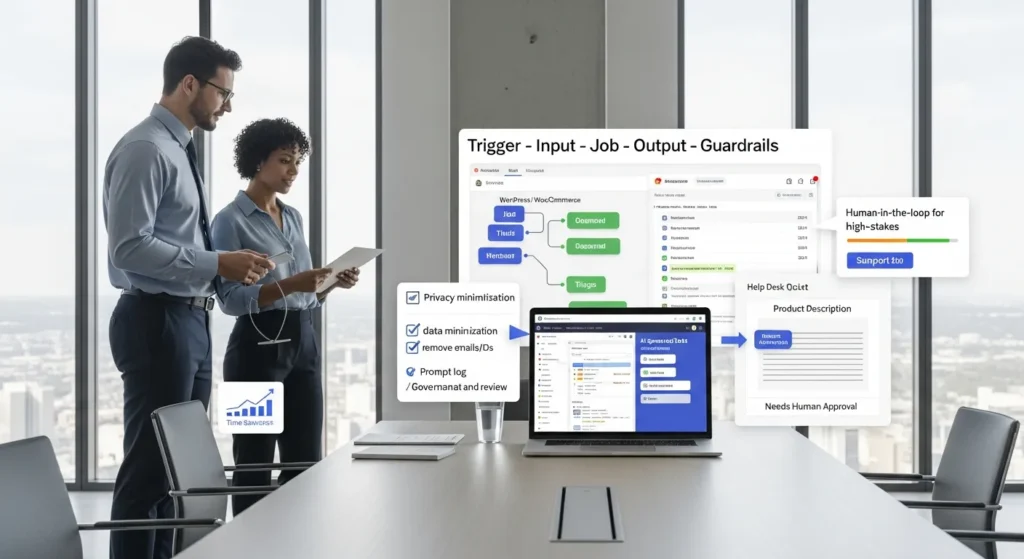
- Treat AI intelligence as a workflow component by mapping Trigger → Input → Job → Output → Guardrails to keep results predictable and reviewable.
- Reduce risk from hallucinations by feeding source text, banning unsupported claims, requesting confidence labels, and adding a second-step check for names, numbers, and policies.
- Keep humans in the loop for high-stakes areas (health, law, finance, safety) so the model drafts but a person approves final claims and decisions.
- Start with a one-week shadow-mode pilot, measure time saved and error rates, and expand gradually with logging, versioning, and rollback so you can trust AI intelligence in production.
Define AI Intelligence In Plain English
AI intelligence means a system learns from data and then predicts, generates, or classifies based on patterns. That sounds abstract, so here is a grounded way to think about it.
A spreadsheet rule -> changes -> a number. AI intelligence -> changes -> a decision suggestion.
You feed it examples (past tickets, past sales, past posts). It learns the shape of the problem. Then it produces the next best guess.
We like a simple test: if the system can improve after seeing new data, you are dealing with AI. If it always follows the same if/then path, you are dealing with automation.
AI Vs. Automation Vs. Analytics: The Practical Differences
Automation runs rules you already know. Analytics reports what already happened. AI intelligence tries to predict what should happen next.
Here is why that matters on a real site:
- Automation -> reduces clicks. It moves data from A to B when X happens.
- Analytics -> reduces confusion. It shows what pages convert and what pages leak users.
- AI intelligence -> reduces decision time. It drafts content, tags leads, and sorts issues based on patterns.
A quick website example:
- Analytics -> shows “people drop off on checkout step 2.”
- Automation -> sends an abandoned cart email 2 hours later.
- AI intelligence -> reads support tickets and identifies the real blocker (“shipping costs surprise”) and suggests what to fix first.
Narrow AI, Generative AI, And AGI: Why The Distinction Matters
Most business use cases today sit in narrow AI and generative AI.
- Narrow AI focuses on a specific task (fraud detection, product recommendations, ticket routing).
- Generative AI creates new text, images, or code based on learned patterns.
- AGI (artificial general intelligence) aims to act like a human across most tasks. You do not need AGI for your store, your clinic, or your law firm site.
This distinction matters because risk follows capability.
Generative AI -> increases -> speed of drafting.
Generative AI -> increases -> risk of confident mistakes.
So we use generative AI for drafts and triage. We keep final claims, prices, medical guidance, legal language, and financial advice under human control.
Where AI Intelligence Helps Most On Real Business Websites
Most teams do not need “AI everywhere.” They need AI where time leaks happen every day.
AI intelligence -> reduces -> time spent on repetitive writing.
AI intelligence -> reduces -> time spent sorting messy requests.
If your business runs on WordPress, WooCommerce, a CRM, and a help desk, those are perfect places to start because the inputs already exist.
Content And SEO Support For WordPress Sites
We see the same bottleneck across industries: you have expertise, but you do not have hours to turn it into publishable pages.
AI intelligence helps when you treat it like a drafting assistant:
- Draft product descriptions from specs and bullet notes.
- Generate FAQ candidates from support conversations.
- Create post outlines from a keyword list and a few customer questions.
- Rewrite text for clarity and reading level without changing the meaning.
One caution: models can invent “facts.” So we ask it for structure, variations, and clarity. We do not ask it to create claims.
If you want your content to show up in AI search answers and standard search results, you also need clean entities, scannable sections, and consistent on-page signals. We cover a practical approach in our guide on improving AI search visibility.
Customer Support And Operations Triage For Ecommerce And Services
Ticket queues punish small teams. The first hour of the day disappears into sorting.
AI intelligence -> improves -> ticket routing.
AI intelligence -> improves -> first-response drafting.
Common website-connected use cases:
- Tag tickets as “refund,” “shipping,” “login,” “bug,” or “billing.”
- Detect urgency signals (“chargeback,” “medical device error,” “deadline tomorrow”).
- Draft replies that your team edits and sends.
- Summarize long threads for handoffs.
On WooCommerce stores, we also use AI to flag order notes that need human attention. A model can spot patterns like “address mismatch” or “suspicious rush order,” then hand the case to a person. That keeps speed high without letting the model make the final call.
The Workflow Architecture: Trigger → Input → Job → Output → Guardrails
Before you touch any tools, map the workflow like an architect. AI intelligence works best as a component, not a magic button.
Here is the pattern we use:
- Trigger: What starts the workflow?
- Input: What data do we send, and what do we leave out?
- Job: What does the model do (summarize, classify, draft, extract)?
- Output: Where does the result go (draft post, CRM note, help desk reply)?
- Guardrails: What checks stop bad output from shipping?
This setup keeps the system calm. It also keeps your team in control.
Choosing The Right “Brain” And The Right “Hands And Feet”
We separate the “brain” from the “hands and feet.”
- The brain -> produces -> language or decisions (your AI model).
- The hands and feet -> move -> data between systems (Zapier, Make, n8n, custom WordPress code).
A WordPress example:
- Trigger -> a new WooCommerce review lands.
- Input -> review text plus product name (not the customer email).
- Job -> model classifies sentiment and suggests a response.
- Output -> draft reply saved in WordPress as pending.
- Guardrails -> only a human can publish the reply.
If you want to build workflows like this on your own site, start with the pieces you already have: WordPress hooks, custom fields, and your existing help desk. Our breakdown on making AI-friendly content and workflows pairs well with this architecture.
Logging, Versioning, And Rollback So You Can Trust The System
Trust comes from receipts.
AI intelligence -> increases -> need for logging.
We log three things in plain language:
- What input went in (with sensitive fields removed).
- What prompt version ran.
- What output came out, plus who approved it.
Versioning matters because prompts drift. A small prompt edit can change tone, accuracy, and formatting.
Rollback matters because business reality changes. Your return policy changes. Your pricing changes. Your disclaimers change. A good system lets you revert to the last safe version fast.
If you work in regulated fields, logging also supports audits. It shows who made the final decision and what the model contributed.
Quality And Risk: What AI Intelligence Gets Wrong (And How To Reduce It)
AI intelligence fails in ways that feel weirdly human. It can sound confident while being wrong.
So we treat quality as a design job, not a hope.
Hallucinations, Overconfidence, And Silent Failure Modes
Hallucination means the model generates a false detail. Overconfidence means it states that false detail like it saw it in writing.
Silent failure feels worse. The model gives you a clean answer that looks right, so nobody checks.
Here is why this happens: the model predicts likely text. It does not “know” in the human sense.
Reduction tactics we use:
- Provide source text in the input, then require the output to quote it.
- Ask for uncertainty. Make the model label confidence.
- Ban unsupported claims in the prompt rules.
- Force a second step that checks numbers, names, and policies.
AI intelligence -> increases -> speed.
Speed -> increases -> risk of shipping mistakes.
So guardrails need to keep up.
Human-In-The-Loop Review For Regulated Or High-Stakes Work
If your work touches health, law, finance, safety, or public services, keep humans in the loop. Always.
A model can draft. A human must decide.
Examples of “human must approve” zones:
- Medical guidance, diagnosis language, or treatment suggestions.
- Legal claims, contract clauses, or jurisdiction-specific statements.
- Financial recommendations, lending decisions, or insurance coverage interpretations.
- Safety instructions for manufacturing, construction, or HVAC.
The Federal Trade Commission has warned that firms must not make deceptive claims about what AI can do, and they must watch for bias and consumer harm. See: FTC Business Guidance on AI.
We also use a simple rule: if a mistake can harm a person, cost real money, or trigger a complaint, a human signs off.
Data Privacy And Compliance Boundaries You Should Set First
AI intelligence touches data. Data touches risk. Set boundaries first, then build.
Data Minimization And “Never Paste Sensitive Data” Rules
Data minimization means you only send what the model needs.
AI intelligence -> increases -> temptation to paste everything.
Do not.
We set a few default rules:
- Do not paste passwords, payment data, or full ID numbers.
- Do not paste protected health information into a general chat tool.
- Do not paste client-confidential legal content into tools without a signed data agreement.
- Remove emails, phone numbers, addresses, and order numbers unless the job needs them.
On WordPress projects, we also isolate environments:
- Production data -> stays -> in production.
- Test prompts -> run -> on staging with fake or masked records.
If you need a clean baseline, the European Data Protection Board has guidance on data protection and AI systems that pushes the same idea: reduce data, control purpose, and document decisions. Start here: EDPB resources on AI and data protection.
Disclosure And Policy Basics For Marketing And Customer Communications
If AI drafts customer-facing content, you need clear policy. You also need consistent tone.
A good baseline policy answers:
- Where AI can draft (blogs, FAQs, support replies).
- Where AI cannot decide (medical, legal, finance, safety calls).
- Who reviews output before publish.
- How you handle user data.
Marketing disclosure often comes down to honesty and clarity. Do not claim a human wrote something if a model wrote it and no one reviewed it. Do not claim your tool makes “guaranteed” decisions. The FTC makes this point across its AI guidance.
A practical move: add internal checklists to your publishing workflow. The checklist prevents last-minute “ship it” errors when the team feels rushed.
How To Start Small: A Safe Pilot You Can Ship In A Week
Start small. Ship a pilot. Keep it reversible.
We like one-week pilots because they create clarity fast. They also stop endless planning.
Pick One Repetitive Task And Run It In Shadow Mode
Shadow mode means the AI runs in parallel, but it does not publish.
Here is a clean pilot for many WordPress teams:
- Trigger -> new blog brief or product update request.
- Input -> bullet notes plus existing page copy.
- Job -> draft an updated page section and a short meta description.
- Output -> save as a draft in WordPress.
- Guardrails -> editor reviews, then publishes.
Or for support:
- Trigger -> new ticket.
- Job -> summarize and suggest category.
- Output -> internal note only.
Shadow mode -> reduces -> risk.
It also gives you a baseline. You can compare what the model suggested versus what your team did.
Measure Time Saved And Quality Before You Expand
A pilot needs two scorecards: time and quality.
Time measures:
- Minutes to produce a first draft.
- Minutes to edit to publish-ready.
Quality measures:
- Error count (facts, pricing, policy statements).
- Tone match (your brand voice).
- Helpfulness (did it answer the question?).
Gartner has projected major economic value from AI, but that value only shows up when teams measure outcomes and control risk. AI intelligence -> increases -> potential upside, but measurement -> increases -> actual results.
When the pilot hits your quality bar, then expand one variable at a time: another content type, another ticket category, another language. Keep logs, keep approvals, keep the “off switch” easy to reach.
Conclusion
AI intelligence can make your business website feel lighter to run. It can take the first pass at drafts, sort messy requests, and turn scattered notes into something usable.
The win comes from structure: map the trigger, control the input, define the job, constrain the output, and enforce guardrails. Start with a small pilot, keep humans in control where stakes rise, and you will get speed without inviting chaos.
AI Intelligence FAQs
What is AI intelligence in plain English?
AI intelligence is software that learns patterns from data and then predicts, generates, or classifies output—like drafting text or suggesting a next step. Unlike simple rules, it can improve after seeing new examples. It still needs clean inputs, guardrails, and human review when the stakes are high.
How is AI intelligence different from automation and analytics?
Automation follows fixed if/then rules to move data and reduce clicks. Analytics reports what already happened to reduce confusion. AI intelligence uses patterns to suggest what should happen next—like drafting content, tagging leads, or identifying the likely cause of checkout drop-off from support tickets.
What’s the difference between narrow AI, generative AI, and AGI?
Narrow AI handles one focused task (fraud detection, ticket routing, recommendations). Generative AI creates new text, images, or code from learned patterns, which boosts drafting speed but can produce confident mistakes. AGI aims to perform broadly like a human—something most businesses don’t need for websites.
Where does AI intelligence help most on WordPress or WooCommerce sites?
AI intelligence is most useful where time leaks happen daily: repetitive writing and messy request sorting. Common wins include drafting product descriptions, generating SEO outlines and FAQ candidates, rewriting for clarity, tagging support tickets (refund/shipping/login), summarizing threads, and flagging order notes needing human attention.
How do you build safe AI intelligence workflows without losing control?
Use a clear architecture: Trigger → Input → Job → Output → Guardrails. Send only necessary data, define the model’s job (summarize/classify/draft), and route results into drafts or internal notes. Add logging, prompt versioning, and “human must approve” steps before anything customer-facing ships.
How can I start with AI intelligence safely in one week?
Run a small pilot in shadow mode so AI intelligence drafts or classifies but never publishes. For example, draft a page update and meta description from bullet notes and save it as a WordPress draft, or summarize new tickets into internal notes. Measure time saved and quality before expanding.
Some of the links shared in this post are affiliate links. If you click on the link & make any purchase, we will receive an affiliate commission at no extra cost of you.
We improve our products and advertising by using Microsoft Clarity to see how you use our website. By using our site, you agree that we and Microsoft can collect and use this data. Our privacy policy has more details.
