
An AI image generator can feel like magic the first time you type a sentence and an image shows up in seconds. We have had that “wait, what?” moment too, usually right before someone asks, “Can we use this on the homepage… today?”
Quick answer: AI image generators are great for fast concepts and web visuals, but you get the best results when you treat prompts like a repeatable workflow, then add human review for brand fit, licensing, and privacy.
Key Takeaways
- An AI image generator works best for fast concepts and web visuals when you treat prompting like a repeatable workflow, not a guessing game.
- Use a structured prompt template (subject, style, composition, lighting, constraints) to get more web-ready images and reduce randomness across outputs.
- Plan around common AI image generator failure points—hands, readable text, logos, and cross-image consistency—by adding constraints and human review.
- For WordPress and marketing pages, optimize generated images for performance with proper dimensions, WebP export, and compression to protect Core Web Vitals.
- Keep brand consistency by reusing art-direction terms, limiting color rules, adding typography in Canva/Photoshop, and placing real logos only in post-production.
- Reduce legal and compliance risk by confirming provider terms (commercial rights, ownership, indemnity), avoiding living-artist style prompts for monetized work, and keeping sensitive data out of prompts with documented reviews and approvals.
What An AI Image Generator Is (And What It Is Not)
An AI image generator creates a new image from your text prompt by learning visual patterns from large image-text datasets. The model learns relationships like “sunset lighting affects color temperature” and **”wide-angle lens affects perspective.” That cause-and-effect learning is what lets it synthesize something new.
It is not a Google Images shortcut. It does not go fetch a single picture and paste your idea on top. Most modern tools use diffusion-style generation, which starts from noise and refines pixels step by step until the prompt matches the image. That process matters because it explains both the speed and the weird mistakes.
How It Works In Plain English: Prompt → Model Job → Image Output
Here is the clean mental model we use when we explain this to clients:
- Prompt (input): You describe the scene. You can add style, camera, lighting, and “no text” constraints.
- Model job (processing): The model turns noise into structure. Your words guide each refinement step.
- Image output (result): You get a new image, plus settings you can reuse (seed, aspect ratio, steps, style presets).
Text affects composition. Composition affects cropping. Cropping affects whether the image works as a hero banner. That chain is why “web-ready” images start with the prompt, not at export time.
Where The Biggest Limitations Show Up: Hands, Text, Logos, And Consistency
AI image generators still struggle in a few predictable places:
- Hands and fingers: Anatomy has many edge cases. Small errors look creepy fast.
- Readable text: Letters require precise shapes. Diffusion often produces “almost text.”
- Logos and trademarks: You should avoid prompting for brand marks anyway. The output can look close enough to cause trouble.
- Consistency across images: One prompt can yield five “different people” with the same description.
Style affects consistency. Randomness affects consistency. Your prompt structure affects consistency. So we treat consistency as a workflow problem, not a button you press.
Best-Fit Use Cases For Websites, Ads, And Content Teams
AI images shine when you need speed, variety, and “good enough” visuals that support a message. They struggle when you need strict accuracy, exact branding, or legally sensitive visuals.
We tell teams to use an AI image generator for concepts first, then move to edited assets for public-facing pages.
Fast Wins For WordPress Sites: Hero Images, Blog Visuals, And Landing Pages
WordPress teams get quick value because the web has endless small visual needs:
- Hero images for new service pages (especially when stock photos feel stale)
- Blog illustrations that match the point of view of the post
- Landing page sections where you need a visual break, not a product photo
A hero image affects first impressions. First impressions affect bounce rate. Bounce rate affects lead volume. That is why we care about “good visuals” even when the page copy is strong.
If you run WordPress, you also need performance. Large images affect Core Web Vitals. Core Web Vitals affect search visibility and conversions. After you generate, you still need proper compression and WebP.
Ecommerce And Product Marketing: Concepts, Lifestyle Scenes, And Variations
Ecommerce teams often use AI images in three safe lanes:
- Concept mockups: “What would a winter campaign feel like?” before you book a shoot.
- Lifestyle backgrounds: Create a scene, then composite the real product on top.
- Variant exploration: Colorways, environments, seasonal themes.
Scene variety affects ad fatigue. Ad fatigue affects click-through rate. CTR affects CPA. Even small creative refreshes can buy you time while you plan real photography.
One caution: do not use an AI image generator to fake product details. Accuracy affects returns. Returns affect margins. That math hurts.
How To Get Better Results: A Prompting Workflow You Can Reuse
Most teams fail with AI images for one boring reason: they treat prompting like guessing. We treat prompting like an SOP.
Quick rule: your prompt should read like a creative brief that a designer could execute.
The Prompt Template: Subject, Style, Composition, Lighting, And Constraints
Use this reusable template:
- Subject: what the image is about
- Style: photorealistic, editorial illustration, 3D render, watercolor, etc.
- Composition: close-up, wide shot, centered subject, negative space for headline
- Lighting: golden hour, soft studio light, neon, overcast
- Constraints: “no text,” “no logos,” “hands not visible,” “clean background,” aspect ratio
Example you can steal:
- “Single stainless steel water bottle on a white marble counter, photorealistic product photography, centered with negative space on the right, soft studio lighting, shallow depth of field, no text, no logos, 16:9”
Subject affects objects. Objects affect shadows. Shadows affect realism. This is why lighting and composition do heavy lifting.
Iteration Rules: Start Simple, Lock What Matters, Then Expand
We use three passes:
- Pass 1: Simple. Get the subject and framing right.
- Pass 2: Lock. Keep what matters stable (angle, setting, mood).
- Pass 3: Expand. Add details like props, wardrobe, background texture.
If you change five things at once, you cannot learn what caused the improvement. One change affects output. Clear changes create repeatable results.
If you need a series, reuse the same structure. Repeat the same art direction terms. Keep aspect ratio consistent. Consistency comes from constraints, not wishful thinking.
Editing And Brand Fit: When To Use Photoshop, Canva, Or Manual Retouching
AI generation gets you 70 percent of the way. Editing gets you the part your customers notice.
Brand trust affects conversion. Visual polish affects brand trust. So we plan time for retouching on anything that hits paid ads, homepages, or sales pages.
Upscaling, Background Removal, And Format Choices For Web Performance
Here is the practical stack most small teams use:
- Canva: fast cleanup, simple layouts, social crops, light color tweaks
- Photoshop: realistic compositing, product-on-background work, precise masking, removing artifacts
- Background removal tools: quick cutouts for product overlays
Then we prep for web:
- Export WebP for most WordPress sites
- Keep dimensions close to what the theme renders (do not upload a 6000px monster)
- Compress before upload
File size affects load time. Load time affects conversion. Compression pays for itself.
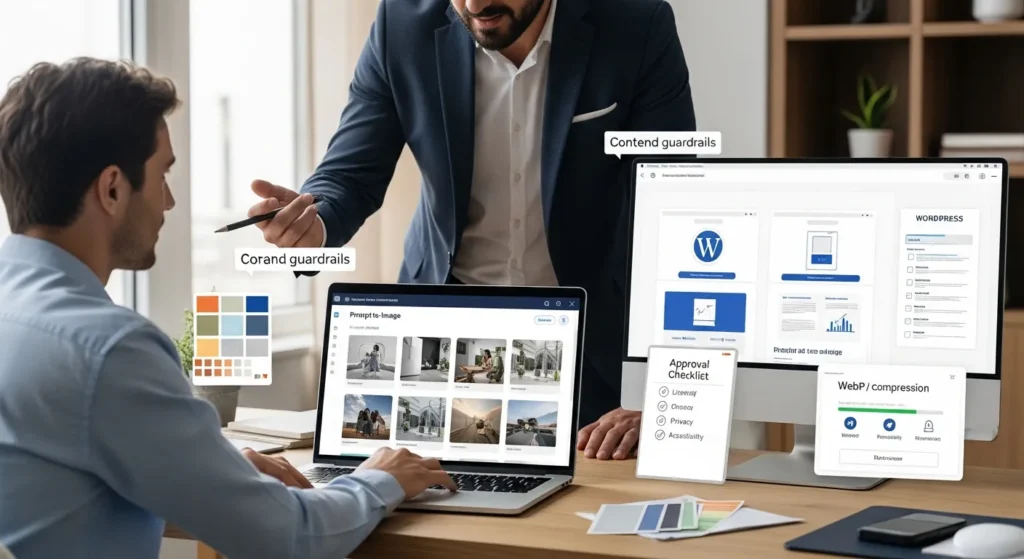
Keeping Visual Consistency: Color, Typography, And Art Direction Guardrails
Consistency is where most AI galleries fall apart. One image looks like a sci-fi poster. The next looks like a wedding photo.
We fix that with guardrails:
- Color rules: pick 2–3 brand colors you want present in the scene
- Typography rule: add text in Canva or Photoshop, not in the generator
- Art direction terms: reuse phrases like “clean editorial,” “soft studio lighting,” “minimal background”
- Do not generate logos: place real brand assets in post
Typography affects readability. Readability affects message retention. Message retention affects clicks.
If you want help applying this inside WordPress, we often build a simple media workflow: naming rules, alt text rules, and a “do not publish until reviewed” checklist. It saves arguments later.
If you are building or refreshing a site, these related guides help teams keep things tight: our WordPress SEO services overview, our website maintenance services, and our WooCommerce solutions (same site, different goals).
Legal, Copyright, And Compliance: How To Use AI Images Safely
AI images create new risks because people publish them fast. Speed affects review time. Review time affects mistakes.
We do not give legal advice, but we do set up safer operating rules for teams that want to move fast without getting reckless.
Licensing And Ownership Basics: What You Need To Confirm Before Publishing
Before you use an AI image generator for commercial work, confirm three things in the provider terms:
- Commercial rights: can you use the output in ads, websites, and packaging?
- Ownership language: who owns the generated output, and what rights do you grant back?
- Indemnity limits: what happens if someone claims infringement?
Provider terms affect your rights. Your rights affect where you can publish.
Also, do not prompt for “in the style of [living artist]” if you plan to monetize the result. That choice can create legal and reputational heat.
Privacy And Regulated Industries: Data Minimization And Human Review
If you work in legal, medical, finance, or insurance, treat prompts like data handling.
Rules we use:
- Do not paste client details, patient data, account numbers, or private case facts.
- Use generic placeholders during generation.
- Run human review before publication.
- Keep an audit trail of what you generated and why.
Sensitive data affects compliance exposure. Compliance exposure affects business risk.
If you must generate a visual about a regulated topic, keep it conceptual. Use icons, abstract scenes, or simple illustrations. Let humans handle claims, advice, and personal details.
For disclosures, the U.S. Federal Trade Commission has clear guidance on truth-in-advertising. Ads must stay truthful even when new tools enter the process. See: FTC guidance on advertising principles.
A Lightweight Adoption Plan: Pilot → Shadow Mode → Production
Most teams do not need a big AI program. They need a small workflow that keeps quality high.
Here is the plan we use when we set this up for a WordPress marketing team.
Quality Checklist: Resolution, Crops, Accessibility, And Disclosure
Run every image through a simple checklist:
- Resolution: export at a size your site needs (no tiny hero images)
- Crops: check desktop, tablet, mobile crops
- Artifacts: look for extra fingers, warped faces, broken edges
- Accessibility: add useful alt text that matches what is in the image
- Disclosure: disclose AI use where your policy or platform rules call for it
Accessibility affects usability. Usability affects conversion. Alt text also helps SEO when it describes the image honestly.
Workflow Logging: Prompts, Versions, Approvals, And Rollback
Logging sounds boring until you need it.
We log four items:
- Prompt and settings: what produced the image
- Version history: which edit became the final
- Approver: who said “yes”
- Rollback plan: where the previous image lives
A prompt affects output. Output affects brand perception. Brand perception affects revenue. Logs keep that chain under control.
If you want this to run smoothly, we often connect generation and review steps to existing tools: WordPress media library rules, a shared folder, and a simple approval step in a project board. No science project. Just fewer surprises.
Conclusion
An AI image generator works best when you treat it like a junior creative teammate. It moves fast. It needs direction. It needs review.
If you start with one workflow, you can get real output in a week: a tighter blog visual style, fresher landing pages, and faster ad testing. Keep humans in the loop, keep sensitive data out of prompts, and keep licensing terms on your checklist.
If you want, we can help you wire this into WordPress so your team can generate, edit, approve, and publish without chaos. The goal is simple: ship better visuals, keep risk low, and make the site feel alive.
Frequently Asked Questions About AI Image Generators
What is an AI image generator, and how does it work from a text prompt?
An AI image generator creates a brand-new image from your text prompt by learning visual patterns from large image-text datasets. Most tools use diffusion: they start with noise and refine pixels step by step. Your prompt guides composition, style, lighting, and constraints to shape the final output.
What are the biggest limitations of an AI image generator (hands, text, logos, consistency)?
Common weak spots include hands and fingers, readable text, and anything resembling logos or trademarks. Consistency across a set is also hard—one prompt can produce different faces or styles. The fix is usually workflow: tighter prompts, stronger constraints, repeated art direction terms, and human review.
How do I write better prompts for an AI image generator for web-ready hero images?
Use a repeatable prompt template: Subject, Style, Composition, Lighting, and Constraints (like “no text,” “no logos,” and aspect ratio). Treat it like a creative brief. Start simple, lock key elements (angle, mood), then expand details. This improves cropping and banner-friendly negative space.
Can I use AI-generated images on WordPress without hurting performance or SEO?
Yes, if you optimize them like any other web asset. Export WebP, size images close to what your theme actually renders, and compress before upload to protect Core Web Vitals. Also add accurate alt text for accessibility and SEO, and verify mobile/desktop crops for hero sections and landing pages.
What should I check in licensing terms before using an AI image generator commercially?
Confirm the provider’s terms for commercial rights, ownership language (who owns the output and what rights you grant back), and any indemnity limits. Avoid prompting for brand marks, and be cautious with “in the style of [living artist]” when monetizing. Keep documentation of prompts and approvals.
Should I disclose AI-generated images in ads or marketing content?
Sometimes. Disclosure depends on your internal policy, platform requirements, and the risk of misleading claims. Even with AI visuals, ads should remain truthful and not imply product features that aren’t real. A practical approach is to add disclosure where required and always run human review before publishing.
Some of the links shared in this post are affiliate links. If you click on the link & make any purchase, we will receive an affiliate commission at no extra cost of you.
We improve our products and advertising by using Microsoft Clarity to see how you use our website. By using our site, you agree that we and Microsoft can collect and use this data. Our privacy policy has more details.
