
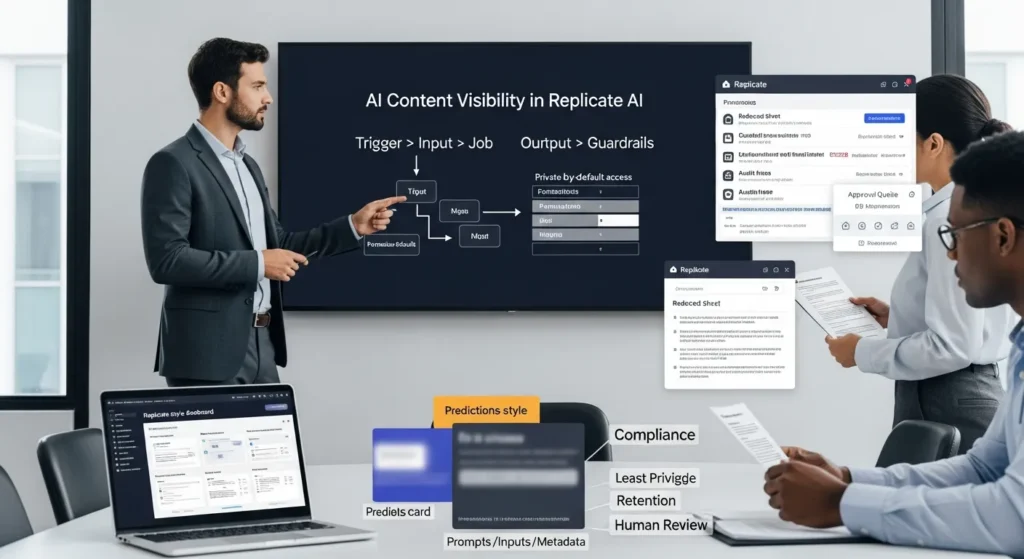
AI content visibility in Replicate AI sounds like a toggle you flip and forget. We learned it is more like leaving your office door open when you thought you shut it.
Quick answer: Replicate keeps predictions tied to an account, and your visibility choices decide who can view models, runs, inputs, outputs, and related metadata. If you treat Replicate like a chat app with throwaway history, you can leak client data without meaning to.
Key takeaways:
- Replicate predictions can stick around under accounts, so “share” can turn into “expose.”
- Think in four buckets: prompts, inputs, outputs, metadata.
- Most safety wins come from boring habits: data minimization, least-privilege tokens, separate environments, and human review.
Key Takeaways
- AI content visibility in Replicate AI controls who can view your models, predictions, inputs, outputs, and metadata—so a “share” setting can accidentally become an “expose” setting.
- Treat every run as four leakable buckets (prompts, inputs, outputs, metadata) because a public prediction can reveal strategy, client data, and identifying details beyond the final asset.
- Map the full workflow (trigger → input → job → output → guardrails) and assume each hop—Replicate plus WordPress/Zapier/custom logs—can store copies that increase exposure risk.
- Keep Replicate private-by-default, minimize data in prompts (redact, tokenize, or reference by ID), and avoid logging raw prompts, input files, or full outputs unless absolutely required.
- Reduce blast radius with environment separation (staging vs production) and least-privilege API tokens so contractors and test systems can’t access sensitive production data.
- Add a human approval gate for client, regulated, or brand-sensitive assets so only reviewed outputs publish to WordPress, ads platforms, email, or other public channels.
What “Content Visibility” Means In Replicate (And Why It Matters)
Content visibility in Replicate AI means one thing: who can see your stuff.
Replicate lets you run models and generate “predictions” (jobs). Each job has inputs, outputs, and metadata. Your choices decide whether other people can view those items.
Here is why: visibility settings affect confidentiality. Confidentiality affects trust. Trust affects whether clients keep sending you their images, briefs, product photos, and regulated docs.
When a prediction goes public, it can expose more than the final image or text. It can expose the input prompt, the source image URL, model name, timestamps, and other metadata. That chain matters in real work. A marketer uploads unreleased product shots. A law firm tests a redaction flow. A clinic tries summarization. Public visibility turns a “quick test” into a permanent record.
Prompts, Inputs, Outputs, And Metadata: The Four Buckets
We treat Replicate data as four buckets because each bucket leaks in a different way.
- Prompts: Your instructions. Prompts often contain client names, campaign angles, locations, or “do not say” rules.
- Inputs: Files, URLs, parameters, and seed values. Inputs often include customer images or product photography.
- Outputs: The generated image, audio, video, or text. Outputs can carry brand risk even when inputs stay private.
- Metadata: Job IDs, timestamps, model versions, status, and sometimes system messages.
Cause and effect shows up fast here. A public prediction -> exposes prompt text -> reveals a campaign strategy. A shared output URL -> enables copying -> erodes brand control.
Common Misconceptions Teams Bring From Chat Apps
Most teams come in with chat habits.
They think:
- “If we close the tab, it is gone.”
- “If we did not publish it, no one can see it.”
- “Only the final output matters.”
Replicate does not behave like a chat window that scrolls away. Predictions live under an account and can persist. That persistence is useful for debugging. It is risky for sensitive workflows.
If your team runs Replicate from WordPress, a CRM, or a no-code tool, the mistake doubles. The calling app can also log the same inputs. Two systems -> two places to leak.
Source:
- Replicate Docs, “Predictions” (Replicate, ongoing), https://replicate.com/docs
Where Your Replicate Data Can Exist Across The Workflow
When teams ask us, “Where is the data stored?”, we answer with a map, not a sentence.
A typical flow looks like this: your site or tool sends an API request -> Replicate runs a model -> Replicate returns output URLs -> your app stores or publishes the result.
Data exists in more than one place because each hop needs a copy. The safest teams assume every hop can log.
The Replicate Layer Vs Your Calling App (WordPress, Zapier/Make, Custom Code)
Replicate stores the prediction record. Your calling app often stores the same details in its own logs.
- WordPress might store prompts in post meta, form entries, WooCommerce order notes, or plugin logs.
- Zapier/Make might store input fields inside task history.
- Custom code might log request bodies to a file, to CloudWatch, or to a database.
This is where we see avoidable leaks. A developer turns on debug logging -> logs full prompts -> exports logs to a vendor -> sends sensitive text outside your control.
If you run AI workflows through WordPress, it helps to treat prompts like passwords. Store references, not the raw content. And if you want a wider view of how search and AI systems surface your content, our guide on improving AI optimization for professional sites pairs well with this visibility work.
Artifacts And Storage: Files, URLs, And Cached Outputs
Replicate outputs often arrive as URLs pointing to generated files. That feels harmless until someone pastes the link into a Slack channel that includes contractors.
A URL -> grants access to an artifact. Access -> enables copying. Copying -> becomes distribution.
Two practical rules keep teams safe:
- Treat output URLs like share links. If you would not post it publicly, do not paste it casually.
- Pull artifacts into your own storage when needed. Store them under your access controls, with expiration rules.
Source:
- Replicate Docs, “Files and outputs” (Replicate, ongoing), https://replicate.com/docs
A Practical Visibility Model: Trigger → Input → Job → Output → Guardrails
We keep teams calm by using a simple model:
Trigger → Input → Job → Output → Guardrails
Each step changes what can leak.
- Trigger starts the run (a form submit, webhook, or button click).
- Input carries text, images, and parameters.
- Job creates a prediction record inside Replicate.
- Output returns artifacts and URLs.
- Guardrails decide what happens next and who can see it.
This model works because it forces cause and effect. A trigger without auth -> allows misuse. An input with PII -> creates compliance risk. An output with no review -> creates brand risk.
What To Decide Before You Touch Any Tools
Before you connect WordPress to Replicate, decide these items in plain language:
- Public vs private by default: We push for private as the default for most business use.
- Who needs access: Owner only, org members, or a wider team.
- Retention: How long should predictions and logs live.
- What counts as sensitive: Client images, children, health info, financial info, legal case details.
If you want a checklist style approach to prompts, goals, and measurement, you can borrow parts of our AI optimization workflow guide and apply it to Replicate runs.
What To Log For Debugging Without Over-Collecting
Debug logs help. Over-logging hurts.
We usually log:
- Prediction ID
- Model name and version
- Start time, end time, status
- Error codes and truncated messages
We avoid logging:
- Full prompts
- Raw input images
- Full output artifacts
A small log -> supports troubleshooting. A small log -> reduces exposure during audits. Less stored data -> reduces breach impact.
Source:
- Replicate Docs, “API reference” (Replicate, ongoing), https://replicate.com/docs/reference
Settings And Patterns That Reduce Accidental Exposure
Most exposure events do not come from hackers. They come from normal people moving fast.
So we design patterns that make the safe choice the easy choice.
Data Minimization: Redact, Tokenize, Or Reference By ID
Data minimization means you send the least sensitive version of the data that still does the job.
- Redact: Remove names, emails, phone numbers, addresses.
- Tokenize: Replace a sensitive value with a token that you resolve later.
- Reference by ID: Store “customer_id=123” and look up details inside your system.
Cause and effect stays simple. Less sensitive input -> less sensitive output -> lower risk if someone shares a prediction.
If you generate images, you can also strip prompt details in your own app logs. You can store “prompt_template_v4” instead of the raw text.
Environment Separation: Staging, Production, And Least-Privilege Access
Teams break things in staging. Teams protect things in production. You want those worlds separated.
We set up:
- One Replicate token for staging
- One Replicate token for production
- Separate WordPress configs for each
Then we apply least-privilege access. A token with full rights -> increases blast radius. A token with narrow rights -> limits damage.
This matters for agencies and brands. A contractor should not have the same access as a compliance officer. A test site should not see production prompts.
Sources:
- NIST, “The NIST Definition of Least Privilege” (National Institute of Standards and Technology, ongoing), https://csrc.nist.gov/glossary/term/least_privilege
- Replicate Docs, “API tokens” (Replicate, ongoing), https://replicate.com/account/api-tokens
Human Review And Governance For Client, Regulated, Or Brand-Sensitive Content
If your output can harm someone, a human should approve it.
We say that without drama. Brands face ad policy rules. Clinics face patient privacy rules. Lawyers face privilege rules. Even a restaurant can face a reputational mess from one weird image.
Human review -> catches errors. Human review -> creates accountability. Accountability -> builds trust.
Approval Gates For Publishable Assets (Ads, Product Images, Landing Pages)
An approval gate is a simple stop sign in your workflow.
A safe flow looks like this:
- Replicate generates drafts in private.
- Your system stores outputs in a review queue.
- A reviewer approves, edits, or rejects.
- Only approved assets publish to WordPress, Meta Ads, Google Ads, or email.
This gate matters because models can hallucinate logos, add extra fingers, or inject accidental claims. A reviewer catches the problem before the asset goes live.
For WooCommerce brands, we often attach the review step to product updates. Product publish -> triggers generation -> writes to a draft field -> reviewer hits approve.
Disclosure, Consent, And Policy Alignment For Sensitive Domains
Some categories need extra care:
- Health and wellness: Keep patient data out of prompts. Do not treat outputs as medical advice.
- Finance and insurance: Avoid personal financial details in inputs.
- Legal: Avoid uploading privileged documents.
- Kids: Treat images as sensitive by default.
Consent matters too. Client content -> needs permission. User-generated photos -> need clear terms.
We also like to ground this in public guidance. The FTC has warned that AI-related claims still need to be truthful and evidence-based. If a model creates marketing copy that makes claims, you still own the claim.
Source:
- “FTC Blog: Keep your AI claims in check” (Federal Trade Commission, 2023-02-27), https://www.ftc.gov/business-guidance/blog/2023/02/keep-your-ai-claims-check
Conclusion
AI content visibility in Replicate AI becomes manageable when you treat it like a workflow, not a feature. Map the trigger, minimize the input, keep predictions private, limit logging, and put a human gate before anything public.
If you want one practical next step, pick a single Replicate use case and run it in “shadow mode” for a week. Let it generate drafts, but publish nothing. You will learn where data lands, who can see it, and what you need to lock down before you scale.
Frequently Asked Questions about AI Content Visibility in Replicate AI
What does AI content visibility in Replicate AI mean?
AI content visibility in Replicate AI determines who can view your models and predictions (runs), including inputs, outputs, and related metadata. If a prediction becomes public, it may expose more than the final result—like prompts, source URLs, model details, and timestamps—creating confidentiality and client-trust risks.
If I close the tab, are Replicate predictions deleted or hidden?
No. Replicate predictions can persist under your account, which is helpful for debugging but risky for sensitive workflows. Treat Replicate less like a throwaway chat and more like a system of record: what you run can remain accessible depending on your settings, links shared, and account permissions.
What information can leak from a public Replicate prediction besides the output?
A public prediction can leak four “buckets” of data: the prompt (instructions that may include client details), inputs (files, URLs, parameters, seeds), outputs (generated content), and metadata (job ID, timestamps, model/version, statuses). Even metadata can reveal strategy, timelines, or tool usage patterns.
How do output URLs affect AI content visibility in Replicate AI?
Output URLs often function like share links: anyone with the link may be able to access the generated artifact. If you paste an output URL into email or Slack (especially with contractors), you can unintentionally widen access. For control, pull outputs into your own storage with expiration and access rules.
What’s the best way to reduce accidental exposure when using Replicate with WordPress or Zapier?
Assume every hop can log. Keep predictions private by default, minimize data in prompts, and avoid storing raw prompts in WordPress fields or automation histories. Log only what you need (prediction ID, model/version, status, error codes), and separate staging vs production with least-privilege API tokens.
When should you add a human review step to Replicate-generated content?
Use human review when outputs could create brand, legal, or safety risk—ads, product images, client work, regulated domains (health, finance, legal), or anything publishable. A common pattern is: generate drafts privately, route outputs to a review queue, then approve/edit/reject before publishing to WordPress or ad platforms.
Some of the links shared in this post are affiliate links. If you click on the link & make any purchase, we will receive an affiliate commission at no extra cost of you.
We improve our products and advertising by using Microsoft Clarity to see how you use our website. By using our site, you agree that we and Microsoft can collect and use this data. Our privacy policy has more details.
