
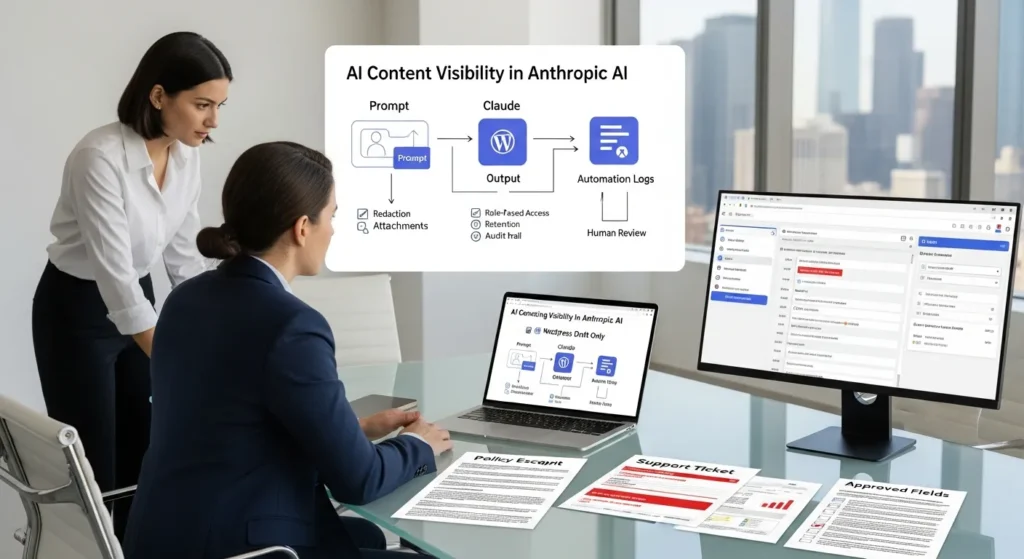
AI content visibility in Anthropic AI sounds abstract until you picture a real moment: your team pastes a messy support ticket into Claude, hits enter, and then freezes. Who else can see this? Where does it go? And did we just leak a customer’s address into an automation log somewhere?
Quick answer: Claude can “see” what you paste, upload, or link in a session, and it can produce downstream outputs that travel farther than you expect. Your job is to control exposure with clear data rules, tight access, and draft-only publishing so helpful does not turn into risky.
Key Takeaways
- AI content visibility in Anthropic AI comes down to what Claude can access in a session (prompts, attachments, and retrievable links) and what your team later spreads through downstream outputs.
- Treat prompts like production inputs: minimize data, redact identifiers, and use approved fields lists so you don’t paste full CRM tickets or raw exports with hidden metadata.
- Control “derived data” risk by reviewing drafts for accidental disclosures (names, locations, revenue ranges) before turning a Claude output into a post, deck, or product catalog.
- Don’t rely on vendor policy alone—most real exposure happens through access paths like WordPress roles, shared histories, and automation run logs that quietly store prompts and outputs.
- Reduce leakage by tightening logging and retention in Zapier/Make/n8n and WordPress debug settings, masking sensitive fields, and avoiding unsanitized AI text in ecommerce notes.
- Keep visibility tight without slowing down by using draft-only WordPress pipelines with RBAC, required citations/banned claims checks, and human-in-the-loop review for regulated or high-stakes content.
What “Content Visibility” Means In Claude (And Why It Matters)
Content visibility means one simple thing: what Claude can access during your work, what it can reference when it responds, and what your team may accidentally spread when you copy the output into other systems.
Claude’s design pushes helpfulness, harmlessness, and honesty through Anthropic’s Constitutional AI approach. That affects behavior in a very practical way. Balanced, well-sourced content tends to earn more citations in Claude-style answers, while pure hype tends to get less trust. And that trust matters because high-intent Claude sessions often convert well in business settings.
A clean mental model helps:
- Your input -> shapes -> Claude’s answer
- Your attachments -> expand -> Claude’s context window
- Your links -> influence -> what Claude verifies and cites
- Your output -> affects -> what your audience repeats, shares, or acts on
Prompts, Attachments, And Linked Content: What Is In-Scope
Claude can process what you provide in the conversation: prompt text, uploaded files, images, voice dictation, and content from links it can retrieve. In practice, that means your “scope” grows fast when a teammate drags in a PDF, drops a screenshot, or links a live policy page.
Claude also uses web retrieval in some experiences, and Anthropic has described support for multi-source verification with search partners. So a link does not just sit there. A link can change what Claude treats as credible.
Here is why this matters for content teams:
- A prompt -> exposes -> internal context if you paste too much
- An attachment -> exposes -> hidden metadata if you upload raw exports
- A link -> exposes -> paywalled or private pages if your org shares them poorly
If you publish with WordPress, treat prompts like a production system. We write prompts like SOPs. We keep a “safe paste” version for real tickets and a “demo paste” version for public examples.
Outputs, Citations, And Derived Data: What You Are Creating Downstream
Claude outputs do not stay put. A draft becomes a blog post. A summary becomes a slide. A product description becomes 500 SKUs.
That downstream trail creates a second kind of visibility: derived data. Derived data is the stuff you did not paste directly, but that your output reveals. A good example is a “case study” draft that accidentally includes a client name, a location, and a revenue range. Nobody pasted a full report, yet the draft still leaks sensitive detail.
Citations matter here too. Claude-style answers reward content that shows limits and tradeoffs. When your page admits uncertainty and backs claims with credible sources, you give the model something it feels safe repeating.
If you want a practical way to tune this for modern search and AI answers, our guide on improving AIO for professionals pairs prompt structure with workflow controls, so you get lift without loose handling.
How Claude Handles Your Data: Training, Retention, And Access Paths
Teams usually ask one question first: “Does Anthropic train on my data?”
Anthropic states in its policies that it does not train models on customer prompts and outputs in certain product contexts, with plan-based controls and admin tooling for business accounts. You still need to read the policy for the exact service you use, because terms differ by product tier and by whether you use consumer, team, or enterprise features.
Your risk posture should stay steady either way:
- Vendor policy -> reduces -> some risk
- Your workflow -> creates -> most real-world exposure
So we focus on access paths. That is where leaks happen.
Default Boundaries Vs Enterprise Controls: Where Policies Usually Differ
Default settings tend to favor individual productivity. Enterprise settings tend to favor governance.
In many SaaS tools, the pattern looks like this:
- Default access -> favors -> convenience
- Enterprise controls -> favor -> auditability
For Claude Team or Enterprise setups, admins often get controls around user management, project sharing, retention windows, and compliance flags. Those controls matter more than most people expect, because they decide who can view histories, who can share work, and how long content sticks around.
If your company runs regulated workflows, choose the plan tier based on your audit needs, not your curiosity about new features.
Human Review And Abuse Monitoring: When People Might See Content
Anthropic frames safety around automated systems and policy enforcement, with monitoring for abuse patterns. The part to internalize is simple: safety systems -> inspect -> content signals.
That does not mean “random humans read everything.” It means you should act like anything you paste could become part of a safety review path or an internal incident trail.
Our rule is blunt:
- Sensitive data -> stays -> out of prompts
- Regulated advice -> stays -> human-led
If your team writes medical, legal, or financial material, keep humans in the loop. Claude can draft and structure. People own the final claims.
Common Visibility Pitfalls For Businesses Using WordPress And Automation
Most visibility problems do not start inside Claude. They start in the glue: WordPress, forms, CRMs, help desks, and automation tools.
We see the same two failure modes on repeat:
- Copy-paste habits -> leak -> private data into prompts
- Logging defaults -> store -> prompts and outputs in tools you forgot existed
If you only fix one thing, fix the workflow around Claude, not Claude itself.
Copy-Paste Leakage From CRMs, Help Desks, And Docs
A support agent grabs a ticket, pastes it into Claude, and asks for a reply. That ticket often includes names, emails, phone numbers, order IDs, addresses, or medical notes.
You can lower this risk without slowing work:
- A redaction step -> removes -> direct identifiers
- A template prompt -> reduces -> “paste the whole thing” behavior
- An approved fields list -> limits -> what enters the model
We like a two-box rule in training:
- Box A: “What the customer asked” (paraphrase, no identifiers)
- Box B: “What we can say” (policy, product facts, next steps)
People resist at first. Then they see how clean drafts get when the input stays clean.
Over-Logging In Zapier/Make/n8n And WordPress Debug Logs
Automation tools love logs. Logs help you fix broken runs. Logs also collect the very thing you should not keep forever: full prompts and full outputs.
This risk shows up in a few places:
- Zapier/Make history -> stores -> task data
- n8n executions -> store -> payloads
- WordPress debug logs -> store -> request bodies and plugin errors
If you run WordPress ecommerce, that can get ugly fast. A webhook can carry customer data. A failed run can store it. A team member can screenshot it.
Next steps:
- Turn off verbose logging in production where you can
- Mask or filter sensitive fields in automations
- Set short retention windows for run history
- Keep AI drafts out of WooCommerce order notes unless you sanitize them
If you want to connect AI workflows to your site, start with safer “draft-only” loops and measure what enters logs. Our AIO workflow guide covers the same idea with checklists you can hand to a team lead.
A Practical Governance Checklist For Safe AI Content Workflows
Governance sounds heavy until you treat it like a simple map. We keep it concrete. We write it down. We keep it close to the work.
Use this checklist as your starting point. Then you can expand.
Map The Flow: Trigger → Input → Model Job → Output → Guardrails
Before you touch any tools, map the workflow on one page.
- Trigger -> starts -> the job
- Input -> feeds -> the model
- Model job -> produces -> a draft
- Output -> enters -> WordPress or your doc tool
- Guardrails -> block -> unsafe publish or unsafe sharing
A safe example for a marketing team:
- Trigger: New blog brief approved
- Input: Brief + public sources + brand voice rules
- Model job: Draft outline and first pass copy
- Output: WordPress draft status only
- Guardrails: Required citations, banned claims list, human editor approval
That map gives you one more gift: rollback. If something goes wrong, you know where to cut the pipe.
Data Minimization, Redaction, And Approved Fields Lists
Data minimization means you only send what the model needs to do the job. Nothing else.
We set three rules:
- Approved fields -> limit -> what can enter prompts
- Redaction -> removes -> personal and confidential data
- Short retention -> reduces -> exposure in logs and histories
An approved fields list for ecommerce support drafts might include:
- Product name
- Problem type (shipping delay, return request, warranty)
- Policy excerpt (public)
- Order status (shipped, delivered) without order ID
It excludes:
- Full name, address, email, phone
- Payment details
- Health details or anything regulated
Human-In-The-Loop Reviews For Regulated Or High-Stakes Content
Human review is not “extra work.” Human review is your control point.
- Human review -> prevents -> accidental claims
- Human review -> catches -> leaked details
- Human review -> raises -> content quality
We set review tiers:
- Tier 1: Blog posts and social drafts (editor reviews)
- Tier 2: Ads, pricing pages, comparison pages (marketing lead reviews)
- Tier 3: Legal, medical, finance, insurance, HR (licensed or trained reviewer)
If your team publishes in healthcare, law, finance, or insurance, keep final language human-led. Claude can support structure and readability. People own the advice.
Implementation Patterns That Keep Visibility Tight (Without Killing Speed)
You do not need a giant rebuild. You need a repeatable pattern.
We aim for a simple outcome: fast drafts, slow publishing. That keeps teams moving without letting risky text slip into production.
Draft-Only Pipelines In WordPress: From AI Output To Editorial Review
A draft-only pipeline means Claude writes, WordPress holds, and humans decide.
Here is a clean pattern we use with WordPress:
- Form or brief -> creates -> a draft task
- Automation -> sends -> only approved fields to Claude
- Claude -> returns -> draft sections + suggested sources
- WordPress -> stores -> content as Draft, not Published
- Editor -> reviews -> claims, citations, tone, and brand fit
- Publisher -> ships -> final content
If you want a technical anchor, you can enforce this with WordPress roles and a little code. A custom plugin can hook into save_post to block publish when required checks fail. It is boring. That is the point.
Role-Based Access, Secrets Handling, And Vendor Risk Notes
Access controls keep visibility tight.
- RBAC -> limits -> who can view prompts and outputs
- Secrets handling -> prevents -> API key leaks
- Vendor review -> reduces -> surprise retention and logging issues
Practical steps that work in small teams:
- Put API keys in a secrets manager or server environment vars, not in Google Docs
- Restrict WordPress admin access: give editors editor roles, not admin roles
- Limit automation tool access: only a few people should view run history
- Run new workflows in shadow mode for a week: compare drafts to what you would publish
If a vendor cannot answer “Where do you store prompts, for how long, and who can access them?” do not run sensitive data through it. Keep the model work on low-risk content until you trust the chain.
Conclusion
AI content visibility in Anthropic AI becomes manageable once you stop treating Claude like a magic box and start treating it like a step in a workflow. Claude can only work with what you feed it, but your tools and habits decide what gets exposed, stored, or copied into places you cannot fully control.
If you want the safest path, start small: run draft-only pipelines, use approved fields lists, and force human review on anything that can cause harm. You will still move fast. You will just sleep better, too.
Sources
- Claude Usage Policy, Anthropic, Accessed 2026, https://www.anthropic.com/legal/usage-policy
- Claude Privacy Policy, Anthropic, Accessed 2026, https://www.anthropic.com/legal/privacy
- Constitutional AI: Harmlessness from AI Feedback, Anthropic, 2022-12-15, https://www.anthropic.com/research/constitutional-ai-harmlessness-from-ai-feedback
- Zapier Security Overview, Zapier, Accessed 2026, https://zapier.com/security
- Make Security, Make (Celonis), Accessed 2026, https://www.make.com/en/security
- WordPress Debugging in wp-config.php, WordPress.org Developer Resources, Accessed 2026, https://developer.wordpress.org/advanced-administration/debug/debug-wordpress/
Frequently Asked Questions (FAQ)
What does AI content visibility in Anthropic AI (Claude) actually mean?
AI content visibility in Anthropic AI means what Claude can access during a session (your prompt, uploads, and retrievable links), what it can reference when responding, and what your team may spread when reusing outputs. The biggest risk is usually downstream sharing, not the model itself.
What content is in-scope for Claude—prompts, attachments, and links?
Claude can process what you paste or dictate, plus uploaded files and images, and it may use content from links it can retrieve. That scope can expand quickly with PDFs, screenshots, or live policy pages. Links can also influence what Claude treats as credible and worth citing.
Does Anthropic train on my prompts and outputs in Claude?
Anthropic states it does not train models on customer prompts and outputs in certain product contexts, often depending on plan and admin controls. Because terms can differ by product tier and experience, check the exact policy for your account. Regardless, workflow choices create most real-world exposure.
How can AI content visibility in Anthropic AI lead to “derived data” leaks?
Even if you don’t paste sensitive data, Claude’s draft can reveal derived data—details inferred or included in outputs, like client names, locations, or revenue ranges inside a “case study.” That content can travel into slides, posts, SKUs, and docs, multiplying visibility far beyond the original chat.
What’s the safest way to use Claude with WordPress without leaking customer data?
Use a draft-only pipeline: send only approved fields to Claude, save results as WordPress Draft (not Published), and require human review before release. Pair it with redaction rules and role-based access so fewer people can view prompts, outputs, and automation histories that may store content.
How do Zapier, Make, n8n, and WordPress logs affect AI content visibility?
Automation tools and WordPress can store prompts and outputs in run history, execution payloads, or debug logs—often longer than teams realize. Reduce exposure by masking sensitive fields, disabling verbose production logging, setting short retention windows, and avoiding raw AI drafts in places like WooCommerce notes.
Some of the links shared in this post are affiliate links. If you click on the link & make any purchase, we will receive an affiliate commission at no extra cost of you.
We improve our products and advertising by using Microsoft Clarity to see how you use our website. By using our site, you agree that we and Microsoft can collect and use this data. Our privacy policy has more details.
